
Google Pixel Buds Pro deliver one of the quietest listening experiences available in true wireless earbuds, and enabling silent mode on Google Pixel Buds Pro is simpler than most people expect once the right settings are located. Silent mode, in this case, refers to Active Noise Cancellation paired with Silent Seal technology, the feature responsible for blocking outside distractions the moment it switches on.
Key Takeaways
- Silent mode on Pixel Buds Pro is achieved through Active Noise Cancellation combined with Silent Seal, not a separate labeled toggle.
- The quickest activation method is a touch-and-hold gesture on either earbud.
- The Pixel Buds app offers a dedicated menu for switching between Noise Cancellation, Transparency, and Off.
- A snug eartip seal is required for silent mode to perform as intended.
- Keeping firmware updated prevents inconsistent noise cancellation behavior.
Method 1: Enable Silent Mode Through the Pixel Buds App
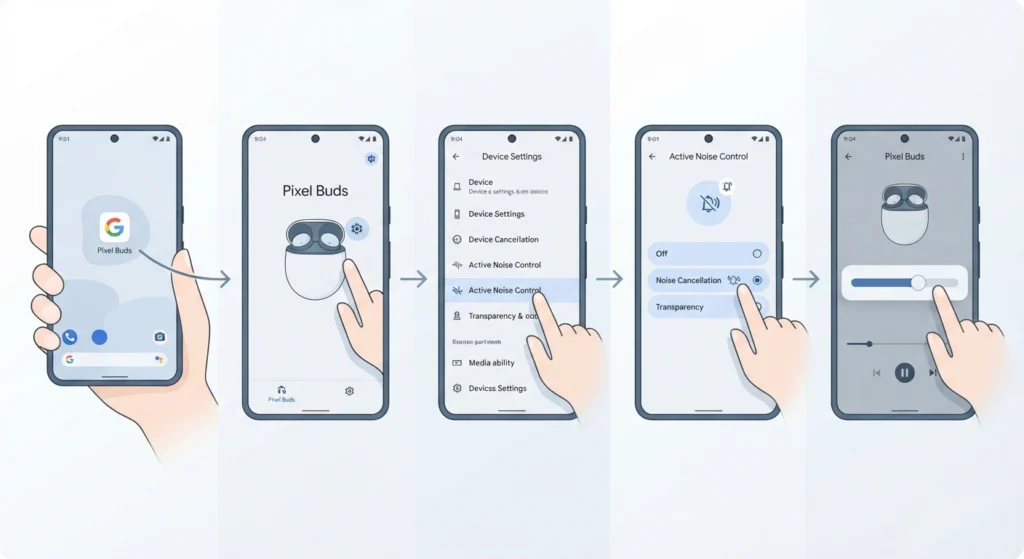
This route gives the most control and works well for anyone setting up silent mode for the first time.
- Step 1: Open the Pixel Buds app on the connected Android or iOS device.
- Step 2: Tap the earbuds image or the settings icon to open the device controls.
- Step 3: Select Active Noise Control from the settings menu.
- Step 4: Choose Noise Cancellation. A single chime confirms silent mode has engaged and Silent Seal is now blocking outside sound.
- Step 5: Fine-tune media volume once the mode kicks in, since blocked ambient noise often makes audio sound louder than before.
Pro-Tip: Silent mode only performs at its best when the eartips form a complete seal. Running the fit test inside the Pixel Buds app takes under a minute and confirms whether a different eartip size is needed.
Method 2: Enable Silent Mode Using Touch Controls
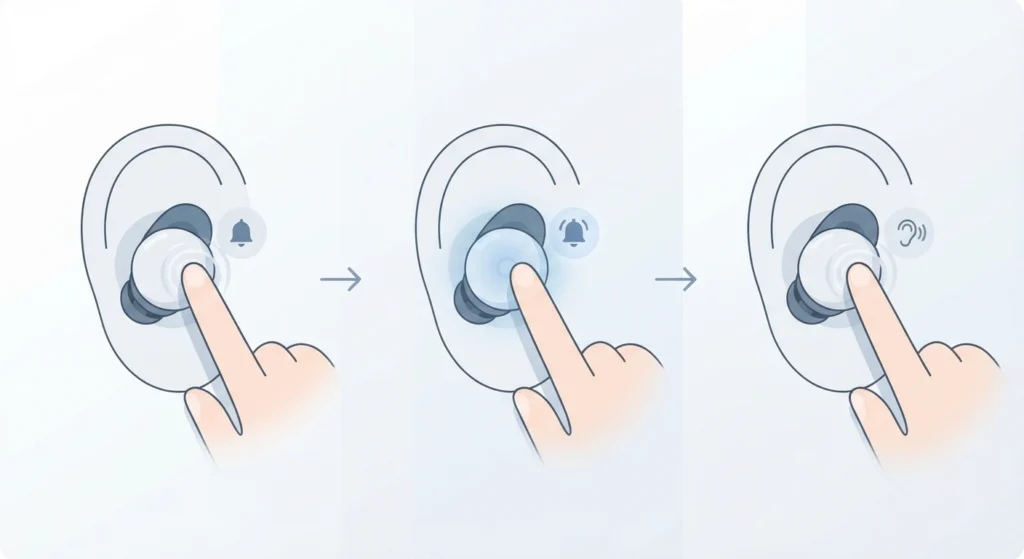
For situations where opening a phone is not convenient, touch controls handle the switch directly on the earbud.
- Step 1: Press and hold either earbud for about one second.
- Step 2: Listen for the chime. A single chime signals Noise Cancellation, meaning silent mode is now active.
- Step 3: Press and hold again to cycle to Transparency mode if outside sound needs to come back in.
On a Windows 11 laptop, if the earbuds stop responding to touch gestures after a system update, it usually helps to re-pair the earbuds for stereo sound so both channels sync correctly with the paired device before trying the gesture again.
Tips for Getting the Best Silent Mode Performance
- Clean the mesh vents on each earbud regularly, since dust buildup weakens noise cancellation over time.
- Test all three included eartip sizes rather than assuming the default fit is correct.
- Update firmware through the Pixel Buds app whenever a notification appears, since noise cancellation tuning often improves with updates.
- Turn on Conversation Detection if switching to Transparency mode automatically during conversations feels more convenient than manual toggling.
Common Problems With Silent Mode on Pixel Buds Pro
Most issues trace back to fit, connection, or software rather than a hardware fault.
- Silent mode feels weak or absent: this usually points to a poor eartip seal rather than a broken feature. Switching eartip sizes typically resolves it.
- Touch gesture stops switching modes: restarting Bluetooth on the connected device or forgetting and re-pairing the earbuds often fixes this.
- Only one earbud applies noise cancellation: removing both earbuds, placing them back in the case for ten seconds, and reinserting them generally restores sync between the pair.
- Audio settings feel off after enabling silent mode on a Windows 11 machine: adjusting audio output settings for the connected device usually corrects volume or channel imbalance introduced by the mode switch.
- Microphone stops registering during calls once ANC is on: resolving microphone detection problems on Windows 11 typically brings the mic back online without needing a full re-pair.
Frequently Asked Questions
What does silent mode actually mean on Pixel Buds Pro?
It refers to Active Noise Cancellation working together with Silent Seal technology, which physically and digitally reduces outside noise reaching the ear.
Is there a dedicated silent mode button on the earbuds?
There is no separate button labeled silent mode. The touch-and-hold gesture toggles Active Noise Cancellation, which produces the silent effect.
Why does music sound louder after silent mode turns on?
Once outside noise is blocked, the audio naturally stands out more, which can make it seem louder even though the volume level has not changed.
Can silent mode be used with only one earbud in?
Yes, Active Noise Cancellation and Transparency mode both work when only one earbud is worn.
Does silent mode drain the battery faster?
Active Noise Cancellation does use more power than having noise control off, so expect a modest reduction in listening time compared to running with ANC disabled.
What is the difference between silent mode and Transparency mode?
Silent mode blocks outside sound through Noise Cancellation, while Transparency mode intentionally lets outside sound through so surroundings remain audible.
Why did the chime not play when switching modes?
A low battery, a firmware delay, or a poor earbud seal can all suppress the confirmation chime, even though the mode switch may have still taken effect.
Can silent mode be scheduled to turn on automatically?
Pixel Buds Pro does not include a built-in schedule for noise control modes, so switching currently needs to happen manually or through Conversation Detection triggers.