
Having only one earbud working on the Jabra Elite 10 is one of the most common frustrations users report. The good news is that in most cases, the fix is straightforward and takes just a few minutes. This guide covers the most effective solutions to get both earbuds working again – no technical background needed.
Quick Summary: Key Fixes at a Glance
- Most common cause: The earbuds have lost sync with each other
- Fastest fix: Place both earbuds in the case, close it for 10 seconds, then reopen
- If that fails: Perform a full factory reset on the earbuds
- Check first: Make sure the silent earbud has sufficient charge
- App tip: Use the Jabra Sound+ app to check individual earbud status and battery levels
- Last resort: Forget the device on your phone and re-pair from scratch
Fix 1: Place Both Earbuds Back in the Charging Case
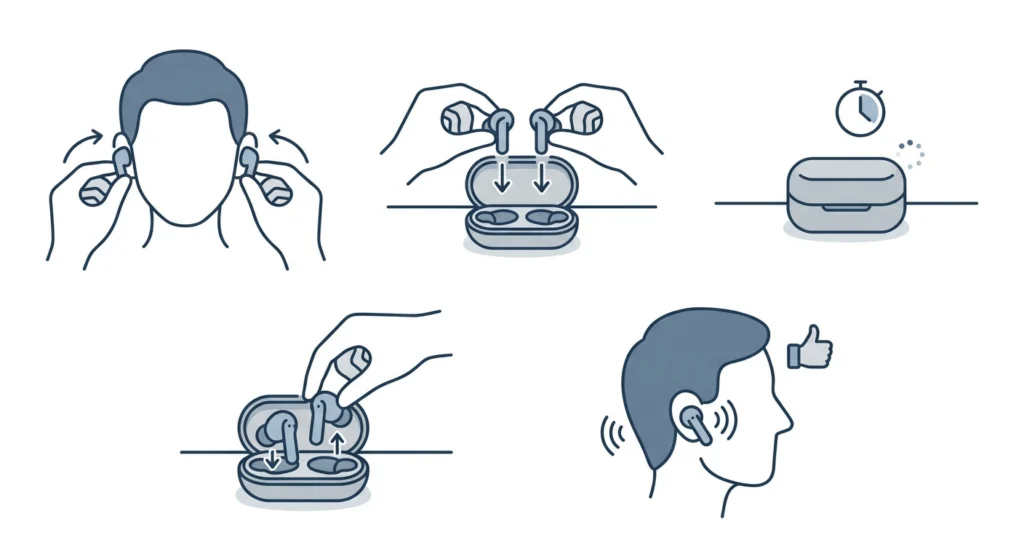
This is the first thing to try and it solves the problem more often than people expect. The Jabra Elite 10 earbuds communicate with each other directly, and sometimes that connection drops. Returning them to the case forces them to re-establish their internal link.
- Step 1: Remove both earbuds from your ears
- Step 2: Place both earbuds into the charging case
- Step 3: Close the lid and wait at least 10-15 seconds
- Step 4: Open the case and put the earbuds back in your ears
- Step 5: Test audio on both sides
This works best when the issue appeared suddenly mid-session or right after switching between devices. Most people find this single step resolves the problem entirely.
Fix 2: Check the Battery Level of the Silent Earbud
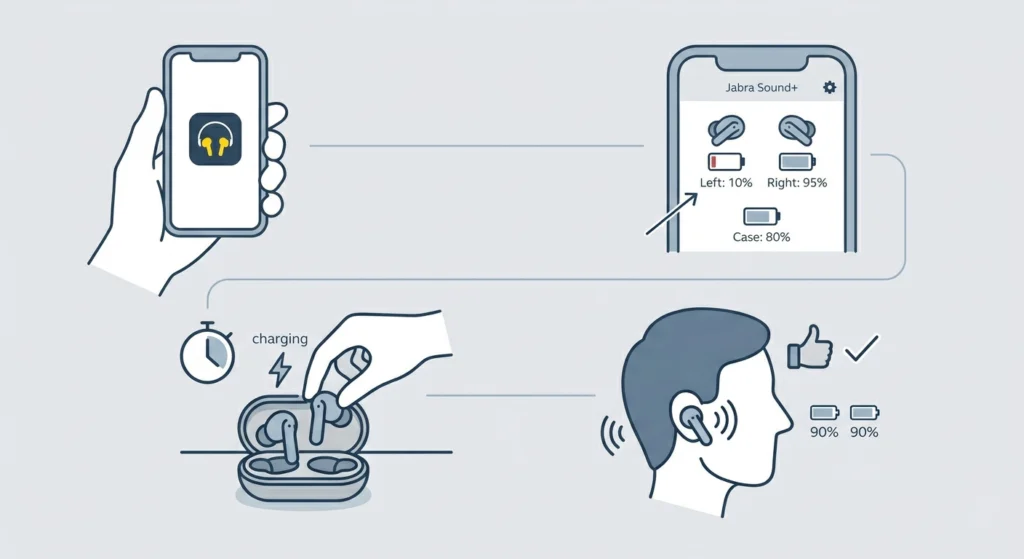
A low battery on one earbud can cause it to go silent or drop out entirely while the other continues playing. The Jabra Elite 10 manages power independently for each bud, so an imbalanced charge is a real culprit here.
- Step 1: Open the Jabra Sound+ app on your phone
- Step 2: Navigate to the device dashboard – it shows individual battery percentages for left, right, and the case
- Step 3: If one earbud shows a low or empty charge, place both back in the case and charge for at least 15-20 minutes
- Step 4: Once charged, take them out and test again
The key is to charge both earbuds at the same time. Charging only one while using the other creates ongoing imbalance that tends to repeat the issue.
Fix 3: Re-Pair the Earbuds to Your Device
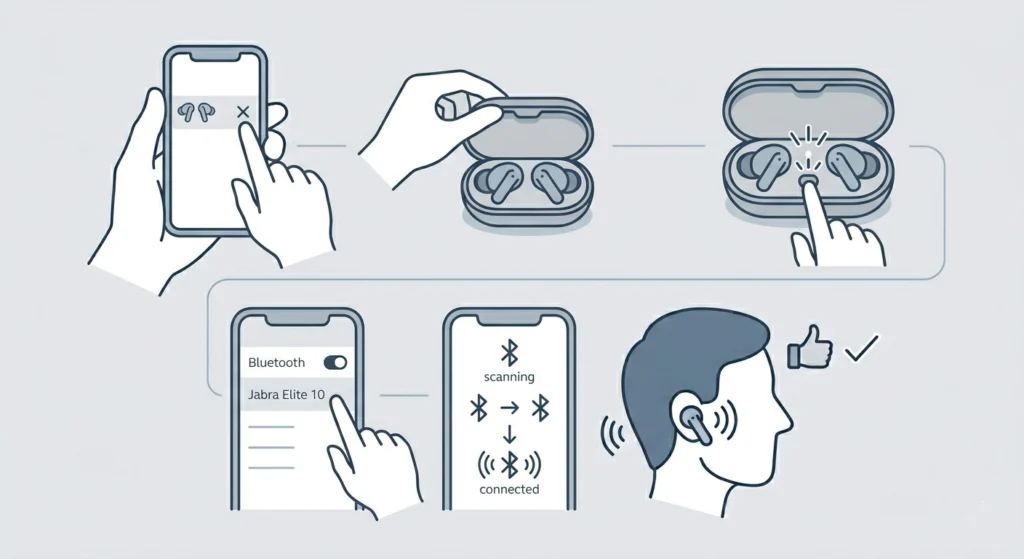
Sometimes the Bluetooth connection between your phone and the earbuds is partially corrupted. One earbud may stay connected while the other silently disconnects in the background. A fresh pairing session clears this up cleanly.
- Step 1: On your phone, go to Bluetooth settings
- Step 2: Find ‘Jabra Elite 10’ in the paired devices list and tap ‘Forget’ or ‘Unpair’
- Step 3: Place both earbuds in the charging case and open the lid
- Step 4: Press and hold the button on the case (or on the right earbud depending on your firmware version) until the LED flashes to indicate pairing mode
- Step 5: On your phone, scan for Bluetooth devices and select ‘Jabra Elite 10’ from the list
- Step 6: Follow any on-screen prompts to complete pairing
For Windows 11 users, if the earbuds still show only one channel after re-pairing, check out this guide on how to re-pair Bluetooth earbuds for stereo sound on Windows – it covers some extra steps specific to that platform.
Pro-Tip: Before re-pairing, also forget the device on any other phone or tablet that was previously connected. The Jabra Elite 10 tries to auto-connect to remembered devices and this can interfere with the pairing process on a new device.
Fix 4: Reset the Jabra Elite 10 to Factory Settings
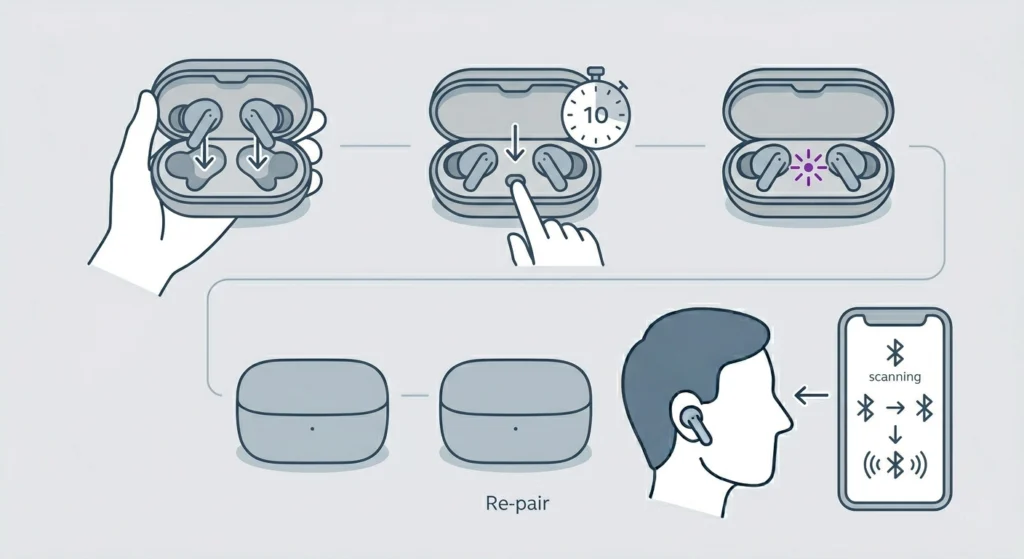
A factory reset wipes all pairing history and restores the earbuds to their default state. This is the go-to solution when the re-pairing fix above does not stick, or when the one-earbud issue has been happening repeatedly.
- Step 1: Place both earbuds in the charging case and open the lid
- Step 2: Press and hold the button on the case for about 10 seconds until the LED flashes purple
- Step 3: The earbuds will power off and then back on – this confirms the reset is complete
- Step 4: Pair them again with your device as if connecting for the first time
After a reset, the earbuds re-sync with each other automatically before searching for a new host device. This internal re-sync is often exactly what was needed to fix the one-sided audio issue.
Pro-Tip: If the earbuds are reset but one side still plays at a lower volume than the other, check the audio balance settings on the connected device. On Windows 11, this is found under sound settings – here is a guide on adjusting audio output settings on Windows 11 to make sure the balance is centered.
Fix 5: Clean the Charging Contacts and Ear Tips
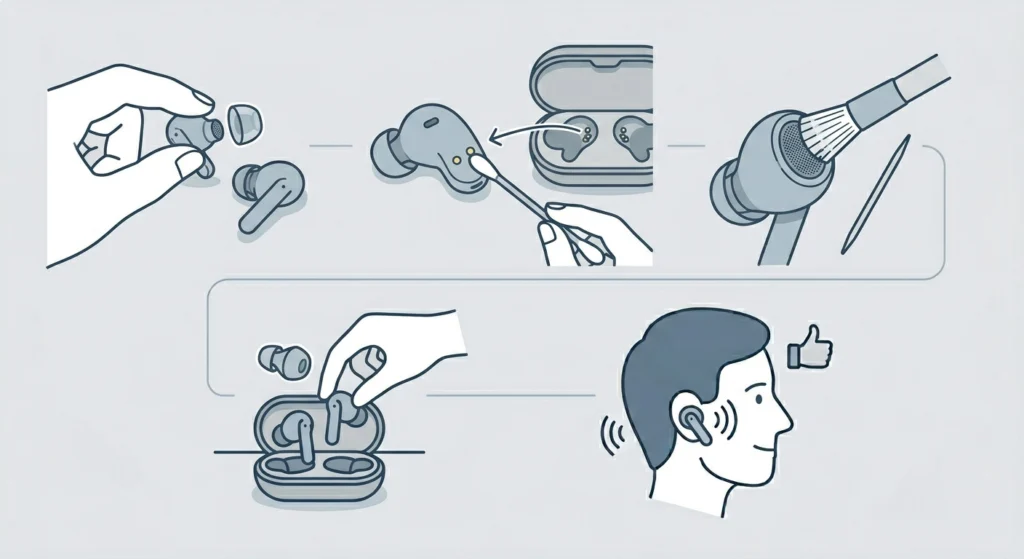
Dirt and earwax buildup on the charging pins inside the case or on the earbuds themselves can prevent one earbud from charging properly – which leads directly to it going silent. This is especially common with earbuds that are used daily.
- Step 1: Remove the silicone ear tips from both earbuds
- Step 2: Use a dry cotton swab to gently wipe the gold charging contacts on each earbud and inside the case
- Step 3: Use a soft dry brush or a dry toothpick to carefully remove any debris from the speaker mesh on the affected earbud
- Step 4: Reattach the ear tips and place both earbuds back in the case for a full charge cycle
- Step 5: After charging, test both earbuds again
Avoid using water or any liquid near the charging contacts. A dry clean is all that is needed here.
Fix 6: Update the Firmware via Jabra Sound+ App
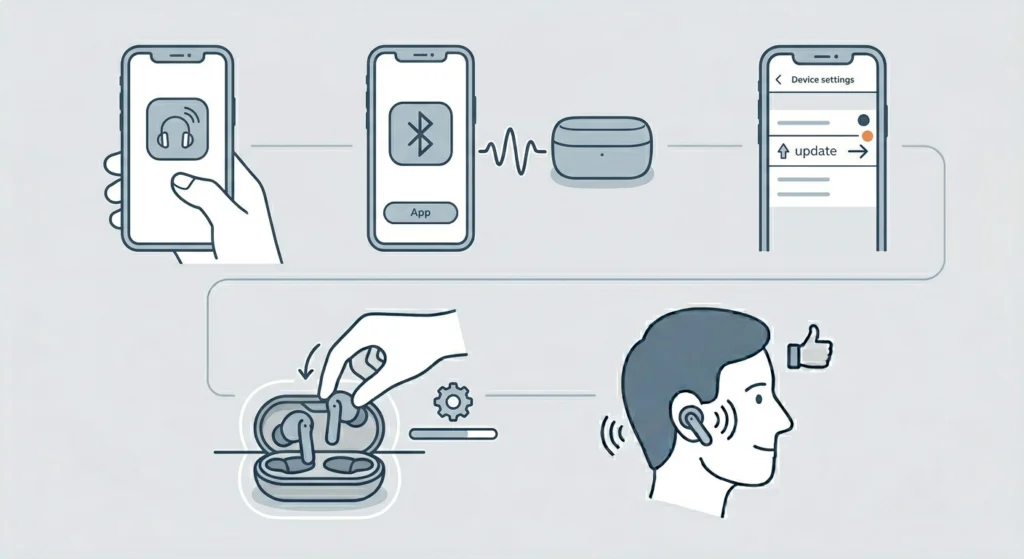
Outdated firmware on the Jabra Elite 10 is a known cause of connectivity bugs, including the one-earbud issue. Jabra regularly releases updates to address these kinds of problems.
- Step 1: Download or open the Jabra Sound+ app on your smartphone
- Step 2: Connect the earbuds via Bluetooth and open the app
- Step 3: Navigate to ‘Device’ settings and look for a firmware update notification
- Step 4: If an update is available, tap to install it – keep the earbuds in the case during this process
- Step 5: Once the update finishes, reconnect and test both earbuds
This works best when performed on a stable Wi-Fi connection. The update can take 5-10 minutes to install fully, so avoid interrupting the process.
Tips for Keeping Both Jabra Elite 10 Earbuds Working
- Always store both earbuds in the case together – storing only one earbud leads to charge imbalance over time
- Keep the Jabra Sound+ app updated, as app updates often include fixes for sync and connection issues
- Avoid leaving the earbuds connected to multiple devices simultaneously – this can confuse the auto-connect logic
- Clean the charging contacts every few weeks, especially if using the earbuds during workouts
- When switching between devices, use the manual switch option in the Sound+ app rather than disconnecting and reconnecting manually
Common Problems and Troubleshooting
One Earbud Has No Sound After Reset
If one earbud stays silent even after a factory reset, it may not have completed the reset properly. Try placing just the affected earbud in the case, close the lid, wait 30 seconds, then open and re-insert. If the issue persists, contact Jabra support – it could be a hardware fault.
Left Earbud Keeps Disconnecting
The left earbud on the Jabra Elite 10 communicates through the right earbud in most configurations. If the left side keeps dropping, the right earbud may have a weak charge or there may be wireless interference nearby. Try moving away from Wi-Fi routers and microwaves, and make sure the right earbud is fully charged.
One Earbud Works on Call But Not for Music
This is almost always a mono/stereo audio setting on the connected device. On Windows 11, the earbuds may have defaulted to a ‘Hands-Free’ profile instead of ‘Stereo’ – check the audio playback devices and switch to the stereo output option. This guide on managing audio input devices on Windows 11 covers how to find and switch profiles.
Sound Only Comes from One Side After Phone Update
Phone software updates sometimes reset Bluetooth audio preferences. After a phone update, forget the Jabra Elite 10 from Bluetooth settings and re-pair from scratch using the steps in Fix 3 above.
App Shows Both Earbuds Connected But One Is Silent
This typically means the audio balance on the device is set to one side. Check the accessibility or sound settings on the phone or computer and make sure the balance slider is centered. This is a common issue that has nothing to do with the earbuds themselves.
Frequently Asked Questions
Why is only one Jabra Elite 10 earbud working?
The most common reasons are a low battery on one earbud, a lost sync between the two earbuds, or an unstable Bluetooth connection with the host device. Placing both earbuds in the case and reopening it usually resolves this quickly.
How do you reset Jabra Elite 10 earbuds?
Place both earbuds in the charging case, open the lid, and press and hold the button on the case for about 10 seconds until the LED flashes purple. The earbuds will reset and turn back on in pairing mode ready to connect again.
Can a dead battery cause only one Jabra earbud to work?
Yes. If one earbud runs out of battery while the other still has charge, it will stop producing sound entirely while the other continues working normally. Always charge both earbuds at the same time to avoid this imbalance.
Do the Jabra Elite 10 earbuds need to be reset separately?
No. The factory reset is triggered through the charging case and resets both earbuds simultaneously. There is no need to reset each earbud individually on the Elite 10 model.
Why does one Jabra earbud play music but the other only works for calls?
This usually means the device has defaulted to a ‘Hands-Free’ Bluetooth profile on one connection, which only uses a single channel for audio. Check the Bluetooth audio profile settings on the connected device and switch to the stereo ‘A2DP’ profile.
How do I check individual earbud battery levels on Jabra Elite 10?
Open the Jabra Sound+ app on a connected smartphone. The main device screen shows three separate battery indicators – left earbud, right earbud, and the charging case. This makes it easy to spot if one side has significantly less charge.
Does firmware affect whether both Jabra Elite 10 earbuds work?
Yes. Outdated firmware has been linked to Bluetooth sync issues that cause one earbud to drop audio. Keeping firmware current through the Jabra Sound+ app is one of the most effective ways to prevent this problem from recurring.
What should you do if the Jabra Elite 10 still does not work after a reset?
If a factory reset does not resolve the issue, try using the earbuds with a different device to rule out a phone-specific Bluetooth problem. If one earbud is still silent across multiple devices after a reset, it likely has a hardware defect and should be reported to Jabra support under warranty.
Can dirty charging contacts cause one earbud to stop working?
Absolutely. Debris or oxidation on the charging pins can prevent one earbud from charging properly inside the case. That earbud then runs out of battery faster and goes silent during use. Cleaning the contacts with a dry cotton swab is a simple fix for this.
Is it normal for the left Jabra Elite 10 earbud to disconnect more often than the right?
On the Jabra Elite 10, the right earbud acts as the primary connection point to the device, and the left earbud communicates through it. This means the left side is more vulnerable to dropping out if there is any interference or if the right earbud loses signal. Keeping the right earbud well-charged and free of obstructions between it and the device helps prevent this.