
Earbuds that randomly turn off in the middle of a song, call, or workout are one of the most frustrating audio problems out there. The good news? Most of the time, the fix is simple and takes only a few minutes. This step-by-step guide covers the most effective solutions to stop your earbuds from cutting out unexpectedly – whether they are wired, wireless, or true wireless.
Quick Summary
- Top cause: Low battery or dirty charging contacts
- Most overlooked fix: Disabling auto-off or power-saving settings
- Fastest fix: Re-pair or reset the Bluetooth connection
- When all else fails: Factory reset the earbuds
- Works for: True wireless earbuds, Bluetooth earbuds, and wired earbuds
How to Fix Earbuds That Randomly Turn Off
Fix 1: Charge the Earbuds and Clean the Charging Contacts
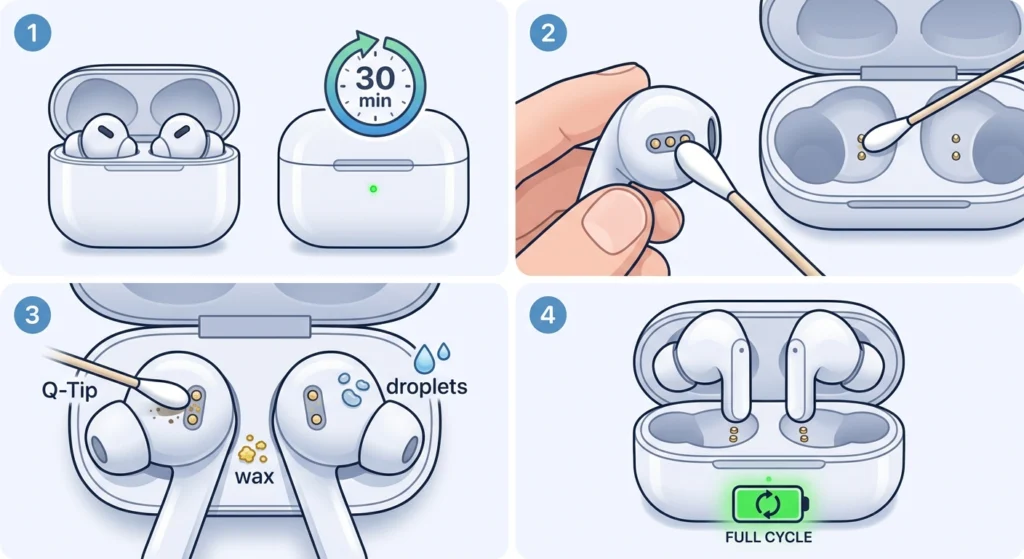
The most common reason earbuds shut off without warning is a low or inconsistent battery. Even if the battery indicator shows some charge, a faulty or dirty charging contact can cause the earbud to misread its actual power level.
- Step 1: Place both earbuds in the charging case and close the lid for at least 30 minutes.
- Step 2: Use a dry cotton swab or soft lint-free cloth to gently clean the metal charging pins on both the earbuds and the inside of the case.
- Step 3: Check for debris, earwax, or moisture on the contacts – these are the most common culprits.
- Step 4: Reinsert the earbuds firmly so the pins make solid contact, then charge for a full cycle before testing again.
This works best when the problem happens after only a short period of use or when one earbud turns off sooner than the other.
Fix 2: Disable Auto-Off or Power Saving Mode
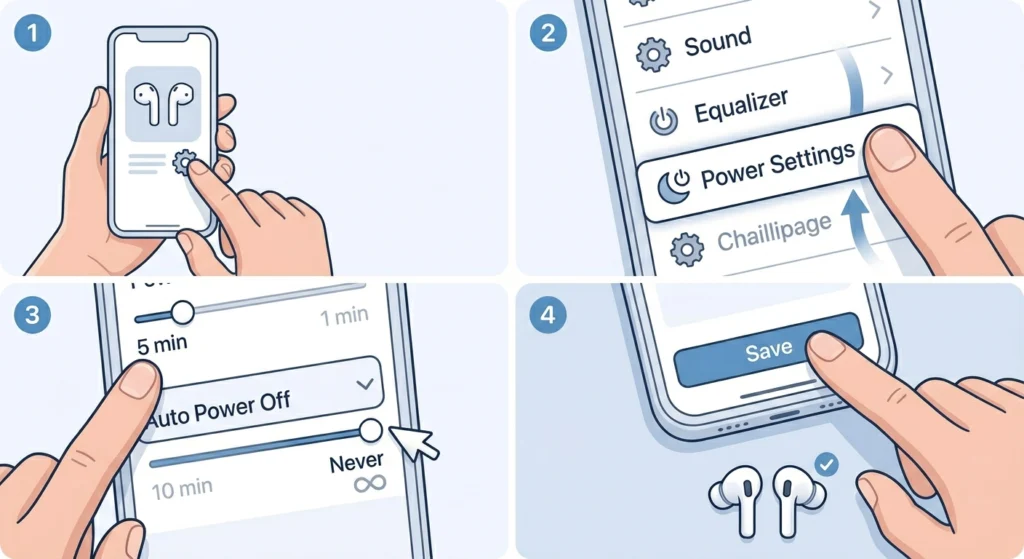
Most earbuds come with a built-in auto-off timer designed to conserve battery. This feature kicks in after a set period of silence or inactivity – and for many users, it feels exactly like the earbuds are randomly shutting down.
- Step 1: Open the companion app for the earbuds (such as Sony Headphones Connect, Samsung Galaxy Wearable, Jabra Sound+, or the brand-specific app).
- Step 2: Look for settings labeled ‘Auto Power Off’, ‘Auto Sleep’, ‘Idle Timer’, or ‘Power Saving Mode’.
- Step 3: Either extend the timer to the longest available setting or turn it off entirely.
- Step 4: Save the settings and test the earbuds again.
The key is to check this setting first if the earbuds seem to shut off only during pauses in audio – like between songs or during a quiet video.
Pro-Tip: If there is no companion app, check the earbud manual or the brand’s website for the button sequence to adjust the auto-off timer. Many earbuds allow toggling this feature with a long-press combination on the earbud controls.
Fix 3: Re-Pair or Reset the Bluetooth Connection
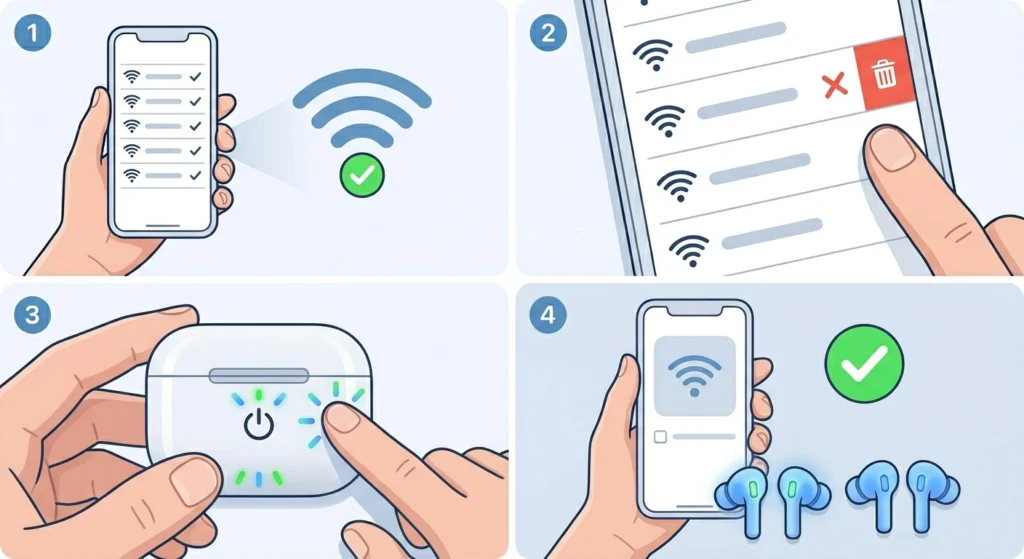
A weak or corrupted Bluetooth connection can cause earbuds to drop in and out of audio – which often feels like they are turning off. Re-pairing forces a clean new connection between the earbuds and the device.
- Step 1: On the connected device (phone, laptop, or tablet), go to Bluetooth settings.
- Step 2: Find the earbuds in the paired devices list and select ‘Forget’ or ‘Remove’.
- Step 3: Turn the earbuds off and back on, then put them into pairing mode (usually by holding the power button until the LED flashes).
- Step 4: On the device, scan for Bluetooth devices and re-pair the earbuds fresh.
If the earbuds are used with a Windows PC and the problem includes audio dropouts or one earbud losing the stereo signal, it helps to follow a proper guide to re-pair Bluetooth earbuds for stereo sound on Windows for the most reliable result.
Fix 4: Check and Adjust Ear Fit
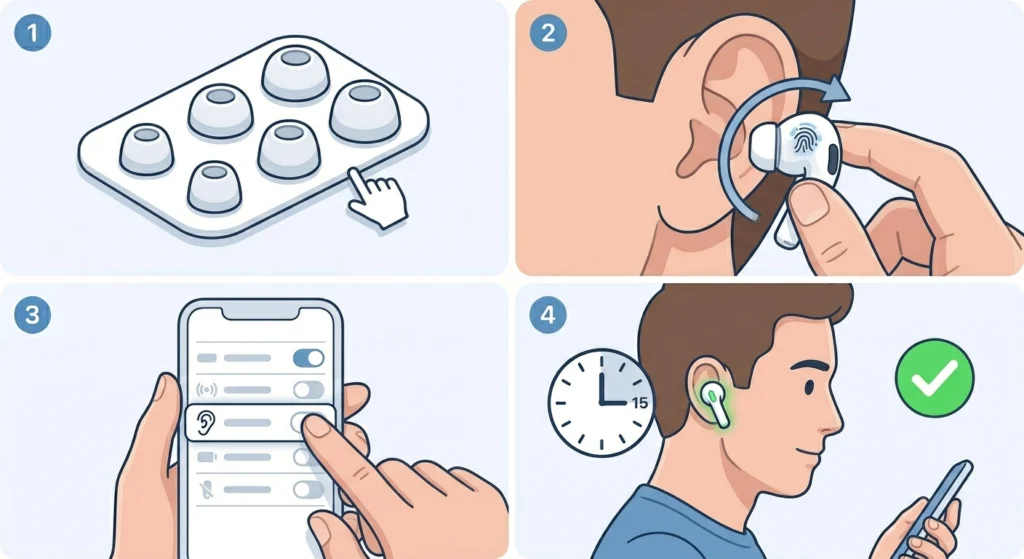
True wireless earbuds often have touch or proximity sensors that detect whether they are in the ear. If the fit is loose or the sensor is triggered by movement, the earbud interprets it as being removed – and shuts off automatically.
- Step 1: Try a different size of ear tips – most earbuds include small, medium, and large options in the box.
- Step 2: Reinsert the earbud with a slight twist to lock it in position, ensuring the sensor stays covered.
- Step 3: If the companion app has a ‘Wear Detection’ or ‘In-Ear Detection’ toggle, try disabling it temporarily to test if that feature is causing the shutoffs.
- Step 4: Use the earbuds for 10 to 15 minutes to confirm the shutoffs stop.
Fix 5: Update Earbud Firmware
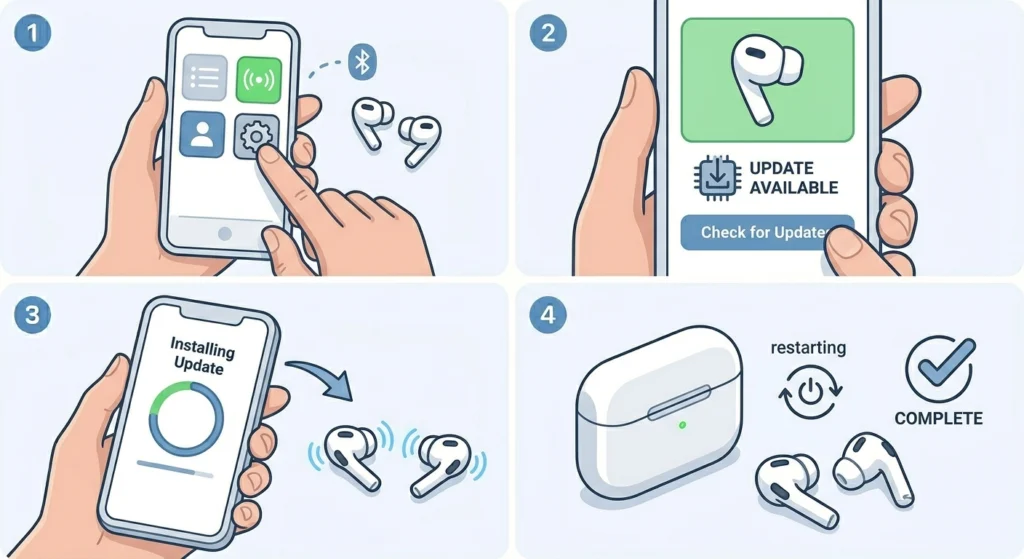
Outdated firmware is a surprisingly common cause of random shutoffs. Manufacturers regularly release firmware updates that fix bugs related to battery management, Bluetooth stability, and sensor behavior.
- Step 1: Open the official companion app for the earbuds while they are connected and in the case or actively worn.
- Step 2: Navigate to ‘Settings’, ‘About’, or ‘Device Info’ and look for a firmware or software update option.
- Step 3: If an update is available, tap to install it. Keep the earbuds connected and nearby during the update process.
- Step 4: After the update completes, restart the earbuds and test.
Most people find that a firmware update resolves persistent or unexplained shutoffs, especially on earbuds that worked fine before a recent software change on the paired device.
Fix 6: Check for Interference and Distance Issues
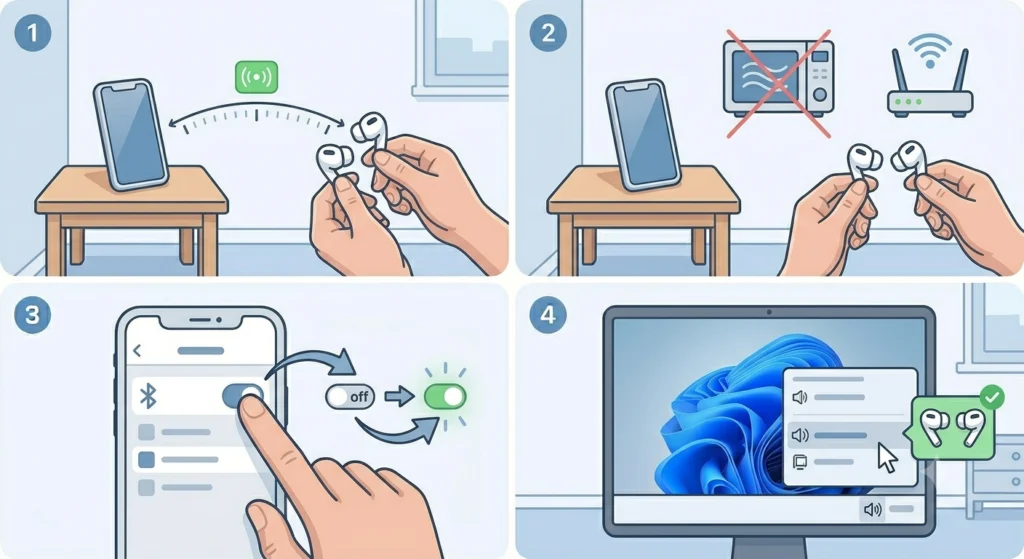
Bluetooth earbuds can disconnect – which feels like powering off – when the signal is too weak or blocked. Thick walls, crowded Wi-Fi environments, and being too far from the source device all contribute to this.
- Step 1: Keep the source device within 5 to 10 meters and in the same room when testing.
- Step 2: Move away from microwave ovens, Wi-Fi routers, and other wireless devices that operate on the 2.4 GHz band.
- Step 3: On the connected device, toggle Bluetooth off and on to refresh the signal.
- Step 4: If on a Windows 11 PC, check the audio output settings to confirm the earbuds are correctly set as the active output device – here is how to adjust audio output settings on Windows 11.
Fix 7: Factory Reset the Earbuds
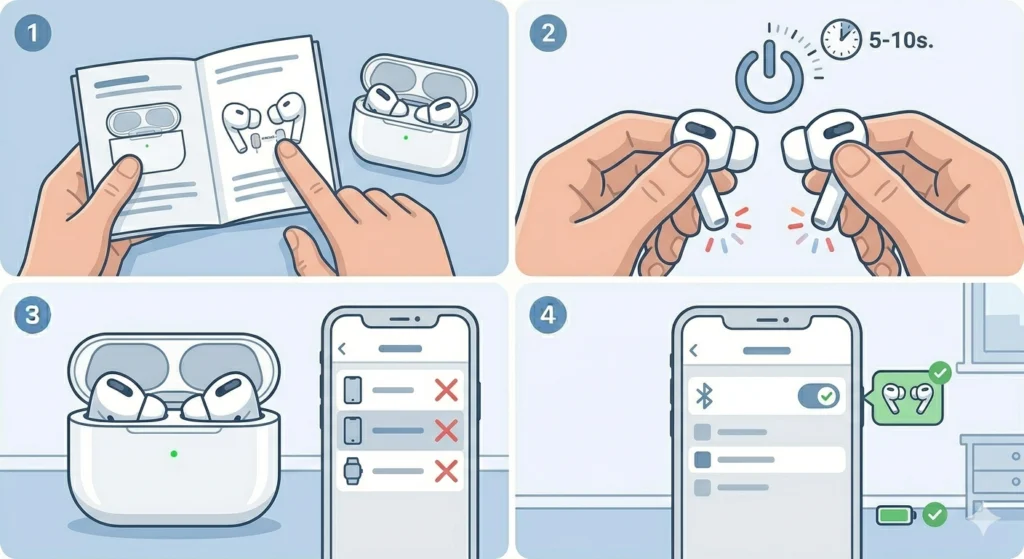
When nothing else works, a factory reset clears all stored pairing data, custom settings, and firmware errors that could be causing the random shutoffs. This is the most thorough software fix available without sending the earbuds in for service.
- Step 1: Refer to the earbud manual or the manufacturer’s website for the specific reset procedure – each brand uses a different button combination.
- Step 2: Most earbuds require holding the button on both buds simultaneously for 5 to 10 seconds until the LED flashes in a specific pattern.
- Step 3: After the reset, remove the earbuds from all previously paired devices.
- Step 4: Re-pair from scratch and test thoroughly before adjusting any settings.
Pro-Tip: After a factory reset, avoid reinstalling old app settings or backups right away. Let the earbuds run on default settings for a day to confirm the shutoffs are gone before customizing.
Tips to Prevent Earbuds From Randomly Turning Off
- Store earbuds in the charging case when not in use to maintain battery health and avoid deep discharge cycles.
- Clean the charging contacts every 2 to 4 weeks with a dry cotton swab – buildup happens faster than most people expect.
- Keep the companion app and firmware updated. Turn on automatic update notifications if the app supports it.
- Avoid extreme temperatures. Heat from pockets or direct sunlight can trigger thermal shutoff protection built into the earbuds.
- Do not let the battery drain to zero regularly – partial charges are better for lithium battery longevity.
- If both earbuds are used with multiple devices, limit the active paired devices list to prevent the earbuds from trying to switch connections mid-use.
Common Problems and Troubleshooting
Only One Earbud Keeps Turning Off
This usually points to an uneven battery level between the two earbuds or a dirty charging contact on one side. Clean the affected earbud’s charging pins, place it in the case alone to charge for 20 minutes, and check if the battery levels equalize in the app.
Earbuds Shut Off Immediately After Powering On
This is a strong indicator of a deeply discharged or damaged battery. Charge for at least one full hour before trying to power them on again. If the problem persists after a full charge, the battery may need replacement.
Earbuds Turn Off During Calls But Not Music
This is often a proximity sensor or wear detection issue. The microphone on the earbud picks up vibration differently during calls, which can confuse the in-ear sensor. Disabling wear detection in the app usually resolves this.
Earbuds Turn Off When Moving or Working Out
Sweat or loose fit is typically the cause here. Sweat can trigger capacitive touch controls accidentally, including the power-off gesture. Use sport ear tips for a more secure seal, and check if the touch control sensitivity can be reduced in the app.
Earbuds Keep Turning Off on a Specific Device
This points to a device-specific Bluetooth or power management conflict. On Windows 11, it can help to review how audio input devices are being managed – check out this guide on managing audio input devices on Windows 11 for a step-by-step walkthrough.
Frequently Asked Questions
Why do my earbuds keep turning off by themselves?
The most common reasons are an auto-off timer activated by silence, a low or inconsistent battery, dirty charging contacts, loose fit triggering the wear sensor, or a Bluetooth connection dropout. Going through the fixes above in order covers all of these causes.
How do I turn off the auto-off feature on my earbuds?
Open the companion app for the earbuds and look for ‘Auto Power Off’, ‘Auto Sleep’, or ‘Idle Timer’ in the settings menu. Set it to the maximum duration or disable it entirely. If there is no app, check the manual for a physical button combination that controls this setting.
Can a software update fix earbuds that randomly shut off?
Yes – firmware updates frequently include bug fixes for battery management and Bluetooth stability. Always check for updates through the companion app before moving on to more involved fixes like factory resets.
Will factory resetting my earbuds delete my settings?
A factory reset clears all paired device data, equalizer settings, and custom configurations. After the reset, the earbuds need to be re-paired and any preferences set up again from scratch.
Why does only one earbud keep turning off?
An uneven battery level or a bad contact on one side is usually the cause. Clean the charging pins on the affected earbud, charge it separately if possible, and check whether the battery level in the app equalizes. If one earbud consistently drains faster, the battery may be deteriorating.
How do I know if my earbuds have a wear detection sensor?
Check the companion app settings for options like ‘Wear Detection’, ‘In-Ear Detection’, or ‘Smart Pause’. These features are common on mid-range to premium earbuds and can be toggled off if they are causing unexpected shutoffs. The earbud product page or manual will also list this as a feature.
Can Bluetooth interference cause earbuds to turn off?
Bluetooth interference does not usually cause earbuds to power off completely, but it can cause audio to cut out or the connection to drop in ways that feel like a power shutoff. Reducing the distance from the source device and moving away from 2.4 GHz devices helps confirm whether interference is the issue.
How long should earbud batteries last before needing replacement?
Most earbud batteries retain good performance for 300 to 500 full charge cycles, which typically translates to 2 to 3 years of regular use. After that, battery capacity degrades and unexpected shutoffs at seemingly adequate charge levels become more common.
Do tight ear tips prevent earbuds from turning off?
Yes, in the case of earbuds with in-ear detection sensors. A loose fit can cause the sensor to repeatedly detect removal and trigger auto-shutoff. Switching to a better-fitting ear tip size – usually one size up – is one of the simplest and most overlooked fixes for this problem.
What should be done if the earbuds still turn off after trying all fixes?
If the earbuds continue shutting off after cleaning the contacts, updating firmware, disabling auto-off, re-pairing, and factory resetting, the issue is most likely hardware-related – typically a degraded battery or a faulty internal component. Contacting the manufacturer for warranty service or a battery replacement is the recommended next step.