
Skullcandy Crusher ANC 2 not charging is one of the most frustrating issues any headphone owner can run into – especially when the battery dies right before a commute or workout. The good news is that most charging problems are not hardware failures. They are usually caused by a dirty port, a bad cable, a firmware glitch, or a drained battery that needs a little patience to wake up. This step-by-step guide covers the exact fixes that resolve this issue for most users.
Quick Summary
- Check the USB-C cable and charger for damage or incompatibility
- Clean the USB-C charging port on the headphones
- Perform a hard reset to clear firmware glitches
- Let the headphones charge for at least 30 minutes if the battery is fully drained
- Update firmware through the Skullcandy app
- Contact Skullcandy support if none of the above work
Step-by-Step Fixes for Skullcandy Crusher ANC 2 Not Charging
Fix 1: Check the USB-C Cable and Power Source
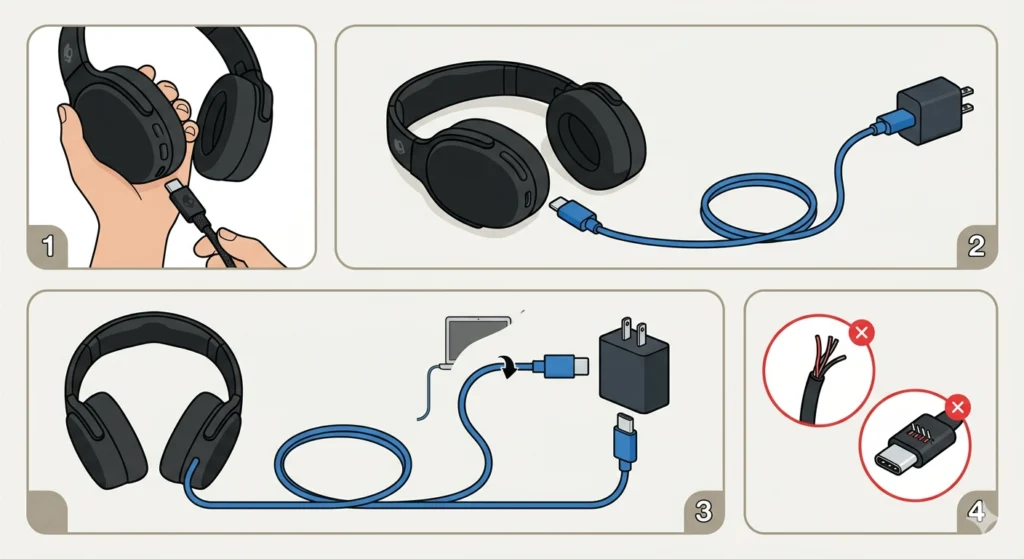
The most common reason the Skullcandy Crusher ANC 2 stops charging is a faulty or incompatible cable. Not all USB-C cables support charging – some are data-only. A cable that works for syncing may not deliver power.
- Step 1: Use the original cable that came with the headphones if possible.
- Step 2: Try a different USB-C cable that is confirmed to support charging.
- Step 3: Swap out the power adapter or wall outlet. A USB port on a laptop or low-wattage adapter can sometimes fail to trigger charging on the headphones.
- Step 4: Look for any visible fraying, bent connectors, or damage on the cable and adapter.
This works best when the problem only started after switching to a new cable or charger. Most people find that going back to a reliable USB-C cable from a reputable brand clears the issue immediately.
Fix 2: Clean the USB-C Charging Port
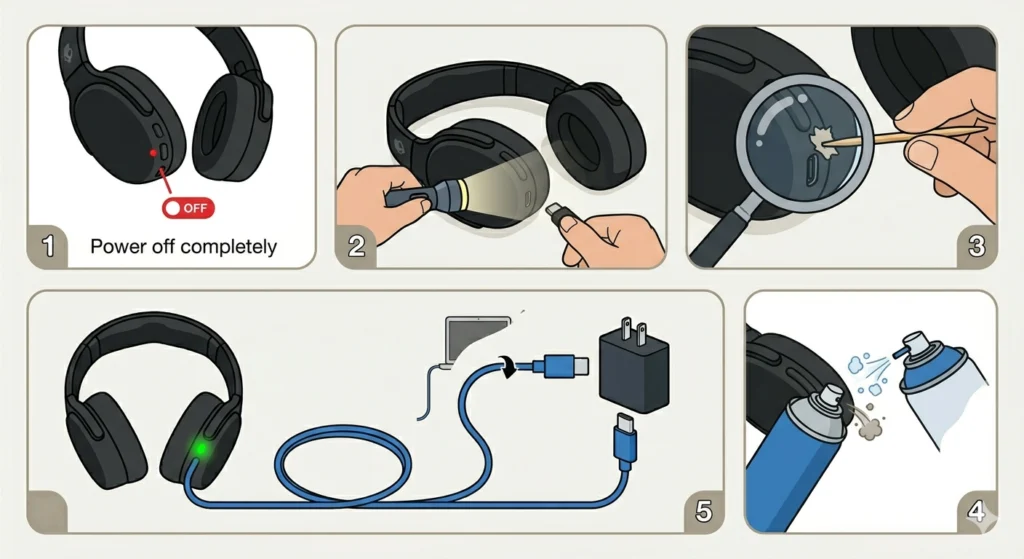
Lint, dust, and debris inside the USB-C port can block the connection between the cable and the headphones. This is especially common for headphones that get tossed into bags or pockets frequently.
- Step 1: Power off the Skullcandy Crusher ANC 2 completely.
- Step 2: Shine a flashlight into the USB-C port and inspect for any debris.
- Step 3: Use a wooden or plastic toothpick – never metal – to gently dislodge any debris. Work carefully to avoid bending the internal pins.
- Step 4: Blow short, controlled bursts of compressed air into the port to clear loose particles.
- Step 5: Plug in the cable again and check if the charging indicator lights up.
The key is to be gentle. The USB-C port pins are delicate, and using metal tools or excessive force can cause permanent damage.
Pro-Tip: A can of compressed air (the same kind used for keyboards) is the safest tool for cleaning headphone charging ports. Always spray in short bursts and hold the can upright to prevent moisture from entering the port.
Fix 3: Perform a Hard Reset
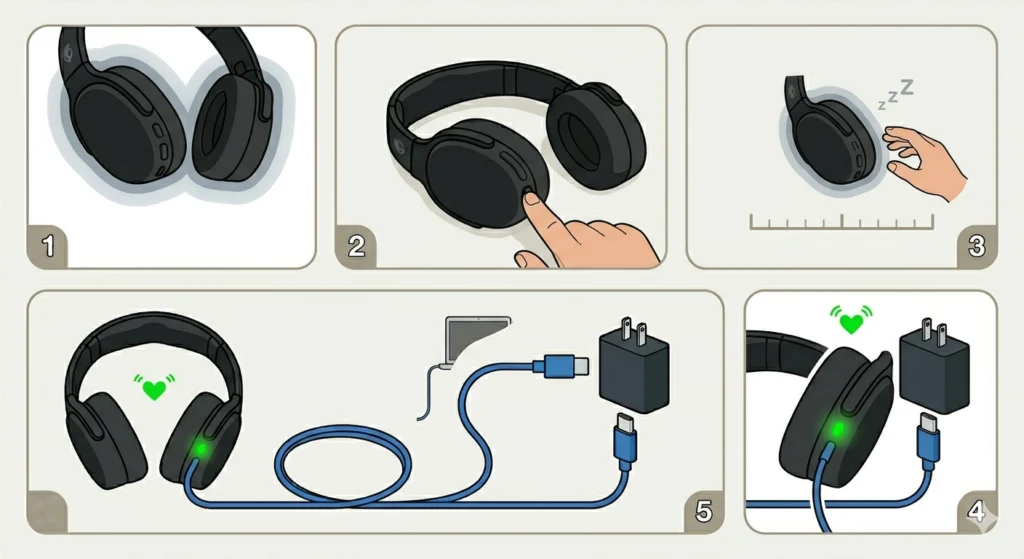
A firmware freeze or software glitch can cause the Crusher ANC 2 to appear unresponsive – including refusing to accept a charge. A hard reset clears these issues without affecting any saved settings permanently.
- Step 1: Make sure the headphones are powered off.
- Step 2: Press and hold the power button for approximately 10 seconds until the LED flashes or the headphones make a sound indicating a reset.
- Step 3: Release the button and wait for the device to fully shut down.
- Step 4: Plug in the USB-C charging cable and check for the charging indicator light.
If the headphones were stuck in a power loop or a frozen state, this reset will typically allow charging to resume normally.
Fix 4: Allow the Battery to Deep Charge (for Fully Drained Units)
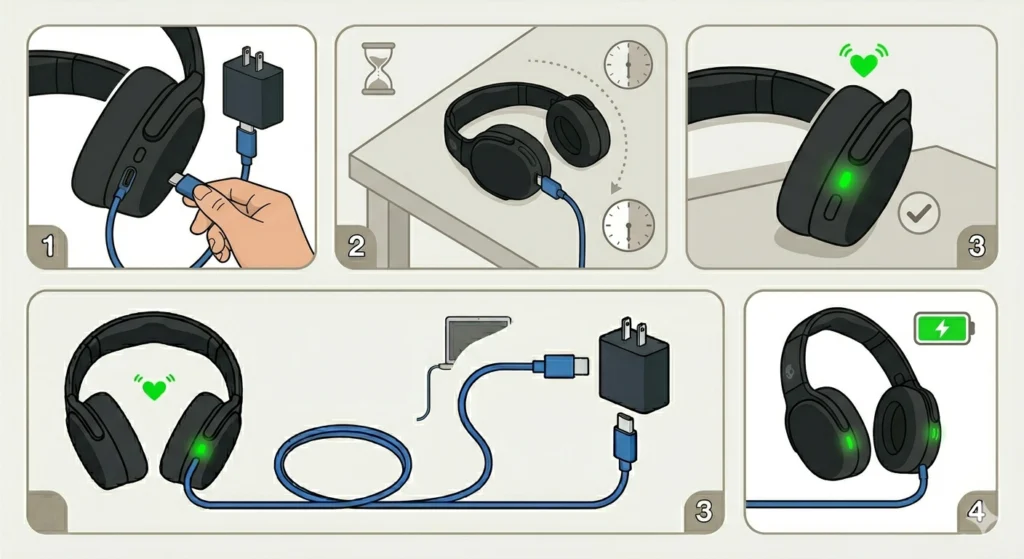
When a lithium battery is completely drained – sometimes called a ‘deep discharge’ – the headphones may not show any charging indicator at all for the first 15-30 minutes. This does not mean the unit is broken.
- Step 1: Connect the headphones to a reliable charger using a quality USB-C cable.
- Step 2: Leave the headphones completely undisturbed for at least 30 minutes.
- Step 3: After 30 minutes, check if the LED charging indicator has turned on.
- Step 4: If the indicator is now active, allow the headphones to fully charge before powering them on.
This situation is especially common when headphones have been in storage for a long time. The battery protection circuit cuts off power at critical lows and needs a slow trickle charge to recover.
Pro-Tip: For long-term storage, always leave the Skullcandy Crusher ANC 2 with at least a 30-40% charge. A fully depleted battery left idle for months can develop a deep discharge condition that is sometimes irreversible.
Fix 5: Update the Firmware via the Skullcandy App
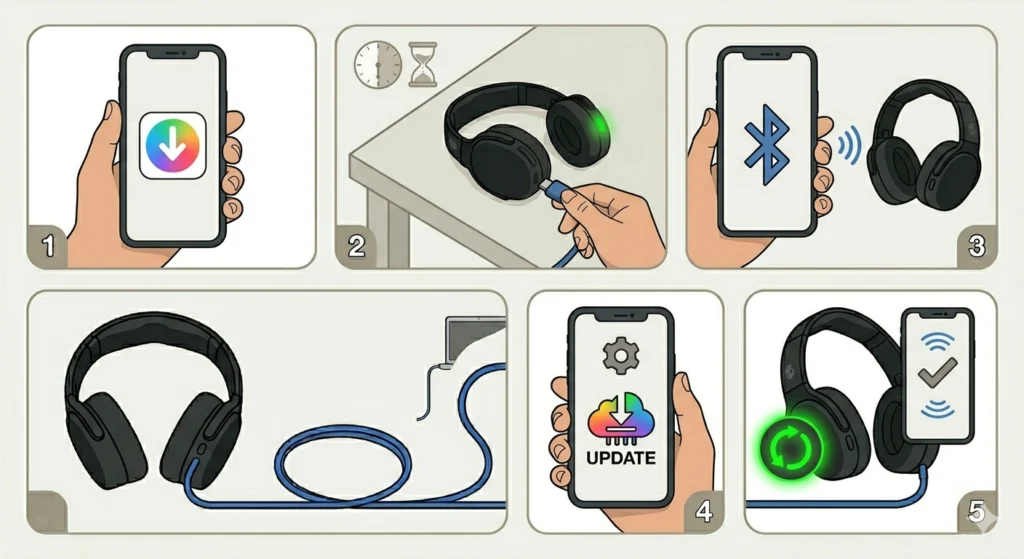
Outdated firmware can interfere with charging behavior. Skullcandy occasionally releases firmware updates that fix battery management bugs and improve charging reliability.
- Step 1: Download the Skullcandy app on a smartphone (available on iOS and Android).
- Step 2: Charge the headphones enough to power them on – even a few minutes of charging may be enough if the battery was only slightly low.
- Step 3: Connect the Crusher ANC 2 to the app via Bluetooth.
- Step 4: Navigate to the device settings within the app and check for any available firmware updates.
- Step 5: Install the update and restart the headphones once complete.
After updating, reconnect the charging cable to see if the issue has been resolved. Similar to how resetting audio settings can clear software conflicts in Windows 11, a firmware update on the headphones clears software-level charging bugs.
Fix 6: Inspect for Physical Damage
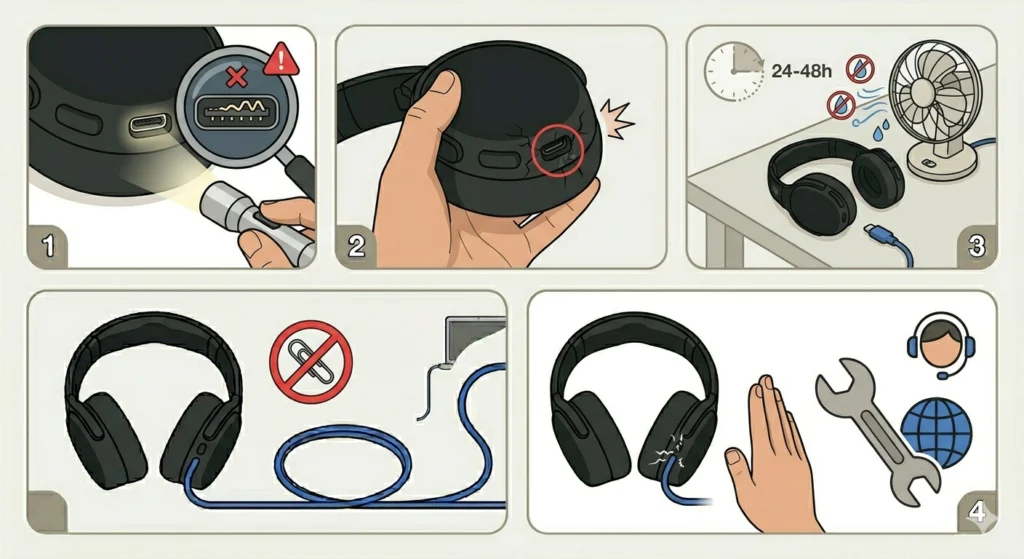
Physical damage to the USB-C port – such as bent pins, a cracked housing, or liquid exposure – can prevent charging even if everything else checks out. Take a close look at the port under good lighting.
- Step 1: Use a flashlight to inspect the USB-C port for bent or broken pins.
- Step 2: Check the outer housing around the port for any cracks or signs of impact.
- Step 3: If the headphones were ever exposed to water or moisture, allow them to dry in a warm, ventilated area for at least 24-48 hours before attempting to charge again.
- Step 4: If pins are visibly bent, do not attempt to straighten them at home – contact Skullcandy support for a repair assessment.
Tips to Prevent Charging Issues on Skullcandy Crusher ANC 2
- Always use USB-C cables rated for both data and charging, not data-only cables.
- Store the headphones in a clean case to prevent lint and debris from entering the charging port.
- Avoid charging the headphones immediately after intense workouts when sweat may still be present near the port.
- Charge the headphones before the battery drops completely to zero whenever possible.
- Keep the Skullcandy app installed and check for firmware updates every few months.
- Use a wall adapter rated at 5V/1A or higher for reliable charging speed.
Common Problems and Troubleshooting
The Charging LED Does Not Light Up at All
This usually points to either a deeply discharged battery or a faulty cable. Try Fix 4 first (deep charge), and if no light appears after 45 minutes, swap the cable and adapter before assuming a hardware issue.
The LED Lights Up but the Battery Percentage Does Not Increase
This can happen when the connection is unstable – typically due to a partially clogged port or a cable that is not fully seated. Clean the port and firmly re-seat the cable. If the problem persists, try a different cable.
The Headphones Power Off Immediately After Plugging In
This often signals a firmware glitch. Perform a hard reset (Fix 3) and then attempt charging again. Just like how resolving microphone detection problems in Windows 11 sometimes requires a device restart to re-establish connection, a reset here can restore normal charging behavior.
Charging Is Extremely Slow
A low-wattage power source – such as a laptop USB port or a phone charger with under 5W output – can cause very slow charging. Switch to a dedicated wall adapter for faster results.
The Headphones Only Charge When Held at a Certain Angle
This strongly indicates a bent or damaged pin inside the USB-C port, or a loose internal charging connection. This is a hardware issue that requires professional repair or replacement under warranty.
Frequently Asked Questions
Why is my Skullcandy Crusher ANC 2 not charging even with a new cable?
A new cable alone is not always enough. The power adapter, the port cleanliness, and the battery state all play a role. Try cleaning the charging port, using a wall adapter instead of a USB hub, and performing a hard reset before concluding the unit is defective.
How long does it take to fully charge the Skullcandy Crusher ANC 2?
Under normal conditions, the Skullcandy Crusher ANC 2 takes approximately 2.5 hours to reach a full charge from empty. If charging is taking significantly longer, the cable or adapter may not be delivering enough power.
Can a deeply discharged battery in the Crusher ANC 2 be recovered?
Yes, in most cases. Connect the headphones to a reliable charger and leave them for 30-60 minutes without interruption. The battery protection circuit should allow a slow recovery charge to begin. If no activity appears after an hour, the battery may need professional replacement.
Is it safe to use a fast charger or high-wattage adapter with the Crusher ANC 2?
The Crusher ANC 2 does not support high-speed fast charging protocols. Using a standard 5V/1A or 5V/2A adapter is recommended. Higher wattage adapters are generally safe as the headphones will only draw what they need, but using the original or a standard USB-C adapter is always the safest option.
What does the LED color mean when charging the Skullcandy Crusher ANC 2?
During charging, the LED indicator typically glows red or amber. Once fully charged, it changes to white or turns off depending on the firmware version. If the LED pulses or blinks rapidly, it may indicate a charging error or a connection issue.
Can water damage cause the Crusher ANC 2 to stop charging?
Yes. The Skullcandy Crusher ANC 2 is not fully waterproof. Moisture entering the USB-C port can cause short circuits or corrosion on the charging pins. If liquid exposure occurred, allow the headphones to dry for at least 24-48 hours in a warm, dry environment before attempting to charge again.
Does the Skullcandy Crusher ANC 2 support wireless charging?
No. The Skullcandy Crusher ANC 2 uses USB-C charging only and does not support wireless or Qi charging. Any charging must be done through the USB-C port.
Will a factory reset fix charging issues on the Crusher ANC 2?
A hard reset can resolve firmware-related charging issues where the headphones freeze or fail to respond to a cable connection. However, if the issue is physical – such as a damaged port or a dead battery – a reset will not help and hardware repair will be necessary.
How do I know if the Skullcandy Crusher ANC 2 battery needs to be replaced?
Signs that a battery replacement may be needed include: the headphones dying very quickly even after a full charge, the battery percentage dropping erratically, or the headphones failing to charge at all even after trying multiple cables, adapters, and resets. Contact Skullcandy support to check warranty coverage before pursuing a third-party repair.
Where can I contact Skullcandy support for charging issues?
Skullcandy support can be reached through the official Skullcandy website at skullcandy.com. The support team can assist with warranty claims, repair options, and replacement units if the charging issue is determined to be a manufacturing defect.