
Getting the right ear tip fit on Jabra earbuds is not just about comfort – it directly affects sound quality, bass response, and noise isolation. The Jabra MyFit Ear Tip Test is a built-in feature inside the Jabra Sound+ app that analyzes how well the ear tips seal inside the ear canal. Running this test takes less than a minute and can make a noticeable difference in the listening experience.
| What It Does | Details |
|---|---|
| Purpose | Checks if ear tips form a proper acoustic seal |
| App Required | Jabra Sound+ (iOS and Android) |
| Time Needed | Under 1 minute per ear |
| Result | Pass or Fail with tip size recommendation |
| When to Run | After changing tip size or repositioning earbuds |
Step-by-Step Guide to Running the Jabra MyFit Ear Tip Test
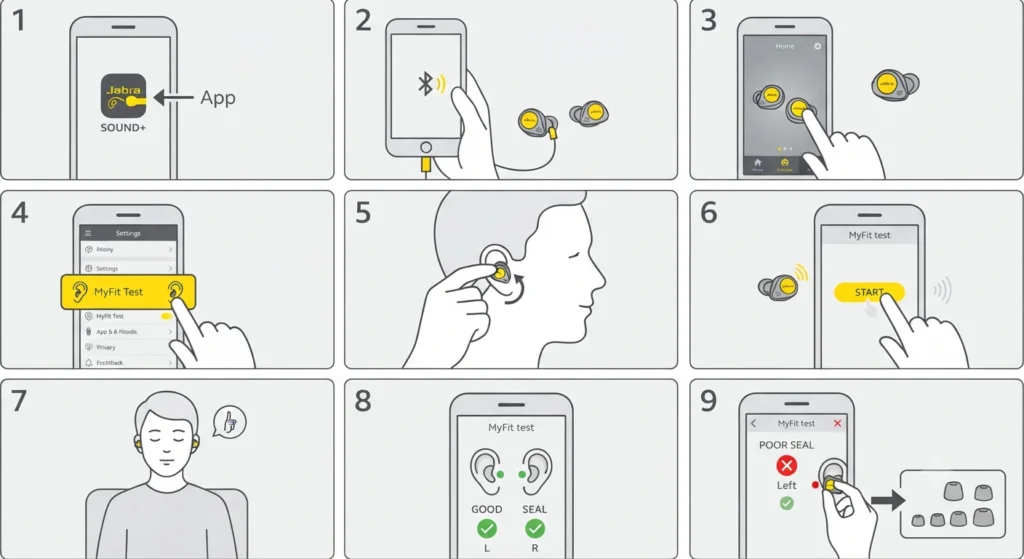
Follow these steps exactly to get an accurate result from the MyFit test. Make sure the earbuds are fully charged and connected before starting.
- Step 1: Download and open the Jabra Sound+ app on a smartphone. The app is available on both iOS and Android.
- Step 2: Make sure the Jabra earbuds are connected to the phone via Bluetooth. The app should detect the earbuds automatically on the home screen.
- Step 3: Tap on the earbud icon or the connected device shown on the app’s main screen to open the device settings.
- Step 4: Look for the ‘MyFit’ or ‘Ear Tip Fit Test’ option in the menu. This is usually found under ‘Personalize’ or ‘Sound Settings’ depending on the app version.
- Step 5: Insert both earbuds into the ears and make sure they are seated properly. Press them gently into the ear canal with a slight twist to secure them.
- Step 6: Tap ‘Start Test’ inside the app. The test plays a brief audio signal through the earbuds.
- Step 7: Stay still and quiet during the test. The microphones inside the earbuds measure how well the seal is holding based on the audio signal.
- Step 8: Wait for the result. The app will display either a ‘Good Seal’ or ‘Poor Seal’ result for each ear separately.
- Step 9: If the result shows a poor seal, try adjusting the earbud position or switch to a different ear tip size and run the test again.
Most people find that a slight upward tug on the outer ear while inserting the earbud helps open the ear canal slightly, making it easier to achieve a good seal on the first try.
How to Change Ear Tip Size Based on Test Results
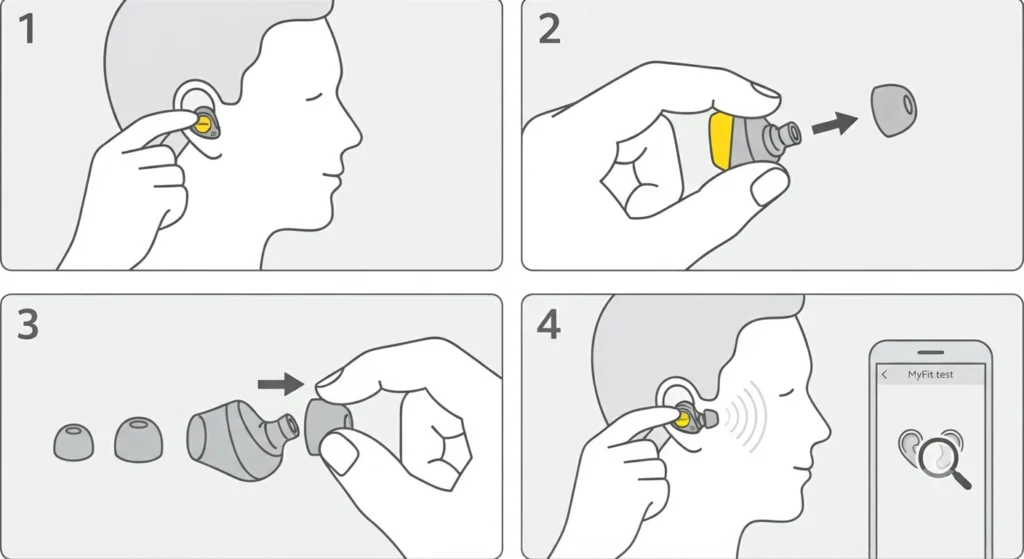
If the MyFit test returns a poor seal result, the most common fix is switching to a different ear tip size. Jabra earbuds typically come with small, medium, and large ear tips in the box.
- Step 1: Remove the earbud from the ear.
- Step 2: Pinch the ear tip at the base where it attaches to the earbud and pull it straight off.
- Step 3: Align the new ear tip with the nozzle of the earbud. Press it firmly until it clicks or snaps into place.
- Step 4: Re-insert the earbud and run the MyFit test again to confirm the fit.
The key is to start with the medium size (usually pre-installed) and go up or down based on the test result. If the seal fails with medium, try large first. A good seal should feel snug but not painful.
Pro-Tip: If one ear consistently fails the test while the other passes, the ear canals may be different sizes – this is completely normal. Use a different tip size on each ear for the best result. Jabra earbuds support mismatched ear tip sizes since each earbud sits independently.
Tips for Getting the Best Seal Every Time
- Always run the MyFit test in a quiet environment. Background noise can interfere with the acoustic measurement.
- Clean the ear tips before testing. Earwax buildup can affect both the seal and the microphone readings inside the earbud.
- Insert the earbud with a gentle forward-and-down or forward-and-up motion depending on the ear anatomy. A straight push rarely seats the earbud correctly.
- Avoid talking or swallowing during the test. These movements shift the ear canal shape and can cause a temporary poor seal reading.
- If using Jabra earbuds with a stereo Bluetooth connection on Windows, make sure the audio source is on the phone during the test, not the computer.
- Let the earbuds adjust to body temperature for a minute or two before testing. Cold ear tips are stiffer and may not seat as well.
Common Problems and How to Fix Them
Fix 1: Test Keeps Showing Poor Seal Even After Changing Tip Size
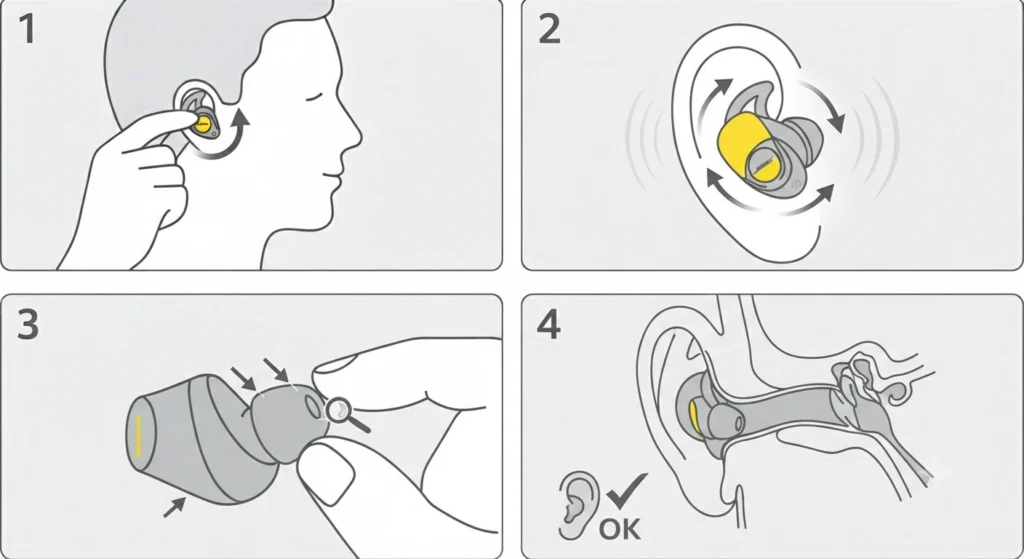
This usually means the earbud is not positioned correctly inside the ear canal. Try rotating the earbud slightly clockwise or counter-clockwise after inserting it. Some ear shapes require a specific angle for the tip to seal properly. Also check that the ear tip is not torn or deformed, since even a small nick in the silicone will cause the test to fail.
Fix 2: MyFit Option Is Not Visible in the App
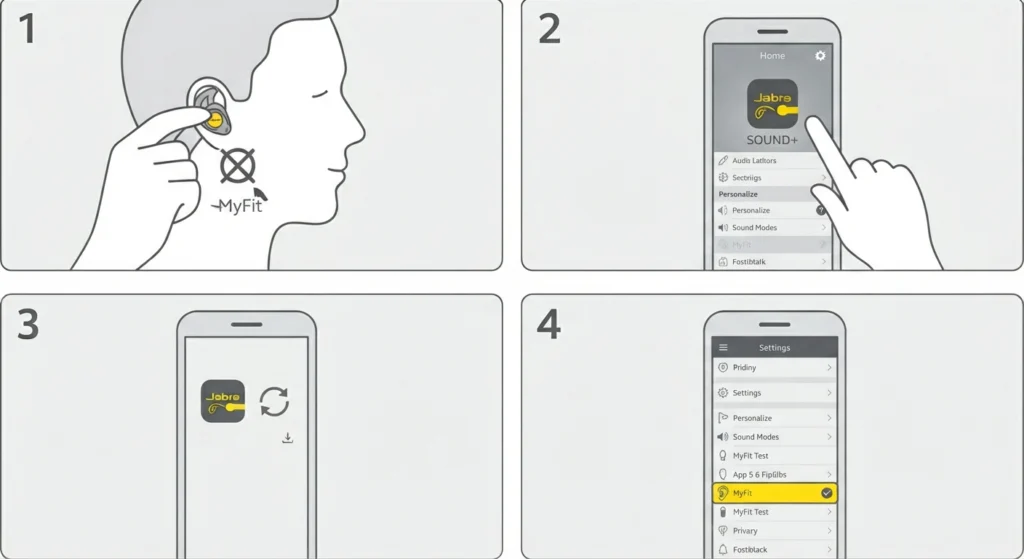
Not all Jabra models support the MyFit Ear Tip Test. This feature is available on select models like the Jabra Evolve2 Buds, Elite series, and other ActiveNoise Cancellation-enabled earbuds. Check the Jabra website for a confirmed list of supported devices. Also make sure the Sound+ app is updated to the latest version, as older versions may not show this feature even on supported hardware.
Fix 3: App Does Not Detect the Earbuds
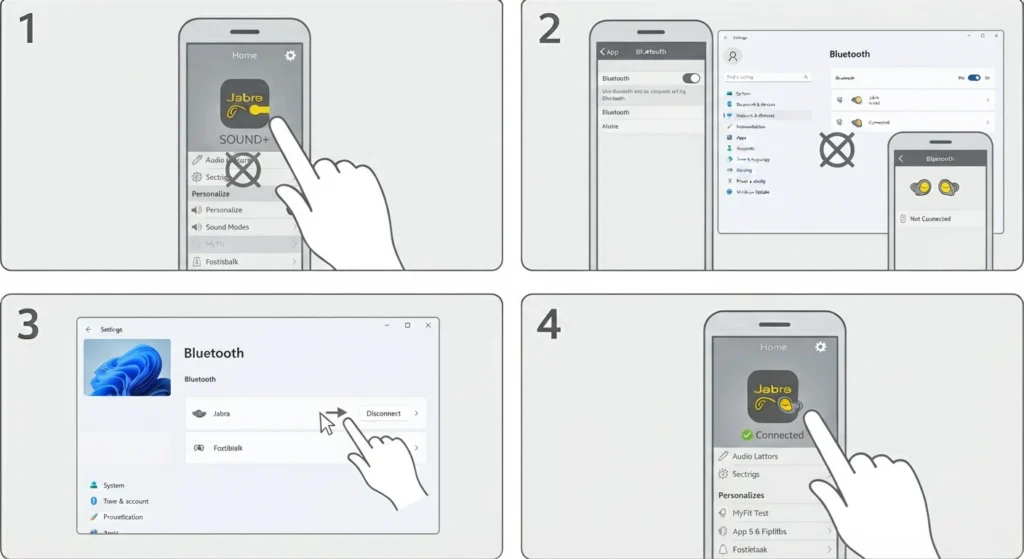
If the Jabra Sound+ app does not show the connected earbuds, check the Bluetooth connection first. On Windows 11, issues like this can sometimes be related to audio input device settings if the phone is paired to a computer at the same time. Disconnect from other devices and test with only the phone connected.
Fix 4: Sound During Test Sounds Muffled or Distorted
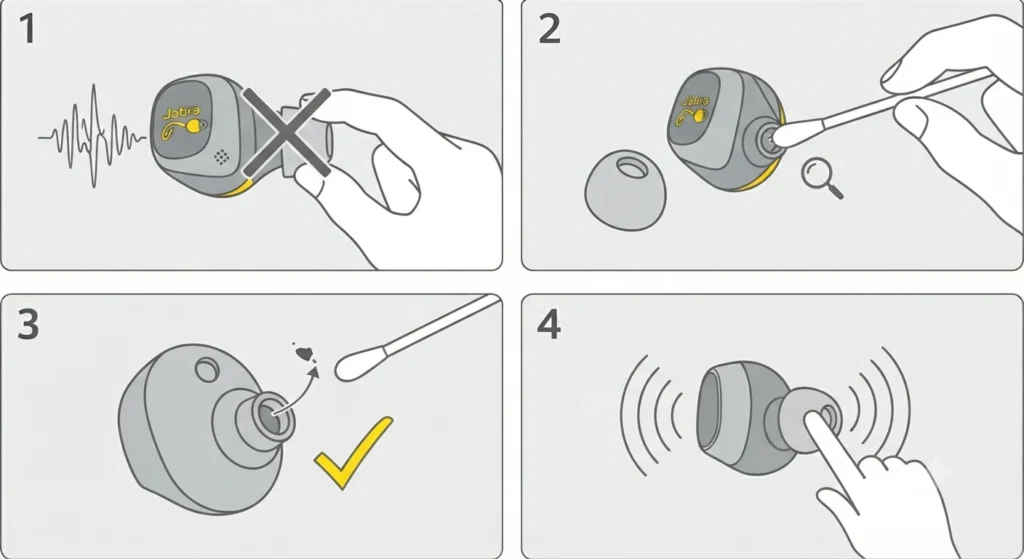
A muffled tone during the MyFit test often means the ear tip is partially blocking the earbud nozzle. Remove the ear tip, check the nozzle for debris, clean it with a dry cotton swab, and reattach the tip before running the test again.
Frequently Asked Questions
What is the Jabra MyFit Ear Tip Test?
The Jabra MyFit Ear Tip Test is a feature inside the Jabra Sound+ app that plays a short audio signal through the earbuds and uses the internal microphones to measure how well the ear tips are sealing inside the ear canal. It gives a pass or fail result for each ear separately.
Which Jabra earbuds support the MyFit test?
The MyFit test is supported on select Jabra models including the Elite series and Evolve2 Buds. The feature requires active noise cancellation hardware since it uses the microphone system to analyze the seal. Check the Jabra Sound+ app after connecting earbuds to see if the option appears.
How long does the Jabra MyFit test take?
The test takes about 10 to 20 seconds to complete. The audio signal plays briefly, the app processes the microphone data, and the result appears within seconds. The entire process from opening the test screen to getting a result is typically under a minute.
What does a ‘poor seal’ result mean?
A poor seal means the ear tip is not sitting tightly enough in the ear canal, which allows sound to leak in and out. This reduces bass response, lowers perceived volume, and weakens noise isolation. A poor seal result suggests adjusting the earbud position or switching to a different tip size.
Can the MyFit test be run with just one earbud?
Yes, the test evaluates each ear independently. The app will show a separate result for the left and right ear. This is useful when only one ear is having fit issues without needing to re-test the other.
Do the ear tips need to be a specific brand for the test to work?
The MyFit test is designed and calibrated for Jabra ear tips. Using third-party ear tips may still return a result, but the accuracy of the test is best guaranteed with genuine Jabra ear tips since the acoustic calibration is matched to those specific dimensions and materials.
Is the MyFit test available on both iOS and Android?
Yes. The Jabra Sound+ app is available on both iOS and Android, and the MyFit Ear Tip Test feature works on both platforms as long as the connected earbud model supports it.
Does the MyFit test affect noise cancellation performance?
The test itself does not change noise cancellation settings. However, passing the test and achieving a proper seal directly improves how well passive noise isolation and active noise cancellation perform. A good seal is the foundation for effective ANC.
How often should the MyFit test be run?
Running the test once after getting a new pair is standard practice. After that, it is worth re-running any time the ear tips are replaced, after a long break from using the earbuds, or when the sound quality seems to have changed. Ear canal shape can shift slightly due to jaw movement, temperature, or physical activity.
Can earwax buildup cause the MyFit test to fail?
Yes. Earwax on the ear tip surface or inside the earbud nozzle can affect the acoustic seal and interfere with the microphone reading used during the test. Regular cleaning of the ear tips with a dry cloth or soft brush helps maintain accurate test results and extends the life of the tips.