
Poor battery life on wireless earbuds is one of the most common complaints among users – and the good news is, most of the time it is completely fixable. Whether the earbuds drain in an hour or the case barely holds a charge anymore, there are real, proven steps to get the battery performance back on track. This guide covers the exact fixes, in order, so there is no guesswork involved.
Quick Summary: Key Takeaways
- Dirty charging contacts are the number one hidden cause of fast battery drain
- High volume and active features like ANC drain battery faster than most people expect
- Firmware updates often include battery optimization fixes
- Leaving earbuds in a discharged state permanently damages lithium-ion cells
- A full reset often restores battery performance that was lost over time
- Most earbuds show roughly 500 full charge cycles before noticeable battery degradation
Fix 1: Clean the Charging Contacts on Both the Earbuds and the Case
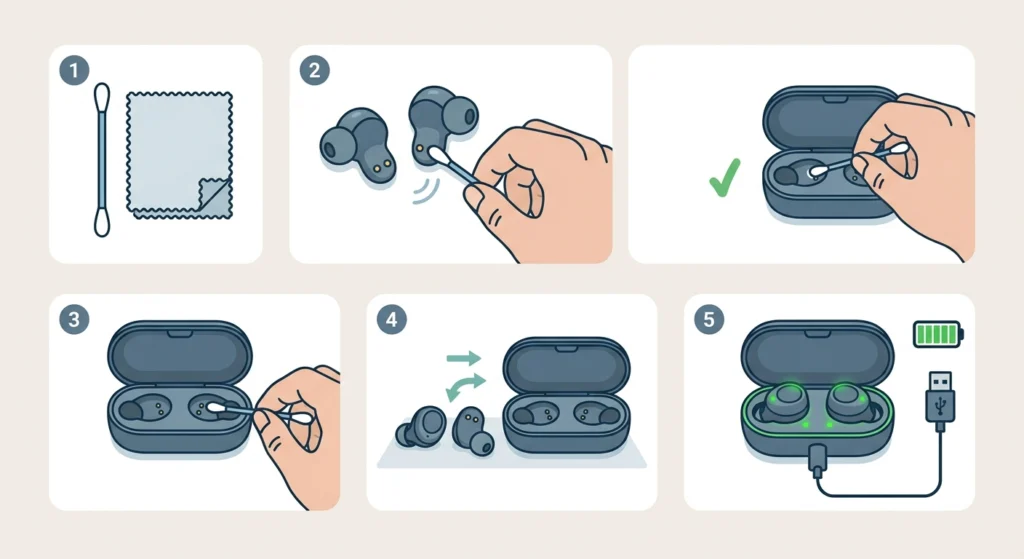
Dirty or corroded charging pins are one of the most overlooked causes of poor battery performance. When the connection between the earbud and case is weak, the earbuds do not charge fully – even if the case shows a full battery indicator. This works best when done before trying anything else.
- Step 1: Get a dry cotton swab or a soft lint-free cloth.
- Step 2: Gently wipe the metal charging contacts on each earbud. Look for any dark residue, earwax buildup, or oxidation.
- Step 3: Clean the matching contacts inside the charging case using the same method.
- Step 4: Let both dry completely for a few minutes before placing the earbuds back in the case.
- Step 5: Charge the earbuds for at least 30 minutes and check whether the battery level improves as expected.
Avoid using water or alcohol directly on the contacts unless the manufacturer specifies it is safe to do so. Most earbuds respond well just to dry cleaning alone.
Fix 2: Lower the Volume and Turn Off Battery-Heavy Features
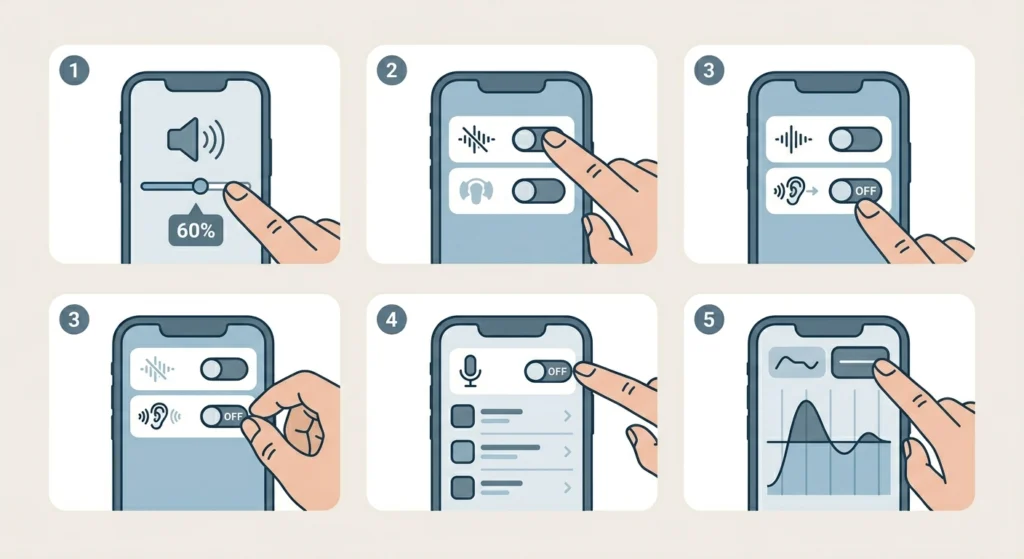
Volume plays a much bigger role in battery drain than most people realize. Running earbuds at 80-100% volume can cut battery life nearly in half compared to listening at 50-60%. The same goes for features like Active Noise Cancellation (ANC), Transparency Mode, and always-on voice assistants. Each one pulls consistent power even when no audio is playing.
- Step 1: Lower the volume to 60% or below during regular listening sessions.
- Step 2: Open the companion app for the earbuds (if available) and turn off Active Noise Cancellation when it is not needed.
- Step 3: Disable Transparency Mode unless actively needed.
- Step 4: Turn off the always-on voice assistant (Alexa, Google Assistant, Siri) in the app settings.
- Step 5: If the earbuds support an EQ (equalizer), use a preset with lower bass boost – heavy bass processing draws extra power.
Most people find that simply turning off ANC when commuting in a quiet environment can add 2-3 extra hours of playback per charge.
Pro-Tip: ANC and Transparency Mode together can reduce total battery life by 30-40% on most earbuds. If battery is the priority, keep only one active at a time – or neither.
Fix 3: Update the Earbud Firmware
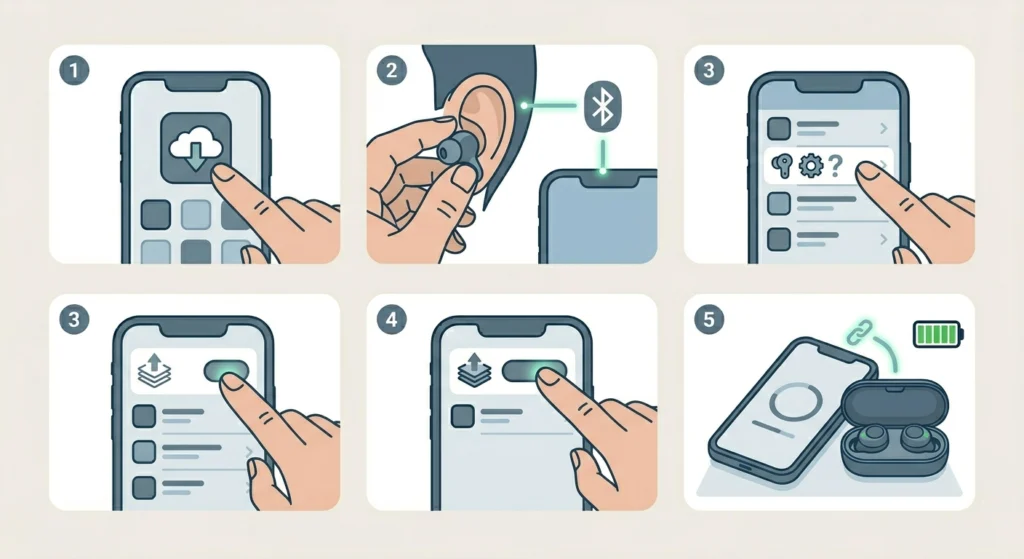
Firmware updates are not just about adding new features – manufacturers frequently release patches that fix power management bugs, charging errors, and battery reporting issues. Running outdated firmware is a surprisingly common reason earbuds drain faster than they should.
- Step 1: Download or open the official companion app for the earbuds on a smartphone (examples: Sony Headphones Connect, Bose Music, Samsung Galaxy Wearable, Jabra Sound+).
- Step 2: Place the earbuds in the ears or keep them connected via Bluetooth.
- Step 3: Navigate to the ‘Device’ or ‘About’ section in the app.
- Step 4: Look for a ‘Firmware Update’ or ‘Software Update’ option and follow the on-screen prompts.
- Step 5: Keep the earbuds near the phone and fully charged during the update process.
If the earbuds do not have a companion app, check the manufacturer website directly for firmware update tools that work on a computer.
Fix 4: Recalibrate the Battery
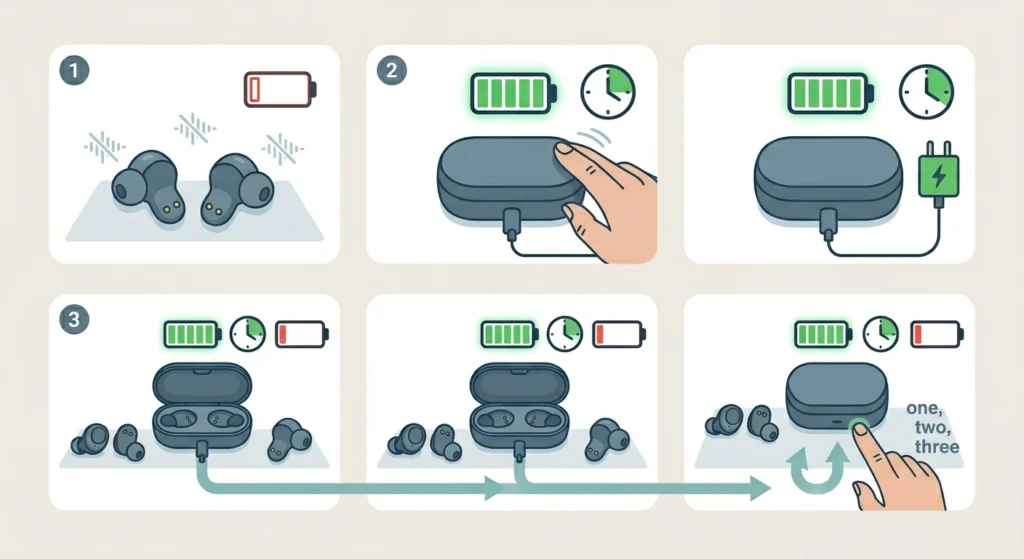
Over time, the battery percentage indicator inside wireless earbuds can fall out of sync with the actual charge level. The earbuds might shut off at 20% or report ‘full’ when they are not. A battery recalibration forces the system to re-learn the true capacity.
- Step 1: Use the earbuds until they completely run out of battery and power off on their own. Do not force-power them off.
- Step 2: Place the earbuds back in the case and charge them to 100% without interruption. Leave them an extra 15-20 minutes after the indicator shows full.
- Step 3: Repeat this full discharge and full charge cycle two to three times over the next few days.
This process is especially effective on earbuds that have been used mostly with partial charges (plugging in at 40%, unplugging at 80%) for an extended period.
Fix 5: Reset the Earbuds to Factory Settings
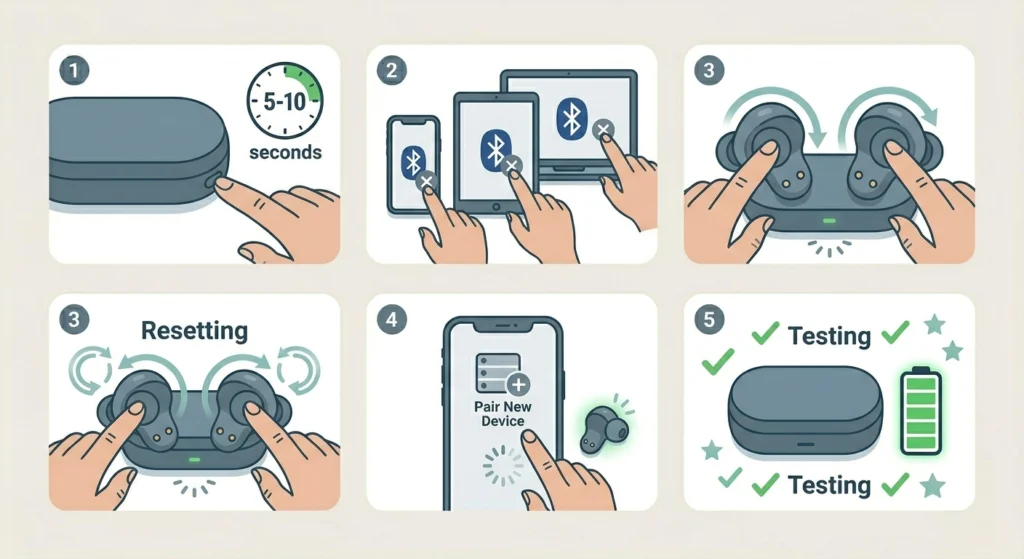
A factory reset clears stored connection data, corrupted settings, and software glitches that can cause abnormal battery drain. If the earbuds burn through battery even when sitting idle in the ears without music playing, a reset is often the fastest fix.
- Step 1: Look up the factory reset method for the specific earbud model. This is usually found in the manual or on the manufacturer website. Common methods include holding a button on the case or pressing buttons on both earbuds simultaneously for 5-10 seconds.
- Step 2: Forget the earbuds from the Bluetooth settings on all connected devices (phone, tablet, laptop).
- Step 3: Perform the factory reset as instructed.
- Step 4: Re-pair the earbuds with the primary device. If re-pairing on Windows, the guide on how to re-pair Bluetooth earbuds for stereo sound on Windows walks through the full process clearly.
- Step 5: Test the battery life over a full listening session after re-pairing.
Pro-Tip: After a factory reset, avoid reconnecting to too many devices at once. Multiple active Bluetooth connections searching in the background – even inactive ones – can cause faster battery drain than most people expect.
Fix 6: Check and Fix the Charging Case Battery
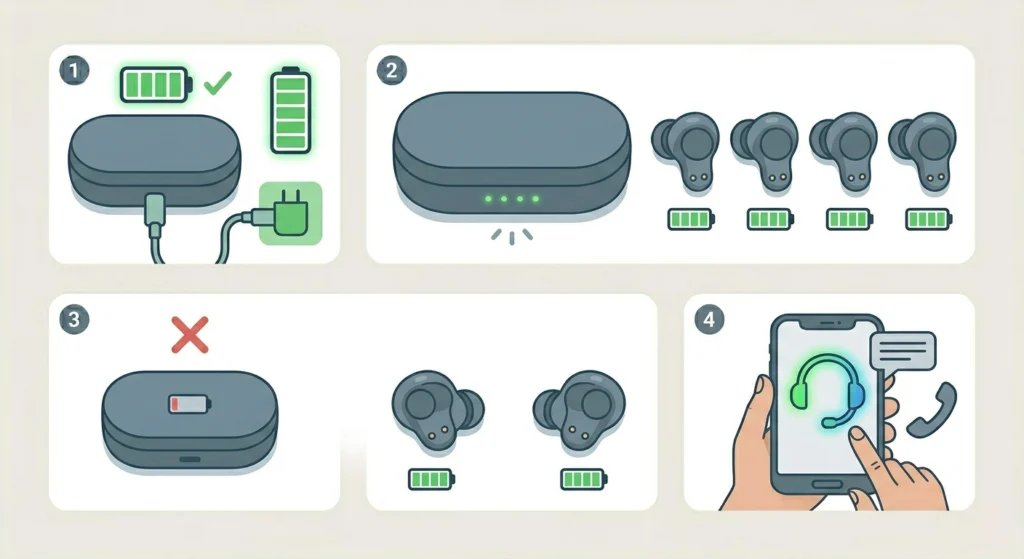
The charging case itself has a battery, and when that battery degrades, the earbuds never reach a full charge even after sitting in the case overnight. A failing case battery is easy to misread as an earbud battery problem.
- Step 1: Charge the case fully using the original cable or a certified USB-C or Lightning cable.
- Step 2: Check how many full charges the case can deliver to the earbuds before the case itself runs out. Compare this to the manufacturer specification (usually listed on the product page).
- Step 3: If the case delivers noticeably fewer charges than the spec – for example, 2 instead of the listed 5 – the case battery is likely degraded.
- Step 4: Contact the manufacturer for a case replacement or battery service. Many brands offer this through their support channels or authorized repair centers.
Fix 7: Store and Charge the Earbuds Correctly Going Forward
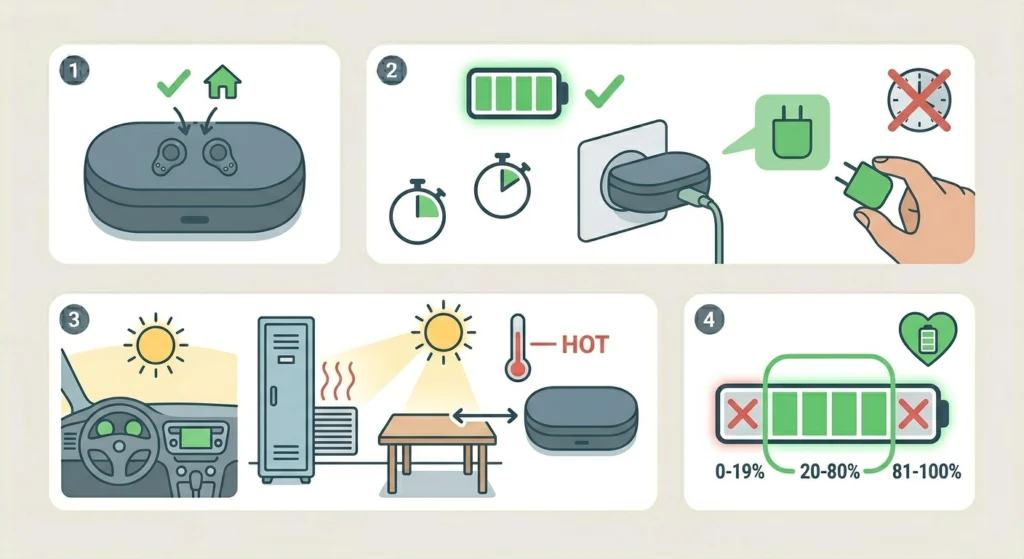
Battery degradation is permanent once it happens, but the right habits stop it from getting worse – and protect replacement earbuds from the same fate. Lithium-ion batteries used in wireless earbuds are sensitive to heat, full discharges, and overcharging.
- Step 1: Store the earbuds in the case between sessions. Leaving them out of the case drains the earbud battery slowly even when not in use.
- Step 2: Avoid leaving the earbuds charging for multiple days straight. Once the case is full, unplug it.
- Step 3: Keep the earbuds away from high-heat environments – car dashboards in summer, gym lockers near heating vents, or sitting in direct sunlight.
- Step 4: Try to keep the charge level between 20% and 80% during regular daily use. This is the ideal range for lithium-ion battery health.
Tips to Maximize Wireless Earbud Battery Life
- Use only one earbud at a time when battery is low – most earbuds support mono mode and this effectively doubles the available listening time
- Turn on the earbuds’ low-power or battery-saver mode if available in the companion app
- Keep the earbuds within close range of the connected device – the Bluetooth radio works harder and uses more power when the signal is weak
- If using earbuds with a Windows PC and experiencing audio issues that cause the system to stay connected longer than needed, checking the audio output settings on Windows 11 can help ensure the connection is optimized
- Avoid using equalizer presets with extreme bass boost – they increase processing load and battery consumption
- Clean the ear tips regularly so the earbuds seal properly in the ears – a poor seal makes the user instinctively raise the volume, which drains battery faster
Common Problems and Troubleshooting
Earbuds Die Faster Than Usual After a Software Update
This happens occasionally after firmware updates that change power management behavior. Check the companion app for any newer firmware that addresses the issue, or contact support to report the regression. A factory reset (Fix 5 above) often resolves post-update battery issues.
One Earbud Drains Much Faster Than the Other
This usually points to an unbalanced charge during the previous session or a dirty contact on one side. Clean the contacts on the faster-draining earbud specifically, then do a full recalibration cycle. If the imbalance continues, the battery in that earbud may be degraded unevenly – a known issue in earbuds over 2-3 years old.
Case Shows Full But Earbuds Are Not Charging
The charging contacts need cleaning (Fix 1). Also check that the earbuds are seated properly and clicking into place. Some cases have a light that confirms charging – if that light does not activate within 30 seconds, the earbuds are not making contact.
Battery Life Is Fine But the Indicator Reports Wrong Percentages
This is a calibration issue. Run the full recalibration process in Fix 4. If the reporting continues to be inaccurate, a firmware update may include a fix – check the companion app.
Earbuds Get Warm While Charging and Battery Still Drains Fast
Warmth during charging is normal, but excessive heat is not. Heat accelerates lithium-ion battery degradation. If the earbuds or case feel hot to the touch during charging, stop using that cable or charger and switch to a certified original accessory. Avoid charging in direct sunlight or on soft surfaces like beds that trap heat.
Frequently Asked Questions
Why does my wireless earbud battery drain so fast all of a sudden?
Sudden battery drain is usually caused by a software glitch, a recent firmware change, or dirty charging contacts that prevented a full charge in the previous session. Start with a factory reset and a full recalibration cycle. If the issue appeared right after a firmware update, report it to the manufacturer and check for a newer update.
How many years do wireless earbud batteries last?
Most wireless earbud batteries last between 2 and 3 years of daily use before noticeable degradation. Lithium-ion cells are typically rated for around 300 to 500 full charge cycles. Proper storage habits – avoiding extreme heat, not leaving them fully discharged, and not overcharging – can extend this to 4 years or more.
Does leaving earbuds in the case all the time damage the battery?
No, leaving earbuds in the case is actually the correct way to store them. The case keeps the earbuds charged and protected. What does cause damage is leaving the case plugged into a power source for weeks at a time when it is already full, or storing the earbuds in high-heat environments.
Can the earbud battery be replaced?
This depends on the brand and model. Some manufacturers like Sony and Jabra offer battery replacement services through their support centers. Many budget earbuds are sealed and not serviceable. Check the manufacturer support page or contact them directly – a replacement is often cheaper than buying new earbuds.
Does Active Noise Cancellation really drain battery that much?
Yes, significantly. ANC requires constant microphone input processing, which runs continuously regardless of what is playing. On most earbuds, enabling ANC reduces total playback time by 20-40%. Turning it off when in a quiet environment is one of the easiest ways to get more hours per charge.
Why does one earbud die faster than the other?
This is usually caused by uneven charging from dirty contacts, or battery degradation that progressed faster on one side. Clean both contacts, run a recalibration, and check for imbalance again. If one side consistently loses charge faster, the battery cell in that earbud is likely more worn and may need professional service.
Is it bad to use earbuds while they are charging in the case?
Most earbuds cannot be used while in the case since the case lid needs to be open and the earbuds need to be in the ears. However, some earbuds with a charging case that connects via cable allow passthrough use. In that scenario, it is fine for short sessions but not ideal as a regular habit, since it keeps the battery in a constant partial-charge state.
Does Bluetooth version affect battery life?
Yes. Newer Bluetooth versions (5.0 and above) are more power-efficient than older versions. If the earbuds use Bluetooth 4.x and the connected device supports 5.0+, the earbuds are the limiting factor. There is no hardware fix for this – it is a consideration when choosing new earbuds rather than something that can be changed on existing hardware.
Does cold weather affect wireless earbud battery life?
Cold temperatures temporarily reduce lithium-ion battery capacity. In temperatures below 10 degrees Celsius (50 degrees Fahrenheit), earbuds may report lower battery or shut off sooner than usual. This is not permanent – once they warm up, the capacity returns. Storing earbuds at room temperature before a session in cold weather helps reduce this effect.
How do factory settings help with battery life?
A factory reset clears corrupted configuration data, stuck background processes, and any misconfigured power settings that could be causing abnormal drain. It is not a guaranteed fix, but it eliminates software-side causes before concluding the battery hardware is at fault. Always re-pair from scratch after a reset rather than restoring from a backup.