
Earbuds charging slower than normal is one of those frustrating issues that sneaks up without warning. One day they charge overnight fine, and the next they barely recover any battery after hours on the case. The good news is that most causes are simple to fix – no tools required, just a few minutes and the right approach.
Key Takeaways
- Dirty charging contacts are the most common reason earbuds charge slowly
- Using the wrong charger or a worn-out cable can significantly reduce charging speed
- The charging case itself may need a charge before it can properly power the earbuds
- Software bugs and outdated firmware can interfere with normal charging behavior
- A full reset often resolves charging issues caused by internal software glitches
- Extreme temperatures slow down lithium battery charging as a built-in protection
How to Fix Earbuds Charging Slower Than Normal
Fix 1: Clean the Charging Contacts
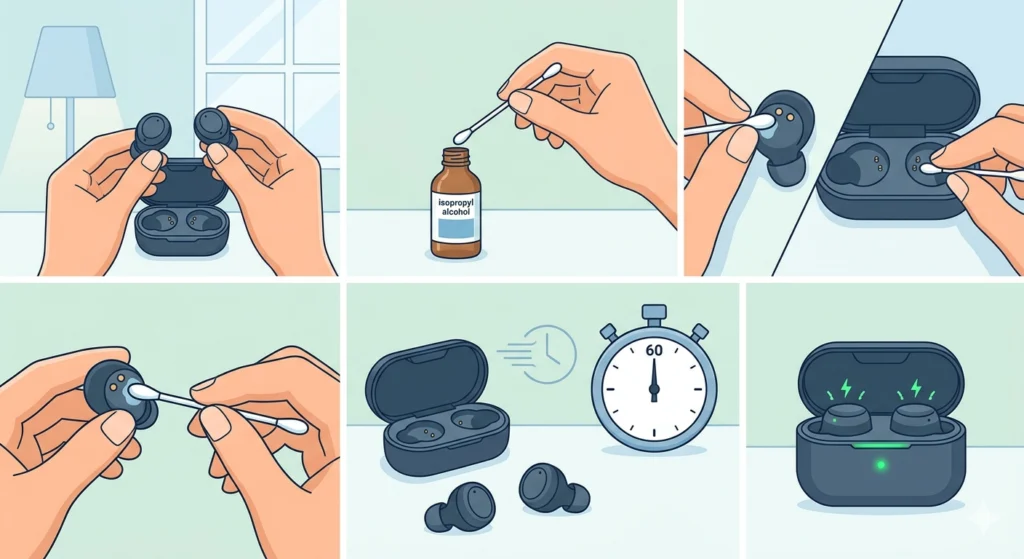
This is the first place to check. Earbuds sit inside pockets, bags, and cases all day, and tiny debris, earwax, and dust collect on the metal charging pins over time. Even a thin layer of buildup is enough to create resistance and slow the charge dramatically.
- Step 1: Take the earbuds out of the case and inspect the small metal contacts on both the earbuds and inside the charging case under good lighting.
- Step 2: Dampen a cotton swab lightly with isopropyl alcohol (70% or higher works best).
- Step 3: Gently rub the swab over each contact point on the earbuds and the corresponding pins inside the case.
- Step 4: Let everything dry completely for at least 60 seconds before placing the earbuds back in the case.
- Step 5: Close the lid and check if the charging indicator lights up properly and more quickly than before.
Most people find this single fix solves the slow charging problem entirely. The key is using a dry, lint-free cloth or cotton swab – never anything wet enough to drip liquid into the case.
Fix 2: Use the Original Charger and Cable
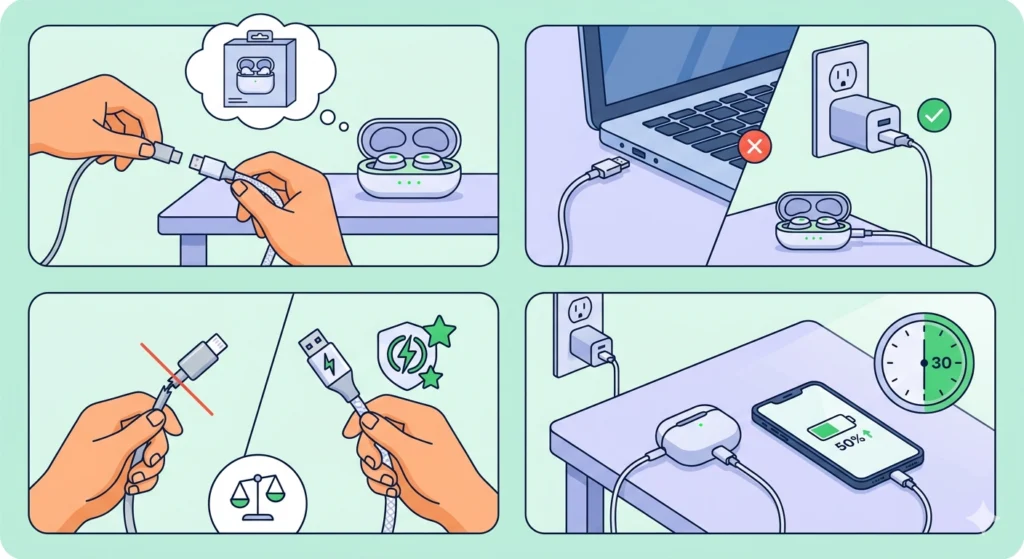
Third-party cables and adapters are convenient but they are not always built to the same standard as the original. A cable with a slightly damaged wire, a cheap USB adapter, or a power brick that outputs lower wattage than required will all result in slow or inconsistent charging.
- Step 1: Swap out the current cable for the original cable that came in the box with the earbuds.
- Step 2: Plug into a direct wall adapter rather than a USB port on a laptop or monitor – these often deliver much less power.
- Step 3: If the original cable is no longer available, choose a certified replacement cable (USB-IF certified for USB-C, or MFi certified for Lightning).
- Step 4: Charge for 30 minutes and compare the battery percentage to what it was before to gauge whether speed has improved.
Pro-Tip: Avoid charging earbuds through a USB hub, car charger, or portable power bank unless the output specs match the manufacturer’s recommended wattage. These sources frequently deliver unstable or lower-than-rated power, which is a common but overlooked cause of slow earbud charging.
Fix 3: Charge the Case Itself First
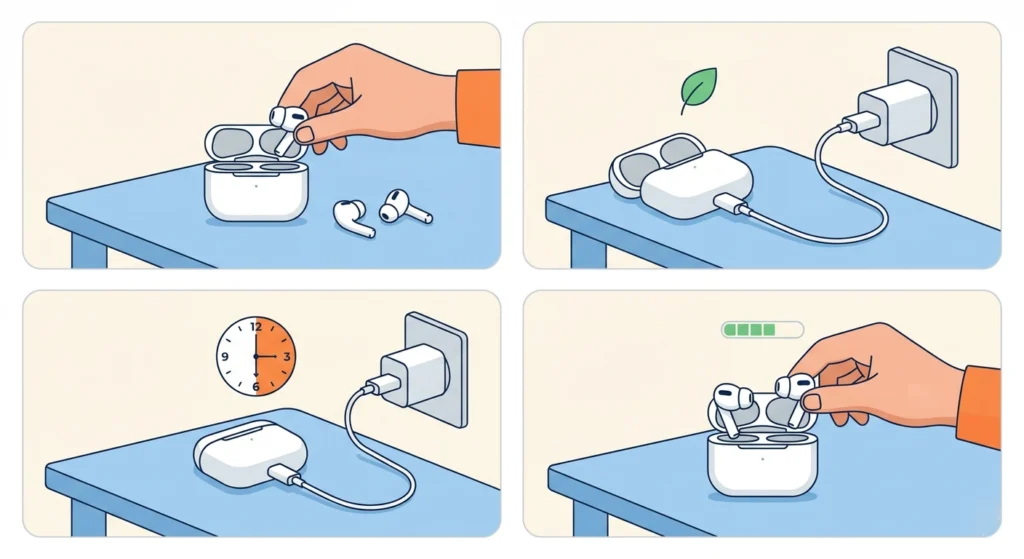
The charging case needs its own battery to pass power to the earbuds. If the case is low or critically drained, it cannot deliver enough current to charge the earbuds at normal speed – or at all. This is an easy step to overlook because the case can look fine externally.
- Step 1: Remove the earbuds from the case and set them aside.
- Step 2: Connect the case to power using the original cable and a reliable wall adapter.
- Step 3: Let the case charge on its own for at least 30 to 60 minutes without the earbuds inside.
- Step 4: Once the case indicator shows a sufficient charge level, place the earbuds back inside and monitor whether they charge faster.
Fix 4: Check for Firmware Updates
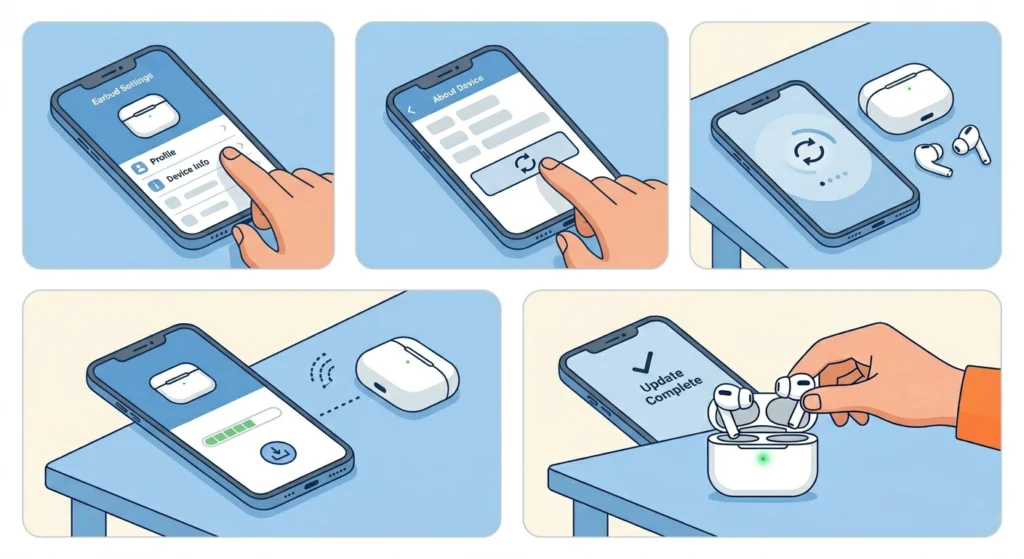
Manufacturers regularly push firmware updates that include bug fixes, and charging performance issues are among the problems these updates address. Running outdated firmware means the earbuds may be operating with known bugs that affect battery management.
- Step 1: Open the companion app for the earbuds on a smartphone (for example, Galaxy Wearable for Samsung, Sony Headphones Connect for Sony, or the Jabra Sound+ app).
- Step 2: Navigate to the device settings or ‘About’ section within the app.
- Step 3: Look for a ‘Firmware Update’ or ‘Software Update’ option and tap it.
- Step 4: If an update is available, follow the on-screen steps to install it. Keep the earbuds in the case and near the phone during this process.
- Step 5: After the update completes, place the earbuds back in the case and test charging speed again.
Fix 5: Reset the Earbuds
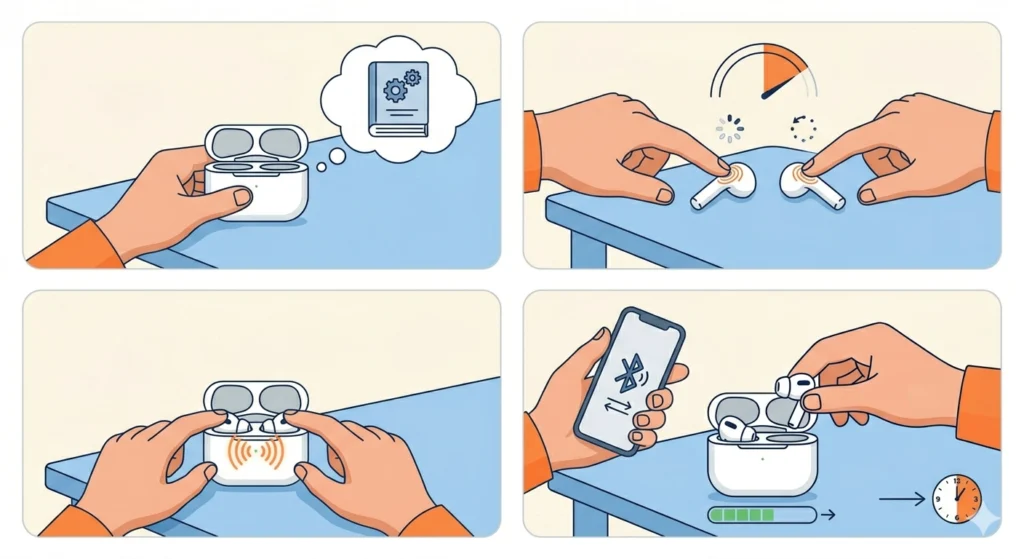
A factory reset clears out any software state that may be interfering with charging behavior. This works similarly to restarting a phone when it behaves unexpectedly – the reset forces the earbuds back to a clean, default state where charging should work as intended. If there have been any Bluetooth pairing issues alongside charging problems, a reset resolves both at once.
- Step 1: Check the user manual or manufacturer website for the exact reset method for the specific earbud model, as this varies between brands.
- Step 2: Common reset methods involve holding the touch controls or physical buttons on both earbuds simultaneously for 5 to 10 seconds until the LED flashes a specific pattern.
- Step 3: Some models require placing the earbuds in the case with the lid open while performing the reset – refer to the product documentation to confirm.
- Step 4: After the reset completes, re-pair the earbuds with the device and then place them back in the case to charge.
- Step 5: Monitor the charging progress over the next hour to see if the speed has returned to normal.
Fix 6: Avoid Extreme Temperatures While Charging
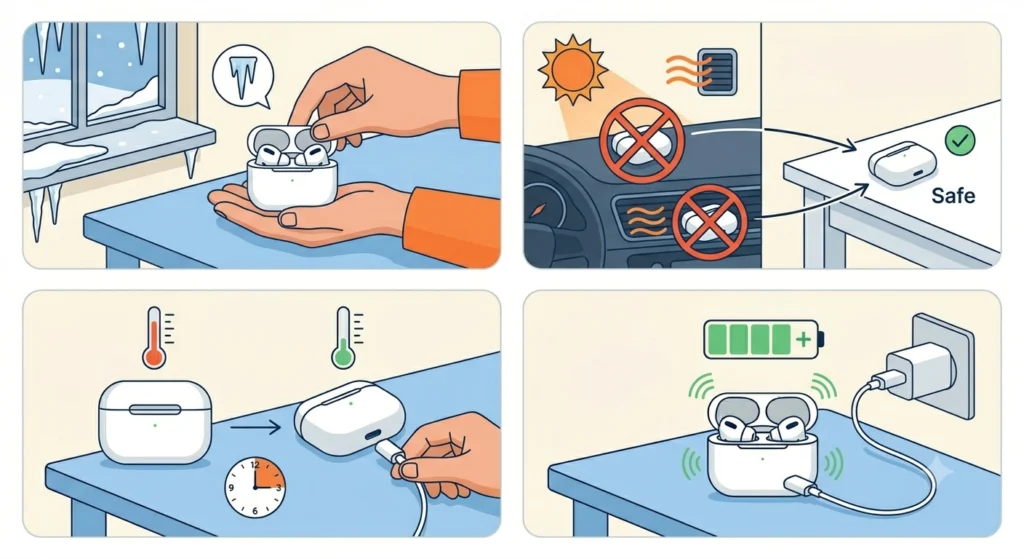
Lithium batteries have a built-in thermal protection system. When the temperature is too hot or too cold, the battery management system automatically reduces charging current to prevent damage. This is not a malfunction – it is a safety feature. However, it does cause charging to feel unusually slow.
- Step 1: Move the charging case to a room-temperature environment, ideally between 15 degrees and 25 degrees Celsius (59 to 77 degrees Fahrenheit).
- Step 2: Avoid charging on surfaces that retain heat, such as car dashboards, windowsills in direct sunlight, or near heating vents.
- Step 3: If the case feels warm to the touch, let it cool down for 10 to 15 minutes before reconnecting to power.
- Step 4: Once at a stable temperature, resume charging and observe whether the speed returns to normal.
Pro-Tip: Never leave earbuds charging in a hot car or in direct sunlight. Repeated exposure to high temperatures during charging shortens battery lifespan significantly over time, eventually causing permanent capacity loss that no fix can reverse.
Fix 7: Inspect the Charging Port on the Case
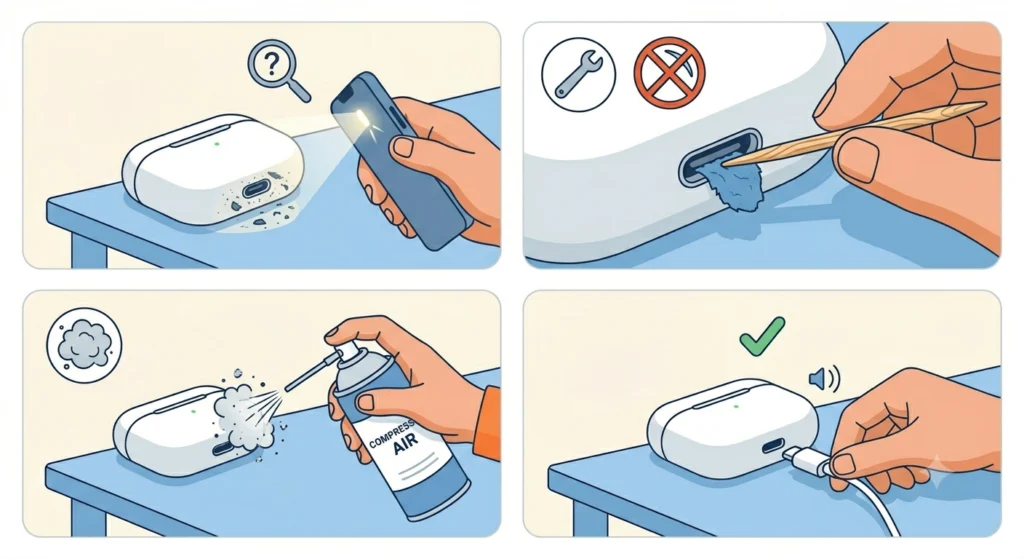
The charging port on the case collects lint and debris just like any USB port on a phone or laptop. A clogged port creates a poor electrical connection, which limits the amount of power that flows into the case and eventually slows earbud charging.
- Step 1: Use a flashlight or the torch on a phone to inspect the USB-C or Lightning port on the bottom of the case.
- Step 2: If debris is visible, use a dry wooden toothpick or a purpose-made port cleaning tool to carefully remove it. Avoid metal objects that can scratch or damage the port contacts.
- Step 3: Use a can of compressed air to blow out any remaining dust if available.
- Step 4: Reconnect the cable firmly and make sure it clicks or seats properly into the port.
Tips to Keep Earbuds Charging at Full Speed
- Store earbuds in the case when not in use to prevent contact corrosion from moisture and air exposure
- Wipe down the charging contacts with a dry cloth every couple of weeks as part of regular maintenance
- Only charge the case with a wall adapter that matches the manufacturer’s output specification
- Keep firmware updated through the companion app whenever new versions become available
- Avoid draining the case battery to zero regularly – lithium batteries prefer partial charge cycles over complete discharge
- If the earbuds or case get wet, dry them thoroughly before attempting to charge
Common Problems That Cause Slow Earbud Charging
- Dirty contacts: The most frequent cause – oxidation and debris on the metal pins reduce conductivity
- Low-quality or damaged cable: Worn cables, especially at the connector end, create resistance that limits current flow
- Depleted charging case: A nearly dead case cannot supply adequate current to the earbuds
- Firmware bugs: Software glitches in the battery management system cause erratic or slow charging behavior
- Temperature extremes: Both heat and cold trigger the battery protection system, reducing charge rate
- Clogged charging port: Lint inside the case’s USB port prevents a solid cable connection
- Battery age: Lithium batteries degrade after 300 to 500 full charge cycles, naturally slowing charge acceptance over time
- Incorrect seating: Earbuds not sitting flush inside the case do not make full contact with the charging pins
For users experiencing audio issues alongside charging problems – such as devices that are not being detected or recognized correctly – checking the microphone detection settings on Windows 11 can sometimes reveal a broader connection issue with the device that is worth ruling out.
Frequently Asked Questions
Why are earbuds charging slower than normal all of a sudden?
Sudden slow charging usually points to dirty charging contacts, a cable that has started to fail, or a firmware bug introduced by a recent update. Start by cleaning the metal pins on the earbuds and inside the case with a cotton swab and isopropyl alcohol, then test with a different cable before investigating further.
How long should earbuds take to fully charge?
Most earbuds take between 1 and 2 hours to charge from empty to full. The charging case itself typically takes 1 to 3 hours depending on its battery capacity. If charging takes significantly longer than what is listed in the product manual, something is interfering with normal charging speed.
Can a bad cable really slow down earbud charging?
Absolutely. Cables with internal wire damage, poor-quality connectors, or non-compliant materials restrict how much current flows through them. Even a cable that looks fine externally can have internal damage near the connector that limits performance. Swapping to the original cable is one of the quickest fixes to test.
Does temperature affect how fast earbuds charge?
Yes, and it is by design. Lithium battery management systems reduce charging current in extreme heat or cold to protect battery health. Charging in temperatures above 35 degrees Celsius or below 10 degrees Celsius will noticeably slow things down. Moving to room temperature resolves this quickly.
Will resetting earbuds delete anything?
A factory reset clears the pairing history and any custom settings such as equalizer preferences or touch control configurations. It does not affect the music or files on the connected device. After a reset, the earbuds simply need to be re-paired with the phone or computer.
How often should charging contacts be cleaned?
A light cleaning every two to four weeks is a good habit, especially for earbuds used during workouts where sweat exposure is higher. If the earbuds are used daily in dusty or humid environments, more frequent cleaning keeps contact resistance low and charging performance consistent.
What if the charging case is not charging the earbuds at all?
If there is no charging activity at all rather than just slow charging, check that the case itself has power by plugging it in and watching for indicator lights. Also confirm the earbuds are seated correctly and that the contacts are clean. If the issue persists after these checks, a hardware fault in the case or the earbuds may require manufacturer support.
Can firmware updates really fix a charging problem?
Yes. Battery management is software-controlled on modern earbuds, and bugs in the firmware can cause the charging circuit to behave incorrectly. Manufacturers release firmware patches specifically for charging and battery issues. Keeping the firmware current is both a fix and a preventive measure.
Is it bad to leave earbuds in the charging case all the time?
Modern earbuds and their cases have overcharge protection, so leaving them in the case is generally safe. However, lithium batteries prefer to stay between 20% and 80% charge for long-term health. Constantly topping off to 100% and letting them drain to zero repeatedly will degrade battery capacity faster over time.
When should earbuds be sent in for repair due to slow charging?
If all the fixes above have been tried – clean contacts, new cable, firmware update, full reset, proper temperature – and the earbuds still charge unusually slowly, the battery inside the earbuds or case may have degraded beyond normal use. Most manufacturers offer battery replacement or warranty repair for this type of issue. Check the warranty terms and contact customer support with documentation of the troubleshooting steps already completed.