
JLab Go Air Pop earbuds not charging is one of the most common issues users run into – and the good news is that most of the time, it is fixable without any special tools or technical know-how. Whether the earbuds are not charging at all, the case is not holding a charge, or the LED indicators are behaving strangely, this guide walks through every proven fix in a clear, step-by-step format.
Quick Summary: Key Takeaways
- Dirty charging contacts are the number one reason JLab Go Air Pop earbuds stop charging – always clean them first.
- The USB cable or charging adapter is often the culprit, not the earbuds themselves.
- Earbuds must be properly seated in the case for charging to begin.
- A full reset can resolve firmware-related charging glitches.
- If nothing works, JLab offers a 2-year warranty that covers manufacturing defects.
How to Fix JLab Go Air Pop Earbuds Not Charging
Fix 1: Clean the Charging Contacts
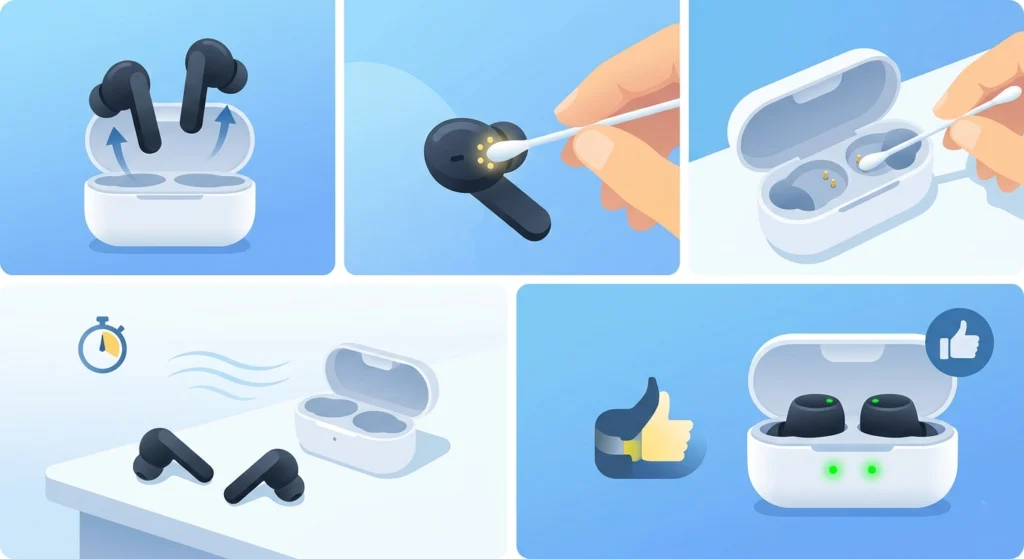
Dirty or corroded charging contacts are the most overlooked cause of charging failures. Even a thin layer of earwax, dust, or skin oil on the metal pins can interrupt the connection completely.
- Step 1: Remove both earbuds from the charging case.
- Step 2: Use a dry cotton swab or a soft, lint-free cloth to gently wipe the metal charging pins on each earbud.
- Step 3: Clean the corresponding charging contacts inside the case using the same method.
- Step 4: Let everything dry for about 30 seconds before placing the earbuds back in the case.
- Step 5: Check whether the LED indicators light up, which confirms charging has resumed.
This single step resolves the issue for the majority of users. The key is to be thorough – even a small amount of debris on one pin can stop charging entirely.
Fix 2: Check the USB Cable and Charging Adapter
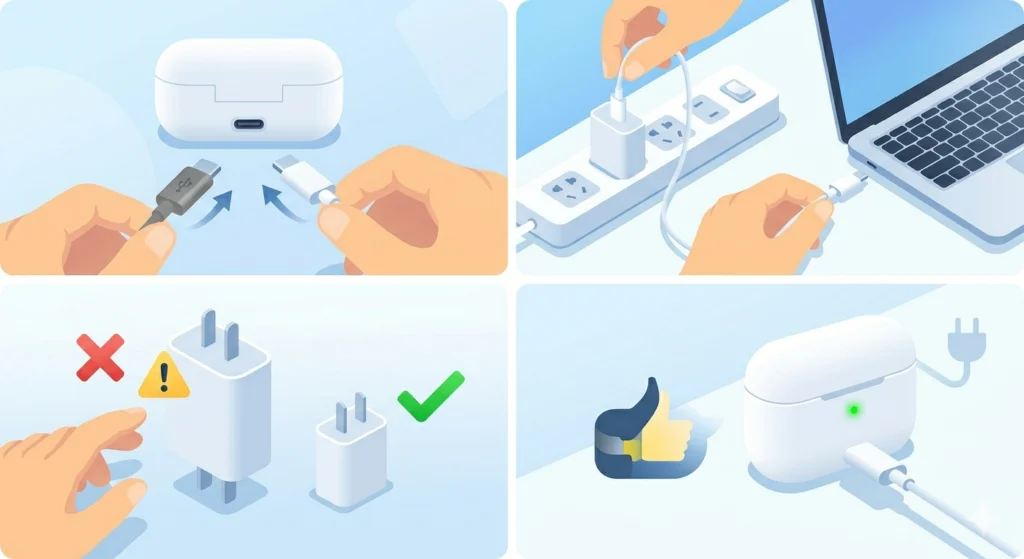
A faulty USB-C cable or a weak charging adapter is another leading cause that is easy to miss. The cable might look fine on the outside but have a damaged internal wire.
- Step 1: Swap the current USB-C cable for a different, known-working one.
- Step 2: Try plugging into a different power adapter or USB port on a computer.
- Step 3: Avoid using fast-charging bricks above 5V/1A for the Go Air Pop case, as some high-wattage adapters can cause issues.
- Step 4: Confirm the LED on the charging case lights up when connected to power.
Most people find that switching to a different cable is all it takes. It is one of those fixes that sounds too simple to work, but it solves the problem surprisingly often.
Fix 3: Reseat the Earbuds Properly in the Case
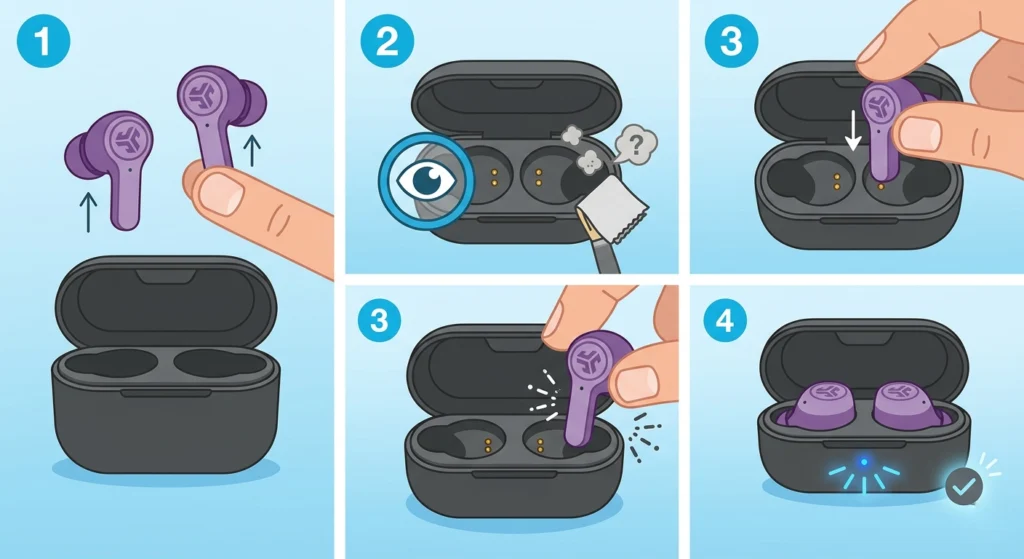
The JLab Go Air Pop earbuds need to sit perfectly in the case for the charging pins to make contact. Even a slight misalignment can prevent charging from starting.
- Step 1: Remove both earbuds from the case completely.
- Step 2: Inspect the earbud slots for any debris or foreign objects that might be blocking proper seating.
- Step 3: Place each earbud back firmly until they click or sit flush inside the case.
- Step 4: The LED lights should illuminate within a few seconds if the connection is good.
This works best when done slowly and deliberately. Rushing the placement often results in the earbuds sitting at a slight angle, which is enough to break the contact.
Pro Tip: After seating the earbuds, gently press down on each one for two to three seconds. This extra pressure ensures the metal pins are fully engaged with the charging contacts inside the case.
Fix 4: Reset the JLab Go Air Pop Earbuds
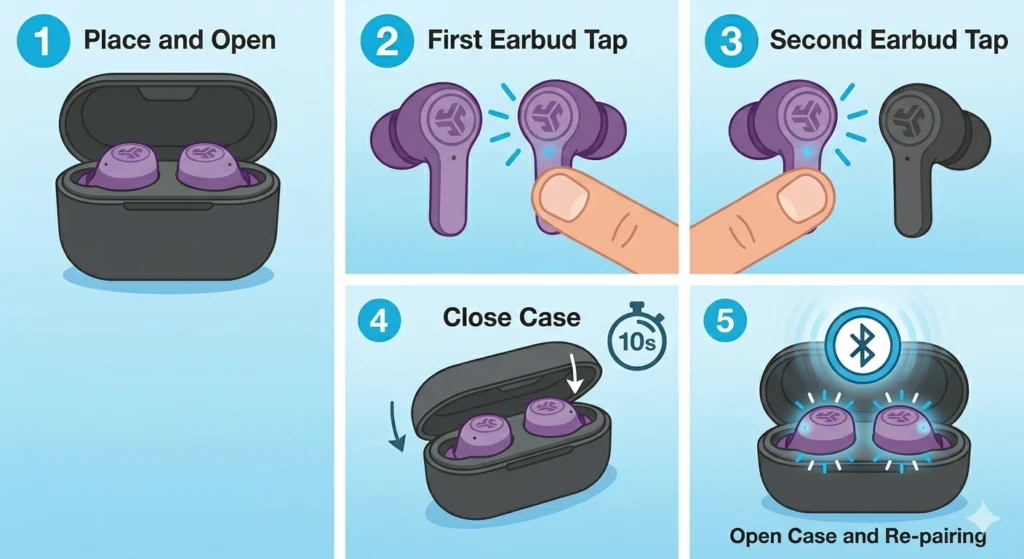
A firmware glitch or sync error can sometimes cause the earbuds to behave as if they are not charging even when the hardware is fine. Performing a factory reset clears this.
- Step 1: Place both earbuds inside the charging case and leave the lid open.
- Step 2: Quickly tap the button on one earbud 4 times. The earbud will flash blue 4 times and then turn off.
- Step 3: Repeat on the other earbud.
- Step 4: Close the case and wait for about 10 seconds.
- Step 5: Open the case – the earbuds should now be reset and re-pairing mode will activate automatically.
After the reset, check if the charging indicators behave normally. This step also helps if the earbuds have lost their stereo sync and need to be re-paired after the fix.
Fix 5: Charge the Case Itself First
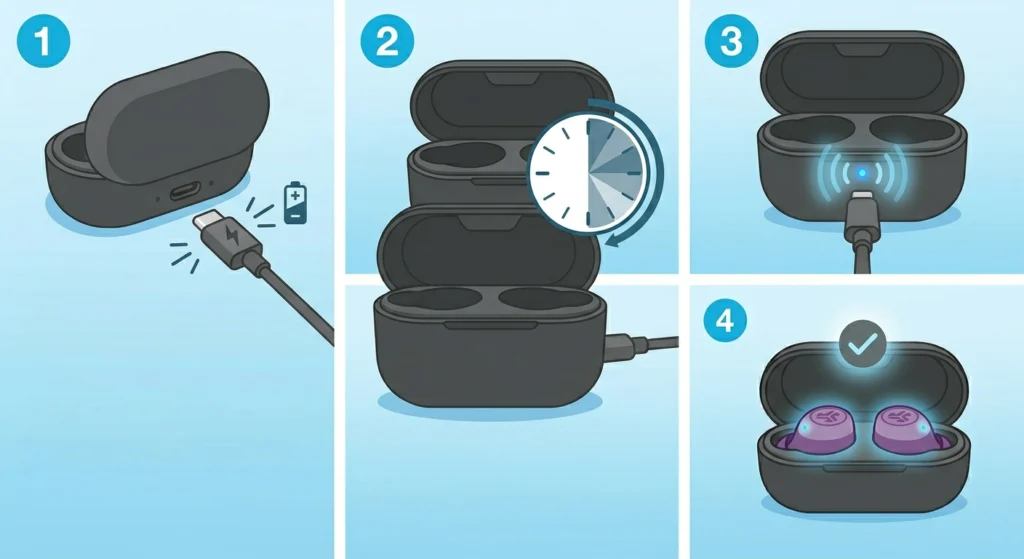
It is easy to assume the case is charged when it actually is not. If the case battery is fully depleted, it cannot charge the earbuds regardless of how well they are seated.
- Step 1: Connect the charging case to a power source using the USB-C cable.
- Step 2: Allow the case to charge for at least 30 to 60 minutes before placing the earbuds inside.
- Step 3: The LED on the case should light up while it is receiving power. A solid or pulsing light indicates active charging.
- Step 4: Once the case has some charge, place the earbuds inside and verify they begin charging.
Fix 6: Let Deeply Discharged Earbuds Recover
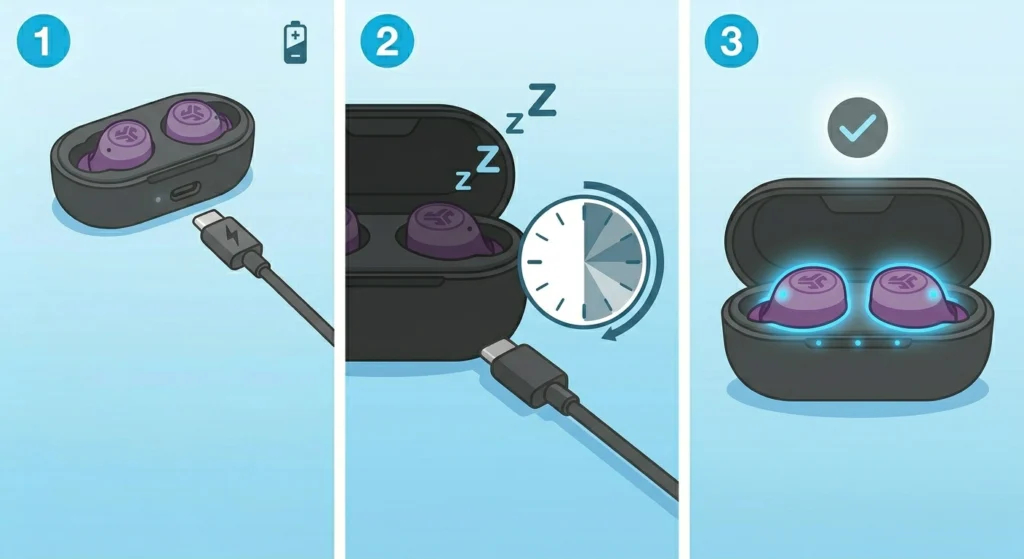
If the JLab Go Air Pop earbuds have been left uncharged for weeks or months, the battery may be in a deep discharge state. In this condition, they will not show any charging indicator right away.
- Step 1: Place the earbuds in the case and plug the case into a power source.
- Step 2: Leave them undisturbed for 30 to 60 minutes without checking.
- Step 3: After the recovery period, check if the LED indicators light up.
Lithium-ion batteries in a deep discharge state take time to recover. The key is patience – the charging light may not appear for the first 15 to 20 minutes.
Pro Tip: Avoid letting the JLab Go Air Pop battery fully drain regularly. Storing them in the case with at least 20 to 30% charge prevents deep discharge and extends overall battery lifespan significantly.
Fix 7: Update the JLab App and Firmware
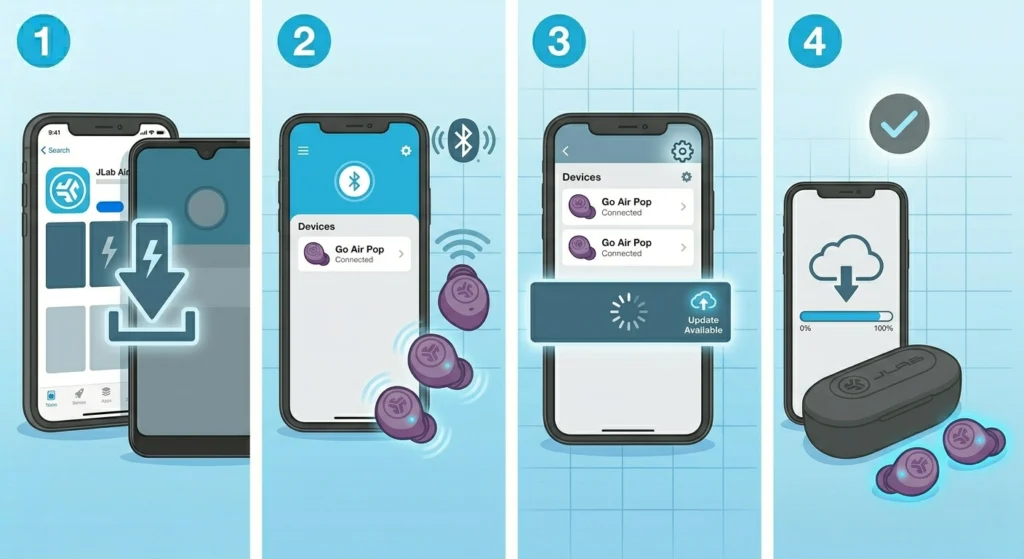
Outdated firmware can occasionally cause charging behavior to malfunction. JLab releases periodic updates through the JLab Air app.
- Step 1: Download the JLab Air app from the App Store or Google Play if it is not already installed.
- Step 2: Open the app and connect the Go Air Pop earbuds.
- Step 3: Navigate to the device settings and check for available firmware updates.
- Step 4: Install any pending updates and restart the earbuds afterward.
Tips to Keep JLab Go Air Pop Charging Properly
- Clean the charging contacts once every two weeks, especially if the earbuds are used during workouts.
- Store the earbuds in the case with the lid closed to protect the charging pins from dust and moisture.
- Always use a 5V/1A adapter – high-voltage chargers designed for phones can interfere with the case charging circuit.
- Avoid exposing the charging case to extreme heat or cold, as temperature affects lithium-ion battery performance.
- Do not leave the earbuds unused and uncharged for more than two to three weeks.
Common Charging Problems and Solutions
Earbuds Not Charging but Case is Charging
This usually points to dirty earbud pins or improper seating. Go back to Fix 1 and Fix 3. If that does not resolve it, perform the reset in Fix 4.
Case Not Charging at All
Try a different USB-C cable and adapter first. If the case still does not charge, inspect the USB-C port on the case for debris. Use a toothpick or compressed air to clear any blockage.
One Earbud Charging, the Other Not
This is almost always a contact issue on the non-charging side. Clean that specific earbud’s pins thoroughly and make sure it seats correctly. If the problem persists, performing a reset (Fix 4) re-syncs both earbuds and often resolves one-sided charging failures.
LED Flashing but No Charge Increase
A flashing LED that never progresses can indicate a low or failing battery cell. Try the deep discharge recovery method in Fix 6. If the battery does not recover after an hour of connected charging, the earbud battery may need replacement or the unit qualifies for warranty service.
Earbuds Draining Fast After Charging
Fast battery drain after a full charge usually means the battery health has degraded. This is normal after 300 to 500 full charge cycles. If the earbuds are relatively new and this happens, a firmware update (Fix 7) may address battery calibration issues.
Frequently Asked Questions
Why are my JLab Go Air Pop earbuds not charging in the case?
The most common reason is dirty charging contacts on either the earbuds or inside the case. Other causes include improper seating, a drained case battery, or a faulty charging cable. Start by cleaning the contacts and reseating the earbuds firmly.
How do I know if my JLab Go Air Pop earbuds are charging?
When the earbuds are properly charging inside the case, the LED indicator on each earbud slot will illuminate. The case itself also shows an LED indicator that reflects its current battery level.
How long does it take to fully charge JLab Go Air Pop earbuds?
The earbuds take approximately 2 hours to fully charge from empty. The charging case takes around 2 to 3 hours to fully charge. Once full, the earbuds provide up to 8 hours of playback, and the case extends total listening time to 32 hours.
Can I use any USB-C cable to charge the JLab Go Air Pop case?
Any standard USB-C cable should work, but it is best to use the original cable that came with the earbuds. If using a third-party cable, make sure it supports data and charging (not a charge-only cable). Avoid using cables from fast-charging kits rated above 18W.
Why does only one JLab Go Air Pop earbud charge?
When only one earbud charges, the issue is usually specific to the non-charging earbud’s contacts or its position in the case. Clean the pins on that earbud and make sure it clicks into place. If the problem continues, perform a full reset to resync both earbuds.
How do I reset JLab Go Air Pop earbuds?
Place both earbuds in the open case, then tap the button on each earbud 4 times quickly. Each earbud will flash blue 4 times and power off. Close the lid, wait 10 seconds, then reopen. The earbuds will boot fresh in pairing mode.
Why are my JLab Go Air Pop earbuds not holding a charge anymore?
Battery capacity naturally decreases over time with regular use. After 300 to 500 charge cycles, it is normal to notice reduced battery life. If this happens early, check for firmware updates through the JLab Air app, as updates sometimes include battery optimization improvements.
Can moisture or sweat damage the charging contacts on JLab Go Air Pop?
Yes. While the Go Air Pop earbuds are sweat-resistant (IP33 rated), moisture can still accumulate on the charging contacts over time. After sweaty workouts, wipe down the earbuds and let them air out for a few minutes before placing them back in the case.
What should I do if none of the fixes work?
If all fixes have been tried and the earbuds still refuse to charge, contact JLab Support directly at jlab.com. JLab offers a 2-year warranty on the Go Air Pop earbuds, and charging failures caused by manufacturing defects are typically covered for a free replacement.
Is there a way to charge JLab Go Air Pop earbuds without the case?
No. The JLab Go Air Pop earbuds do not support direct charging via cable – they charge exclusively through the case. If the case is damaged or broken, a replacement case may be available through JLab’s support or accessory store.