
Key Takeaways
- Debris or earwax buildup inside the charging case is the most common reason earbuds won’t seat properly.
- Wrong or swollen eartips prevent the earbuds from fitting flush into their slots.
- Damaged or bent charging pins can stop earbuds from seating correctly.
- Replacing the eartips or cleaning the case thoroughly resolves the issue in most situations.
- Physical damage to the earbud shell may require manufacturer support or replacement.
Earbuds not fitting in the charging case is one of the most frustrating problems any wireless earbud owner can run into. The earbud just does not click in, sits at an odd angle, or refuses to charge even when placed inside. Before assuming the worst, the good news is that this is almost always fixable at home with a few careful steps. The key is to identify exactly what is causing the poor fit – then apply the right fix.
How to Fix Earbuds That Don’t Fit in the Charging Case
Fix 1: Clean Debris and Buildup from the Charging Case Slots
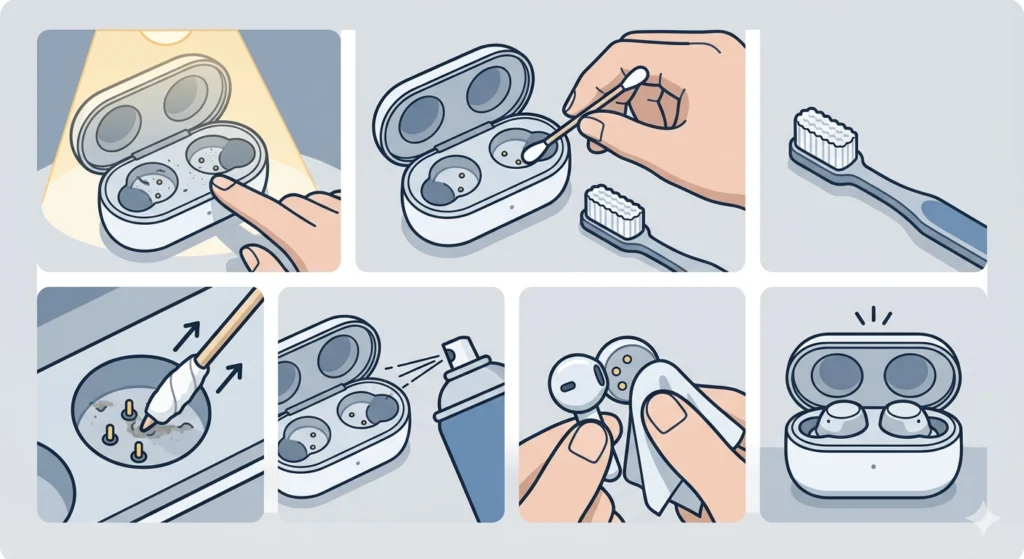
This is the first thing to check. Lint, earwax, dust, and skin oils accumulate inside the charging slots over time. Even a tiny amount of debris can raise the earbud just enough to break contact with the charging pins.
- Step 1: Open the charging case and inspect each slot under good lighting or use a flashlight.
- Step 2: Use a dry, soft-bristle toothbrush or a clean, dry cotton swab to gently brush out visible debris from the slot walls and bottom.
- Step 3: For stubborn buildup around the charging pins, wrap a toothpick lightly with a dry cotton swab tip and carefully dislodge the residue without bending the pins.
- Step 4: Blow gently into the slot or use a can of compressed air held at a distance to remove loosened particles.
- Step 5: Wipe the outside edges of the charging contacts on the earbuds themselves using a dry microfiber cloth.
- Step 6: Place the earbuds back into the case and check if they sit flush and snap into place.
Most people find that a thorough cleaning alone solves the problem, especially with earbuds that have been used daily for several months.
Pro-Tip: Never use rubbing alcohol directly inside the charging slot. A tiny amount on a cotton swab tip is acceptable for the contacts, but flooding the slot with liquid can corrode the pins or damage the internal circuitry permanently.
Fix 2: Remove and Check the Eartips
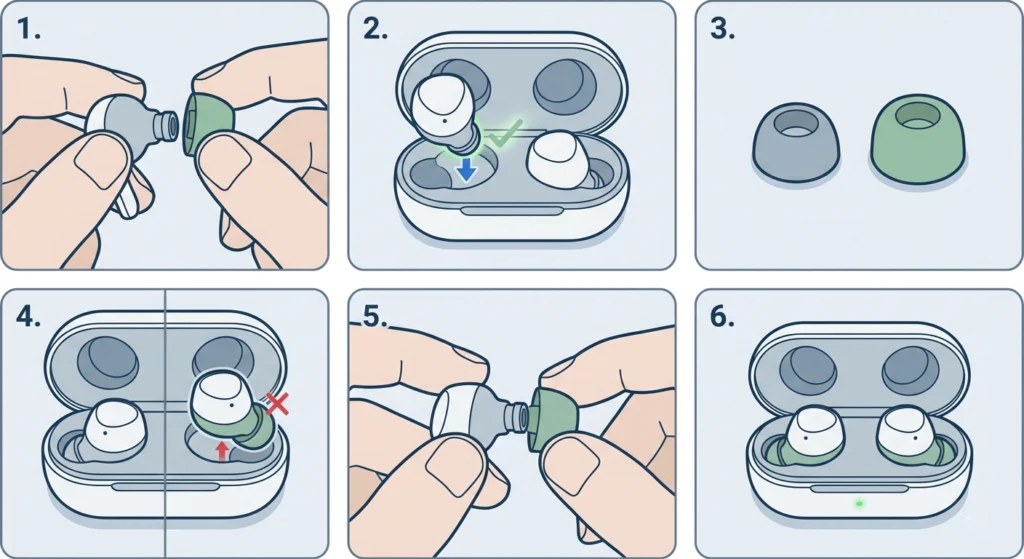
The silicone or foam eartips attached to the earbuds are often the real culprit. When eartips are the wrong size, have shifted, or are swollen from heat or moisture, they physically block the earbuds from dropping into their slots correctly.
- Step 1: Remove the eartips from both earbuds by gripping firmly at the base and pulling straight off.
- Step 2: Try placing the bare earbuds (without eartips) into the charging slots to test if they fit properly.
- Step 3: If the bare earbuds fit without any issue, the eartips are the cause. Compare the eartip size to the size listed in the original packaging.
- Step 4: If using third-party or aftermarket eartips, they may be slightly thicker or wider than the originals, causing a tight fit. Switch back to the stock eartips that came in the box.
- Step 5: Reattach the correct eartips, ensuring they are fully seated and the nozzle hole is not blocked or folded inward.
- Step 6: Place the earbuds back into the case and confirm a proper fit.
This works best when the earbuds have recently had their eartips changed or when someone has borrowed the earbuds and accidentally swapped tips between sides.
Fix 3: Inspect and Realign the Charging Pins
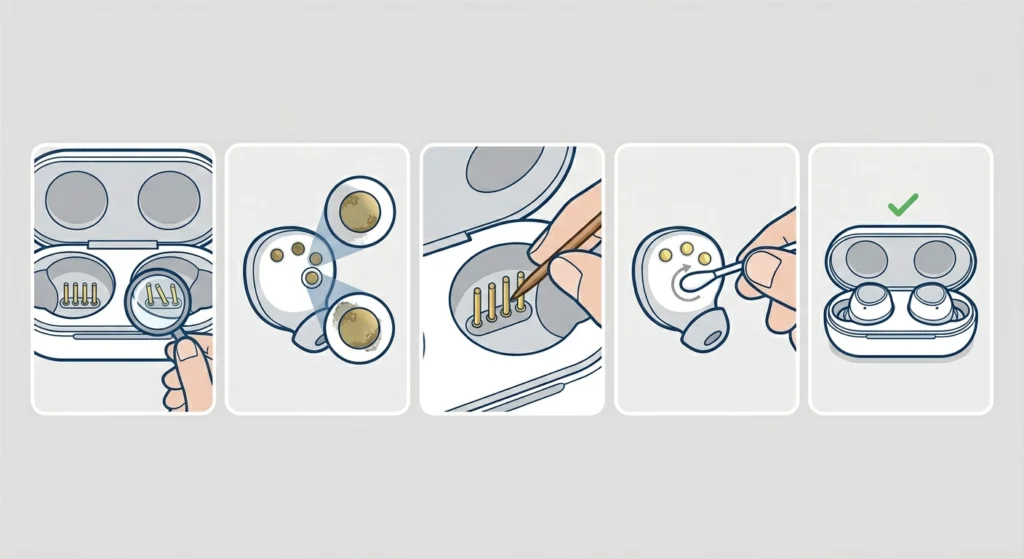
The small metal charging pins inside the case slots or on the earbuds themselves can get bent or pushed slightly off-center, especially if the earbuds were forced in at the wrong angle. Even a minor misalignment is enough to cause a seating problem.
- Step 1: With the case open, look closely at the charging pins at the bottom of each slot. They should be perfectly upright and evenly spaced.
- Step 2: Check the corresponding contacts on the bottom of each earbud for any visible bending, tarnish, or residue.
- Step 3: If a pin is very slightly bent outward or sideways, use a toothpick or the flat edge of a non-conductive tool (like a plastic spudger) to very gently guide it back toward the center. Apply minimal pressure – the pins are fragile.
- Step 4: Clean the contacts on the earbud body using a dry cotton swab to remove any oxidation or buildup that may be affecting the connection.
- Step 5: Test the fit again after any adjustments.
If the pins are severely bent or broken, this goes beyond a home fix. Contact the manufacturer for a case replacement.
Fix 4: Check for Earbud Shell Damage or Swelling
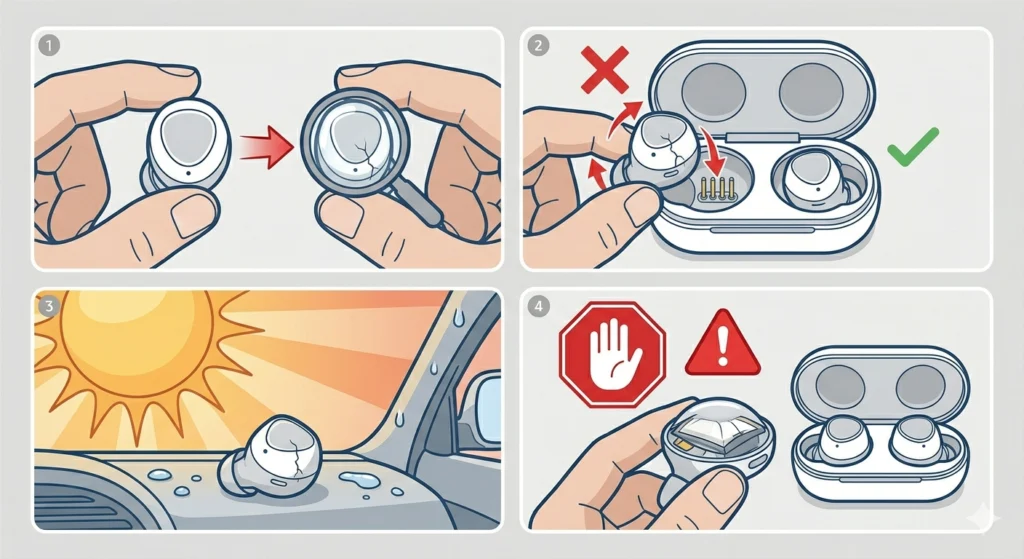
In rare cases, the earbud housing itself can warp slightly from heat exposure, moisture, or physical impact. This changes the shape just enough that the earbud no longer matches the contour of its slot.
- Step 1: Compare both earbuds side by side. If one looks slightly larger, more rounded, or has any cracks, the shell may be warped or damaged.
- Step 2: Test each earbud in both slots. If the problematic earbud does not fit in either slot but the working earbud fits in both, the issue is with the earbud body.
- Step 3: Check if the device has been stored in a hot car, direct sunlight, or exposed to moisture for extended periods – these are the most common causes of housing warping.
- Step 4: If swelling is caused by a battery issue (the earbud feels firmer or slightly puffier than before), stop using it immediately. A swollen battery is a safety concern that requires professional evaluation or replacement through the manufacturer.
Pro-Tip: Always store earbuds in the case inside a bag or drawer away from direct heat. Leaving the case on a car dashboard or windowsill during summer months is one of the fastest ways to cause warping in both the earbuds and the case body.
Fix 5: Reset and Re-seat the Earbuds Correctly
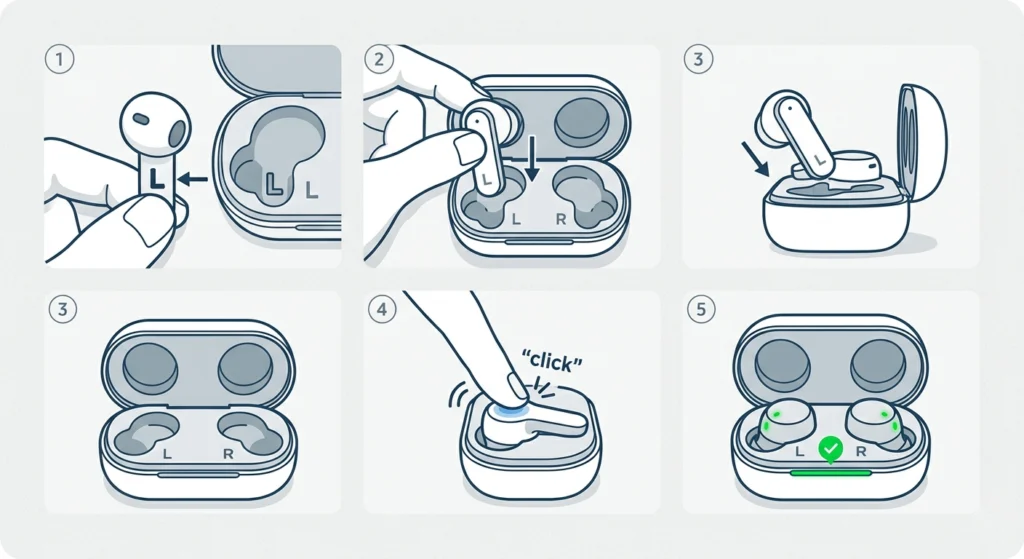
Sometimes the issue is simply improper placement technique. Each earbud is designed for a specific side and orientation – placing the left earbud in the right slot or inserting at the wrong angle can make it feel like they do not fit.
- Step 1: Look for L and R markings on both the earbuds and the inside of the case. These indicate left and right placements.
- Step 2: Orient each earbud so the stem or flat edge aligns with the matching direction of the slot.
- Step 3: Lower the earbud into the slot slowly, allowing the body to settle into the contoured cradle before pressing down.
- Step 4: Press gently but firmly until a small click is felt or heard. This click indicates the magnet has engaged and the earbud is correctly seated.
- Step 5: Confirm the charging light activates. If the LED on the earbud or case lights up, the fit is correct and charging has begun.
Tips for Keeping Earbuds Fitting Perfectly
- Clean the case slots and earbud contacts with a dry cotton swab at least once every two weeks.
- Always use the original eartips included with the earbuds for case compatibility.
- Avoid storing the case in extreme heat or humid environments like bathrooms or car dashboards.
- Handle the earbuds gently when placing them in the case – never force them in at an angle.
- If the case interior feels sticky from residue, clean with a slightly damp cloth and allow it to fully dry before use.
- Store the charging case in a protective pouch to prevent lint and debris from accumulating inside.
Common Problems and Troubleshooting
Earbuds Fit But Won’t Charge
If the earbuds seem to seat properly but are not charging, the issue is likely dirty or oxidized charging contacts rather than a fit problem. Clean both the case pins and the earbud contacts thoroughly. Also check if the case itself has charge – a completely drained case cannot charge the earbuds. If the issue persists and the earbuds also seem to have connectivity problems, reviewing a guide on re-pairing Bluetooth earbuds for stereo sound can help rule out connection-related issues after a reset.
Only One Earbud Fits, the Other Does Not
This almost always points to either swapped eartips (one side has a larger tip that prevents it from fitting) or debris concentrated in one slot. Clean the problematic slot thoroughly, check the eartips, and compare both slots side by side for any visible differences.
Earbud Clicks In But Pops Back Out
The magnet in the case slot may have weakened, or there is a foreign object sitting beneath the earbud that prevents it from dropping to the correct depth. Remove the earbud, inspect the slot floor closely, and clean any debris. If the magnet appears to be the issue, contact the manufacturer.
Case Lid Won’t Close With Earbuds Inside
This usually means the earbuds are sitting too high in the slots due to debris or incorrect eartip size. Thick aftermarket eartips in particular can raise the height of the earbud body just enough that the lid hits them. Remove the eartips, clean the slots, and confirm the earbuds drop to full depth before reassembling.
Frequently Asked Questions
Why do earbuds suddenly stop fitting in the charging case?
The most common reasons are debris buildup inside the case slots, eartips that have shifted or been replaced with incompatible sizes, or slight warping from heat exposure. Start by cleaning the case and checking the eartips before assuming physical damage.
Can I use any eartips with my earbuds or do they need to be specific?
Eartips need to match the nozzle size of the earbud, but they also need to be the correct thickness to allow the earbud to sit at the right depth in the case. Using third-party eartips that are thicker than the originals can prevent the earbuds from seating fully. Always test fit with eartips removed to confirm compatibility.
Is it safe to use a toothpick to clean charging pins?
Yes, a wooden or plastic toothpick is safe for cleaning around charging pins as long as it is used gently. Avoid metal tools, which can scratch contacts or bend pins. Never insert anything wet or conductive directly onto the pins.
What happens if I force the earbud into a misaligned slot?
Forcing an earbud can bend the charging pins, crack the earbud housing, or damage the contact points on the earbud itself. Always identify the cause before applying pressure. If there is resistance, stop and inspect rather than push harder.
Can heat damage cause earbuds to no longer fit?
Yes. Prolonged exposure to heat – such as leaving earbuds in a hot car or direct sunlight – can cause slight warping of both the earbud shell and the plastic case body. Once warped, the fit may be permanently affected. In some cases, heat also accelerates battery swelling, which changes the shape of the earbud body.
How do I know if the charging pins are bent?
Open the case and look directly into each slot under good lighting. The pins should stand perfectly straight and be evenly spaced. Any tilt, lean, or displacement compared to the other slot’s pins indicates bending. Very minor bends can sometimes be corrected carefully; severe bends require professional repair.
Will cleaning the contacts improve charging as well as fit?
Yes. Dirty or oxidized contacts affect both the physical connection and the electrical one. Regular cleaning ensures the earbuds seat at the correct depth and that charge transfers properly. This is one of the simplest forms of earbud maintenance and takes less than a minute.
My earbuds fit before but now one feels loose – what changed?
A loose fit usually means a magnet has weakened, debris is partially filling the slot, or the earbud’s outer surface has picked up a layer of residue that changes how it sits in the cradle. Clean both the earbud body and the slot thoroughly. If the magnet has visibly degraded, the case may need replacement.
Can moisture from sweat affect how earbuds fit in the case?
Moisture itself does not directly change fit, but over time sweat residue can accumulate on the earbud surface and inside the case slots, effectively thickening the contact area. This buildup can prevent the earbuds from dropping to their full seated depth. Regular cleaning after workouts prevents this issue.
When should the charging case be replaced instead of repaired?
If the case shows physical cracks, the slot walls are visibly deformed, the magnets no longer hold the earbuds, or the charging pins are broken rather than just bent, replacement is typically the better option. Contact the brand’s support team – many manufacturers offer case-only replacements at a lower cost than a full unit.