

The modern landscape of audio interfaces has become incredibly competitive, which benefits us as musicians and producers. Whether you’re a singer-songwriter capturing delicate acoustic performances or a producer layering synthesizers and virtual instruments, there’s an interface that fits both your technical requirements and budget. Let me walk you through five interfaces that have genuinely earned their place in studios worldwide, each bringing something distinct to the table.
| Interface | Key Features | Pros | Cons |
|---|---|---|---|
| Universal Audio Volt 276 | Vintage preamp mode, built-in 76 compressor, dual preamps, USB-powered portability | Pleasant analog coloration, onboard compression, excellent build, clean converters, portable | No MIDI I/O, only 2 inputs, vintage mode is subtle |
| Focusrite Scarlett 4i4 (4th Gen) | Air mode, 4 inputs/4 outputs, Auto Gain, Clip Safe, hybrid I/O for synths | Air adds musical clarity, extra inputs for growth, safety features prevent clipping, strong software bundle, reliable | Plastic build, small gain knobs, slight latency on direct monitoring |
| Audient iD14 MKII | Class-A console preamps, JFET DI, ScrollControl, dual headphone outputs | Console-quality sound, great DI for instruments, handy DAW control, strong build, powerful headphone amps | Requires external power, higher cost than entry-level options, no onboard DSP |
| PreSonus Studio 68c | 6 inputs, XMAX-L preamps, USB-C, advanced routing, Studio One Artist included | Flexible multi-mic recording, low latency, full DAW included, consistent preamps, strong routing options | Routing complexity, larger size, cramped front panel layout |
| MOTU M4 | ESS Sabre32 converters, LCD metering, 4 outputs, loopback, low latency | Excellent dynamic range, clear metering, great for plugin monitoring, expanded output routing, ideal for streaming | No DSP effects, software mixer learning curve, heavier metal chassis |
Universal Audio Volt 276
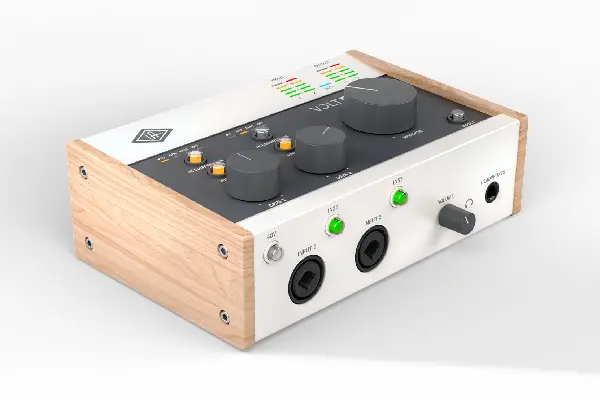
Universal Audio’s entry into the more affordable interface market surprised many of us who’ve long admired their high-end converters and premium preamps. The Volt 276 represents UA’s philosophy distilled into an accessible package, and after months of daily use, I can confidently say they’ve achieved something special here. The vintage preamp mode—inspired by UA’s legendary 610 tube preamp—adds a subtle harmonic richness that makes vocals sit beautifully in a mix without additional processing, something I noticed immediately when tracking a folk singer’s whisper-quiet verses.
The Volt 276’s dual preamps handle everything I’ve thrown at them, from ribbon microphones that need serious clean gain to hot line-level signals from synthesizers. One limitation worth noting is the lack of MIDI I/O, which might matter if you’re heavily into hardware synthesizers (though honestly, most modern controllers use USB anyway). For singer-songwriters, podcasters, and small production setups, this interface delivers professional results without the professional price tag that usually comes with the Universal Audio name.
Pros:
- Vintage preamp mode adds pleasing analog character to recordings
- Built-in 76 Compressor allows confident tracking decisions
- Substantial build quality with excellent tactile controls
- Clean, transparent converters suitable for critical listening
- Bus-powered operation for true portability
Cons:
- No MIDI connectivity for hardware synthesizer integration
- Only two inputs may limit multi-mic setups
- Vintage mode is subtle—those wanting dramatic coloration might want more
Focusrite Scarlett 4i4 (4th Generation)
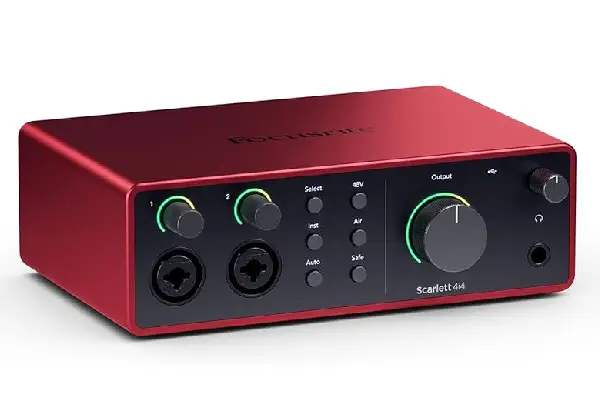
Focusrite’s Scarlett series has become almost synonymous with “first audio interface” for countless musicians, and there’s solid reasoning behind that reputation. The 4th generation 4i4 represents the refinement of years of user feedback, and having used previous Scarlett generations, the improvements here are immediately noticeable. The Air mode—which adds subtle high-frequency presence inspired by Focusrite’s ISA preamps—breathes life into recordings without sounding artificially boosted, something I particularly appreciated when recording acoustic guitar where you want that shimmer without harshness.
What sets the 4i4 apart from the basic 2i2 is the expandability that comes with those additional inputs and outputs. The two combo jack inputs on the front handle your primary microphones and instruments, while the rear panel offers two additional line inputs perfect for integrating hardware synthesizers or effects units. I’ve built complete hybrid setups around this interface, running software synthesizers through analog effects pedals and back into the DAW seamlessly. The monitor mix control with Auto Gain and Clip Safe features have saved me from numerous potential disasters during live streaming sessions where levels can fluctuate unpredictably (these features genuinely work as advertised, not just marketing fluff).
Pros:
- Air mode enhances recordings with musical high-frequency lift
- Four inputs accommodate growing recording needs
- Auto Gain and Clip Safe features prevent recording disasters
- Comprehensive software bundle adds immediate value
- Proven reliability across millions of units worldwide
Cons:
- Plastic construction feels less premium than metal alternatives
- Gain knobs are somewhat small for precise adjustments
- Direct monitoring can introduce slight latency with certain settings
Audient iD14 MKII
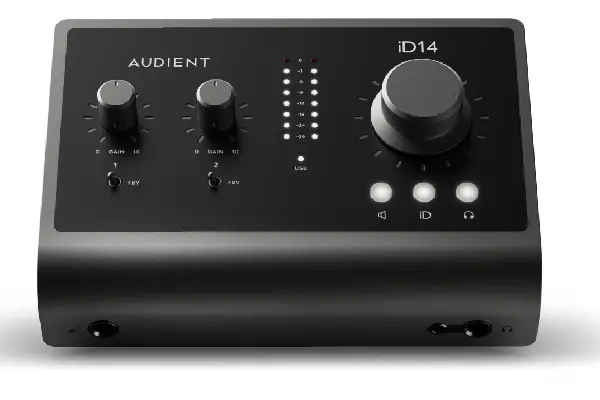
The Audient iD14 MKII occupies an interesting space in the interface market—it costs more than entry-level options but delivers performance that rivals interfaces twice its price. Audient’s heritage in console manufacturing shows throughout this design, particularly in those Class-A microphone preamps that sound remarkably similar to their console counterparts. When I first tracked a ribbon microphone through the iD14, I was genuinely surprised by the depth and dimension in the low-end response—this interface doesn’t compress or squash the life out of your source material.
Build quality here is exceptional, with a solid metal chassis that barely registers desk vibrations and controls that feel like they’ll survive years of daily use. The dual headphone outputs with independent level controls have proven invaluable when recording with collaborators—no more fumbling with Y-splitters or external headphone amps. My only real criticism is that the iD14 requires an external power supply (it’s not bus-powered), which slightly diminishes its portability compared to smaller interfaces, though the tradeoff comes in the form of those powerful, clean preamps that demand more current than USB alone can provide.
Pros:
- Class-A preamps deliver console-quality sound character
- Exceptional JFET instrument input for direct recording
- ScrollControl adds intuitive DAW control functionality
- Dual independent headphone outputs with serious power
- Rugged metal construction built for long-term reliability
Cons:
- Requires external power adapter (not bus-powered)
- Higher price point than similarly-featured competitors
- No onboard DSP effects or processing
PreSonus Studio 68c
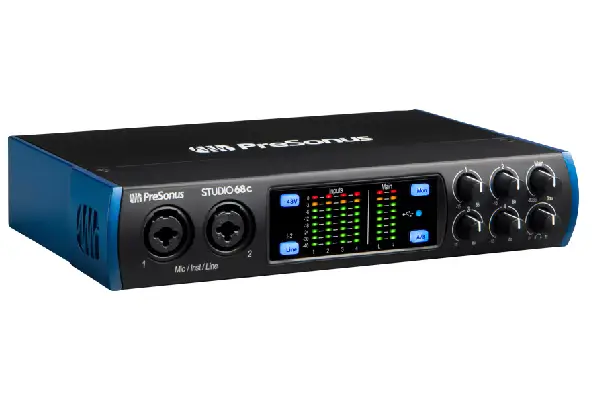
PreSonus has quietly built a reputation for delivering feature-packed interfaces at competitive prices, and the Studio 68c exemplifies this approach perfectly. Six inputs—four mic/line combo jacks on the front and two additional rear inputs—provide genuine flexibility for capturing full band rehearsals or complex multi-mic setups without resorting to additional preamp expanders. I’ve recorded four-piece bands live in a single room with this interface, using the remaining inputs for room mics, and the preamps maintained consistency across all channels without introducing noticeable noise or coloration differences.
PreSonus bundles the Studio 68c with Studio One Artist, their full-featured DAW, which represents serious added value if you’re just establishing your production setup. Unlike some bundled software that feels intentionally limited, Studio One Artist handles professional recording workflows without artificial restrictions that force upgrades. The built-in analog mixer functionality lets you create zero-latency monitor mixes using the front panel controls, though I’ll admit the learning curve here is steeper than more straightforward interfaces—plan to spend time with the manual to unlock the full routing potential. If you’re exploring various instruments for your recordings, having six simultaneous inputs opens creative possibilities that dual-input interfaces simply can’t match.
Pros:
- Six inputs accommodate complex multi-microphone recording setups
- USB-C connectivity delivers lower latency performance
- Studio One Artist DAW included provides immediate production capability
- Consistent XMAX-L preamps across all channels
- Comprehensive routing options for advanced workflows
Cons:
- Interface routing complexity requires study and practice
- Larger footprint demands more desk space
- Front panel controls can feel cramped during quick adjustments
MOTU M4
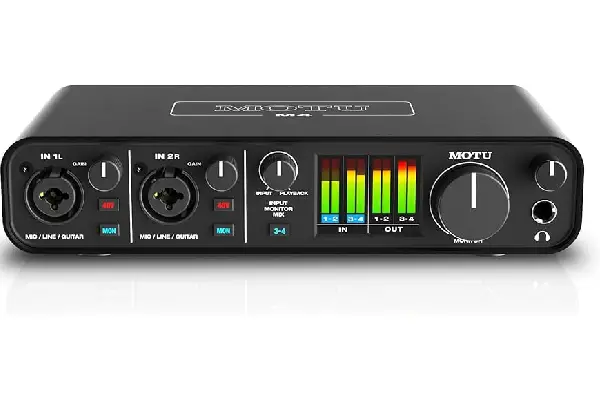
MOTU’s M-Series interfaces emerged as something of a dark horse in the USB interface market, quickly earning enthusiastic recommendations from audio professionals who appreciated the company’s focus on measurement-driven performance. The M4 brings MOTU’s pro-audio heritage to a compact, affordable format, and those specifications aren’t just impressive on paper—they translate to audible improvements in recording quality. The ESS Sabre32 Ultra DAC technology delivers a dynamic range of 120dB, which practically means your recordings capture subtle details that lesser converters simply miss, particularly noticeable in the decay of acoustic instruments or the subtle room ambience during quiet passages.
The four outputs (compared to stereo outputs on many competitors) open up interesting possibilities for hybrid workflows or studio monitoring setups with a subwoofer. I’ve used the additional outputs to send parallel processing signals to external hardware effects units, then returned those signals through the line inputs—creating a complete hybrid production environment around this single interface. The ultra-low latency performance (2.5ms round-trip at 96kHz) makes the M4 viable for guitar amp simulation plugins where monitoring latency can make or break the playing experience. If you’re someone who compares headphones obsessively, you’ll appreciate how the M4’s clean output stage reveals differences between headphone models without adding its own sonic signature.
Pros:
- ESS Sabre32 converters deliver exceptional dynamic range and transparency
- Full-color LCD metering provides precise visual feedback
- Ultra-low latency performance enables real-time plugin monitoring
- Four outputs expand routing possibilities significantly
- Loopback functionality streamlines streaming and content creation
Cons:
- No onboard DSP effects or character processing
- Software mixer initially feels complex for beginners
- Metal construction, while premium, makes the unit heavier for mobile use
Frequently Asked Questions
What sample rate should I use with my USB audio interface?
For most music production and recording work, 48kHz provides the sweet spot between quality and computer resource usage. I record 99% of my projects at 48kHz because it captures all the frequency content humans can hear while keeping file sizes manageable and maintaining compatibility with video production standards. Higher sample rates like 96kHz or 192kHz can be useful when recording material you plan to heavily process with pitch-shifting or time-stretching, but honestly, the quality differences are subtle in most real-world applications. The main consideration is that higher sample rates increase your computer’s processing burden and storage requirements proportionally—recording at 96kHz essentially doubles your hard drive usage compared to 48kHz.
Do I need an audio interface if I’m just using software instruments?
Technically, you could produce music using only software instruments and your computer’s built-in audio output, but the experience will be frustrating due to latency issues that make playing virtual instruments feel disconnected and unresponsive. Even if you’re not recording microphones or external instruments, a dedicated USB audio interface provides low-latency monitoring that makes playing software synthesizers and samplers feel immediate and musical. Additionally, interfaces include proper monitor outputs optimized for studio reference speakers, and headphone amplifiers that reveal detail your laptop’s headphone jack simply cannot reproduce. I’d argue the monitoring improvements alone justify the investment for software-only producers who want to hear their mix decisions accurately.
Can I use multiple USB audio interfaces simultaneously?
While technically possible on some computer systems, using multiple USB audio interfaces simultaneously creates more problems than it solves for most users. The main challenge is that each interface operates with its own clock, and these clocks drift relative to each other over time, causing clicks, pops, and synchronization issues in your recordings. If you genuinely need more inputs than your current interface provides, investing in a single interface with more channels (like the PreSonus Studio 68c) will deliver far more reliable results than attempting to aggregate multiple smaller interfaces. That said, some professional interfaces include digital expansion options (via ADAT connections) that allow synchronized expansion using proper clock management—this is the right approach when you’ve outgrown your interface’s channel count.
How much does the quality of my USB cable affect audio interface performance?
With modern USB audio interfaces, the cable quality matters far less than many audiophile marketing claims suggest, provided you’re using a cable that meets basic USB specifications. USB uses digital transmission with error correction, so either the data arrives perfectly or you’ll experience obvious dropouts and disconnections—there’s no middle ground where a “better” cable provides “better” audio quality. That said, I always recommend using the manufacturer-supplied cable when possible, or purchasing certified cables from reputable brands if you need a different length. Where cable quality does matter is in build durability and shielding—cheap cables can suffer from intermittent connections that cause frustrating dropouts during sessions, and inadequate shielding can occasionally pick up electrical interference in environments with lots of electronic equipment.
Should I choose an interface with DSP effects or rely on software plugins?
This decision depends largely on your specific workflow and whether you value committed processing during tracking versus flexibility during mixing. Interfaces with onboard DSP effects (like the Universal Audio Volt 276’s vintage mode and compressor) let you hear polished sounds while recording, which often leads to better performances—singers especially respond to hearing themselves with flattering effects in their monitor mix. However, these effects are typically printed to your recording permanently, limiting your ability to change processing decisions later. For most modern production workflows, I lean toward interfaces with clean, transparent preamps and rely on software plugins during mixing, where I maintain complete flexibility to experiment with different processing approaches. That said, if you’re exploring new songs and trying to capture inspired performances, hearing yourself sound great through DSP effects during tracking can unlock creativity in ways that stark, dry monitoring sometimes inhibits.
What’s the difference between 24-bit and 16-bit recording?
The bit depth of your recording determines the dynamic range—the difference between the quietest and loudest sounds the system can capture. 24-bit recording provides approximately 144dB of theoretical dynamic range compared to 96dB for 16-bit recording, which translates to a much lower noise floor and greater headroom for capturing both subtle and loud sounds without distortion. In practical terms, recording at 24-bit gives you much more forgiveness if your gain staging isn’t perfect—you can record conservatively to avoid clipping while still maintaining clean, noise-free recordings even in quiet passages. I record everything at 24-bit because storage space is cheap and the safety margin is valuable, though the final delivery format (like audio CDs or most streaming services) will ultimately be 16-bit anyway. Modern USB audio interfaces all support 24-bit recording as standard, so there’s really no reason to limit yourself to 16-bit during the production process.
How important is the headphone amplifier quality in an audio interface?
The headphone amplifier section of your interface matters enormously because it directly affects what you hear during recording, mixing, and production work. A weak headphone amp won’t drive high-impedance studio headphones to adequate volumes, while a noisy amplifier adds hiss that makes critical listening difficult and fatiguing. I’ve worked with interfaces where the headphone output clearly colored the sound differently than the main monitor outputs, creating confusion about what my mixes actually sounded like. The interfaces I’ve recommended here—particularly the Audient iD14 MKII and MOTU M4—include powerful, clean headphone amplifiers that accurately represent your mix without adding unwanted coloration. If you find yourself comparing earbuds or headphones frequently, a transparent headphone amplifier helps you identify the actual differences between headphone models rather than hearing the interface’s sonic signature imposed on everything.