

When you’re performing live, the sampler sitting on your setup table becomes more than just a piece of gear—it’s your creative lifeline, your safety net, and often the element that separates a good performance from an unforgettable one. After years of gigging with various samplers for live performance across everything from intimate jazz clubs to festival stages, I’ve learned that what works flawlessly in the studio doesn’t always translate to the chaotic energy of a live environment. The best live samplers need to deliver instant recall, bulletproof stability, and an interface you can navigate without taking your eyes off the crowd for more than a second.
The landscape of hardware samplers has evolved dramatically, with manufacturers finally understanding that live performers need different features than studio producers. We’re no longer satisfied with gear that requires menu diving or complicated workarounds when we’re trying to trigger a sample in the middle of a performance. Modern samplers designed for stage use prioritize tactile control, visual feedback, and the kind of reliability that lets you focus on connecting with your audience rather than troubleshooting technical issues. Whether you’re layering textures under electronic beats, triggering one-shots in a hip-hop set, or manipulating field recordings in experimental performances, the right sampler becomes an extension of your musical expression.
| Sampler | Best For | Key Strengths | Main Limitations |
|---|---|---|---|
| Akai MPC Live II | Performers who want a full standalone live-performance workstation | Battery powered, large touchscreen, powerful effects, CV/Gate, deep sampling & sequencing, strong live workflow | Expensive, fan noise, learning curve, speakers are mainly for monitoring |
| Elektron Octatrack MKII | Advanced live remixing and experimental performance | Scene crossfader, parameter locks, pickup machines, deep MIDI + audio routing, performance-centric design | Very steep learning curve, limited 8-voice polyphony, small screen, high price |
| Roland SP-404MKII | Beatmakers and portable live performers | Legendary effects, fast resampling, DJ mode, battery power, intuitive workflow | Limited sample time, small pads, SD-only storage, monophonic playback |
| Polyend Tracker Mini | Portable performers who like structured, visual sequencing | Tracker interface, granular synthesis, battery powered, instant loading, scene switching | Small screen, unconventional workflow, limited hands-on controls |
| Teenage Engineering OP-1 Field | Musicians who want an all-in-one creative instrument | Sampling + synthesis + tape workflow, long battery life, built-in mic & effects, huge memory | Extremely expensive, limited polyphony, fragile controls, limited I/O |
Akai Professional MPC Live II
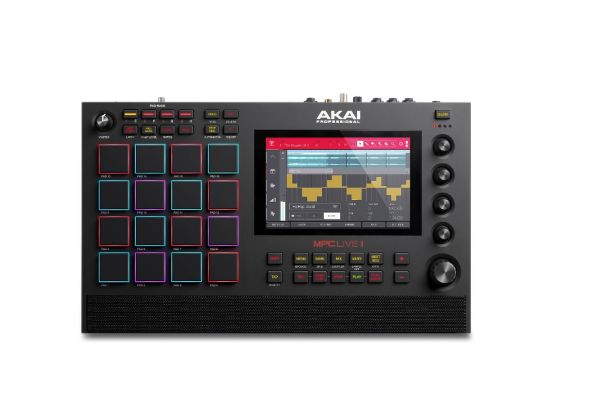
The MPC Live II has become my go-to workhorse for live performances, and after taking it through nearly two years of regular gigging, I understand why it’s achieved near-legendary status among performing musicians. This standalone sampler doesn’t just recreate the classic MPC workflow—it refines it for the modern performer who needs complete creative freedom without being tethered to a laptop. The 10.1-inch multi-touch display provides visual feedback that’s actually readable under stage lighting (something I genuinely appreciate after struggling with dimmer screens), while the 16 velocity-sensitive RGB pads respond with the kind of tactile precision that makes finger drumming feel natural and expressive.
What distinguishes the MPC Live II in live contexts is its genuine portability paired with professional-grade processing power. The built-in rechargeable battery delivers approximately six hours of performance time, which means you can literally set up anywhere—I’ve used mine at outdoor events without power access and in venues where reaching an outlet would’ve required 50 feet of extension cords. The 4GB of RAM handles complex projects with multiple tracks and effects without choking, while the internal storage accepts full-sized SD cards for practically unlimited sample libraries. The WiFi and Bluetooth connectivity initially seemed like unnecessary additions, but being able to wirelessly transfer projects or stream audio during soundcheck has proven surprisingly practical.
The MPC Live II truly shines when you’re building performances on the fly. The eight Q-Link controllers and touch strip give you immediate hands-on manipulation of filters, effects, and parameters without interrupting your flow, while the built-in CV/Gate outputs open doors for integrating modular synthesizers into your live rig. I’ve found the sampling workflow particularly intuitive—you can grab audio from the inputs, chop it, assign it to pads, and start performing with it in seconds rather than minutes. The effects engine includes professional-quality processing from AIR Music Technology, with everything from classic compressors and EQs to creative reverbs and delays that actually enhance rather than mask your sounds.
Pros:
- Completely standalone operation with no computer required
- Excellent battery life for truly portable performances
- Intuitive workflow that doesn’t require constant menu diving
- Extensive connectivity including MIDI, CV/Gate, and multiple audio I/O
- Responsive pads with RGB feedback for visual confirmation
- Powerful effects processing and real-time manipulation
- Seamless integration with Ableton Live when you do want computer control
Cons:
- Premium pricing puts it out of reach for entry-level performers
- Learning curve can be steep if you’re new to MPC workflows
- Fan noise occasionally becomes noticeable during quiet passages
- Some users find the built-in speakers more useful for monitoring than performance tools
Elektron Octatrack MKII
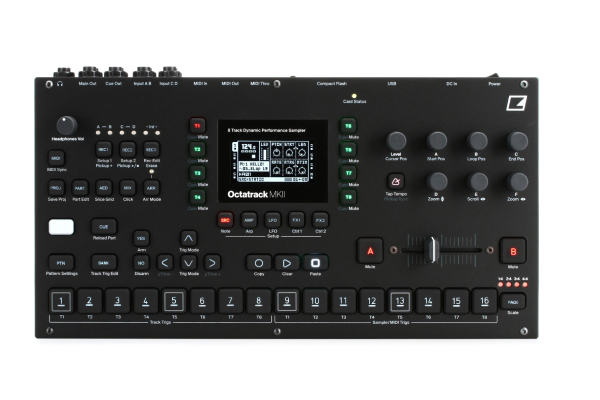
The Octatrack MKII occupies a unique space in the sampler universe—it’s simultaneously one of the most powerful and most polarizing pieces of gear I’ve encountered for live performance. Elektron designed this eight-track sampler with a performance-first mentality, and after working through its admittedly challenging learning curve, I’ve discovered capabilities that simply don’t exist in other samplers. The OLED screen provides clear visual feedback, while the extensive array of knobs, buttons, and encoders gives you direct access to nearly every parameter without ever touching a shift key or diving into submenus.
What makes the Octatrack exceptional for live work is its scene crossfading system, which allows seamless transitions between completely different arrangements and effects settings with a single crossfader movement. The eight dedicated audio tracks can each function as samplers, loopers, or MIDI sequencers, and the flexibility to route audio through different combinations of tracks creates possibilities for live remixing that feel genuinely limitless. The pickup machine feature deserves special mention—it captures whatever’s playing on a track and immediately makes it available for manipulation, which turns spontaneous ideas into performed reality faster than any other workflow I’ve experienced.
The Octatrack’s greatest strength—its depth—can also feel like its greatest challenge for newcomers. This isn’t a sampler you’ll master in a weekend, and the Elektron workflow paradigm requires commitment to truly internalize. However, once those concepts click, you gain access to a performance instrument that rewards experimentation and creativity. The parameter locks system lets you program per-step changes to virtually any parameter, while the conditional triggers enable probability-based variations that keep performances feeling organic rather than rigidly sequenced. I’ve found myself approaching live performance differently since incorporating the Octatrack, thinking more in terms of transformations and variations rather than simply triggering pre-arranged content. If you’re considering exploring different instruments beyond your primary setup, the Octatrack’s flexibility makes it an excellent central hub.
Pros:
- Unmatched flexibility for live remixing and performance manipulation
- Scene crossfader enables seamless transitions between different arrangements
- Comprehensive MIDI sequencing alongside audio sampling
- Parameter locks and conditional triggers add organic variation
- Robust build quality that survives touring conditions
- Direct hands-on control with minimal menu diving once learned
- Pickup machines for capturing and manipulating live audio instantly
Cons:
- Steep learning curve requires significant time investment
- Workflow paradigm feels alien if you’re coming from other samplers
- Limited polyphony (8 voices) can feel restrictive in dense arrangements
- Screen size makes reading detailed waveforms challenging
- Higher price point than many competing samplers
Roland SP-404MKII
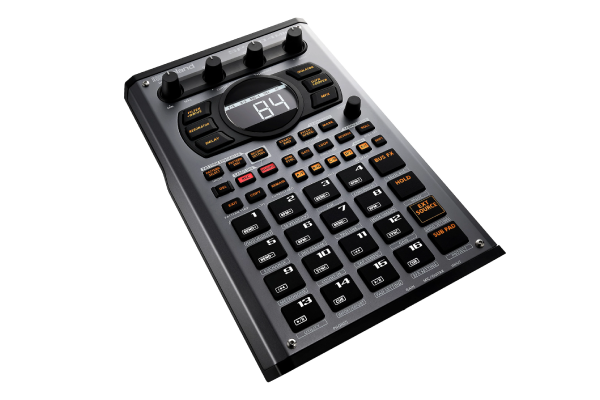
The SP-404MKII represents Roland’s acknowledgment that the original SP-404 had achieved cult status among beat makers and live performers, and this updated version refines the concept while maintaining the immediate, intuitive workflow that made the original beloved. The 16 velocity-sensitive pads respond with satisfying tactility, while the OLED display finally provides the visual feedback that previous models desperately needed.
What continues to set the SP-404MKII apart is its effect processing, which has become legendary for adding warmth, grit, and character to samples in ways that purely digital processing often struggles to achieve. The analog-modeled filters and effects genuinely transform sounds rather than simply applying mathematical processing, and the Vinyl Simulator effect remains my favorite tool for adding subtle imperfections that make digital samples feel more organic and lived-in. The new DJ mode caught me by surprise with its usefulness—being able to trigger and loop samples with single pad presses while maintaining tempo synchronization has streamlined my live performances considerably.
The SP-404MKII functions beautifully both as a standalone performance instrument and as a component within larger setups. The sampling workflow emphasizes speed and spontaneity—you can record from the inputs, apply effects, resample the results, and build entire performances without ever connecting to a computer. The pattern sequencer provides enough structure for arranged performances while remaining flexible enough for improvisational approaches. Battery power support (with optional batteries) maintains the SP series tradition of true portability, and I’ve genuinely appreciated being able to sketch ideas during soundchecks or backstage without hunting for power outlets. The built-in looper functionality has proven surprisingly versatile, particularly when I’m working with vocalists or instrumentalists who want to layer parts in real-time. Much like finding the right monitoring solution when comparing headphones, choosing a sampler that fits your specific workflow makes all the difference in live performance confidence.
Pros:
- Intuitive workflow that beginners can grasp quickly
- Legendary effects processing with distinctive character
- Compact, portable form factor perfect for mobile setups
- DJ mode streamlines live triggering and looping
- Resampling capabilities enable complex layering
- Excellent build quality with performance-ready construction
- Battery operation option for true portability
Cons:
- Limited sample time compared to more expensive competitors
- Smaller pads may feel cramped for finger drumming
- Storage limited to SD cards without internal memory
- Some advanced features require menu navigation
- Monophonic operation limits simultaneous polyphony
Polyend Tracker Mini
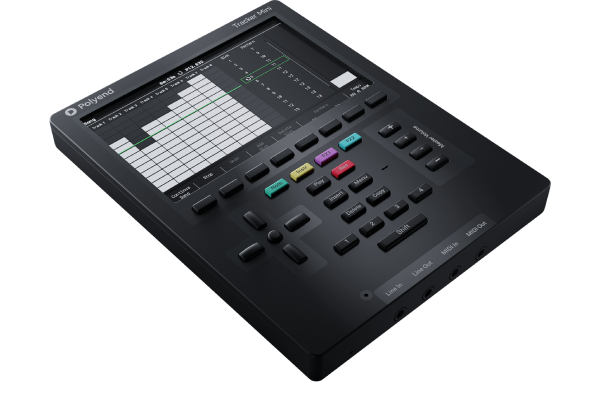
The Tracker Mini entered my live rig almost by accident—I initially purchased it for studio sketching and mobile production—but its unique approach to sequencing and sampling has made it an unexpected star in live performance contexts. Polyend’s decision to implement a tracker-style interface on hardware initially seemed like a niche choice, but the vertical scrolling timeline provides a visualization of your performance that traditional pad-based samplers simply can’t match. The compact form factor (roughly the size of a portable game console) disguises genuinely professional capabilities, with 48kHz/24-bit audio quality and comprehensive sampling features packed into a surprisingly portable package.
The tracker workflow fundamentally changes how you approach live performance with a sampler. Rather than thinking in terms of triggered loops and one-shots, you’re viewing and manipulating entire musical phrases as scrolling patterns, making it easier to visualize structure and timing relationships. The ability to see several bars of music simultaneously helps with planning transitions and variations in ways that feel more intuitive than abstract pad-based approaches. The Mini’s granular synthesis capabilities add another dimension to live manipulation—you can transform samples in real-time with controls for grain size, position, and pitch, creating evolving textures that respond to your performance gestures.
What genuinely impressed me about the Tracker Mini in live contexts is its stability and immediacy. The device boots in seconds, loads projects almost instantly, and responds to input without perceptible latency. The physical controls—particularly the performance knobs and the jog wheel—provide tactile manipulation that feels satisfying and precise. The built-in rechargeable battery delivers several hours of performance time, and the USB-C connectivity means you can power it from portable battery banks when necessary. The Mini includes thoughtful performance features like scene memory for instant arrangement switching and parameter automation that can be recorded and recalled during performances. I’ve started incorporating it specifically for textural elements and granular manipulations that would be awkward to program on more traditional samplers.
Pros:
- Unique tracker interface provides clear visualization of arrangements
- Extremely portable with excellent battery life
- Granular synthesis capabilities for real-time sound design
- Fast, responsive operation with minimal loading times
- Scene memory enables instant arrangement switching
- High-quality audio processing in compact form factor
- Intuitive performance controls despite unconventional interface
Cons:
- Tracker workflow has a learning curve for those accustomed to traditional sequencers
- Small screen can be difficult to read under certain stage lighting
- Limited to monophonic sample playback per track
- Fewer dedicated controls compared to larger samplers
- Some users find the jog wheel interface slower than dedicated buttons
Teenage Engineering OP-1 Field
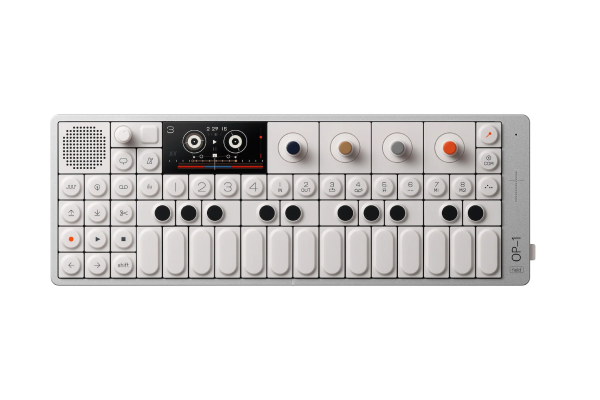
The OP-1 Field represents Teenage Engineering’s evolution of their iconic original OP-1, and while it maintains the distinctive aesthetic and philosophy that made its predecessor beloved, the Field addresses many practical limitations that sometimes held the original back in professional performance contexts. After extensive time with both versions, I’ve found the Field variant genuinely improves on what was already a unique and inspiring instrument. The significantly upgraded OLED screen provides dramatically better visibility under various lighting conditions, while the expanded memory capacity (42 hours of tape versus the original’s 6 minutes) eliminates the constant storage anxiety that sometimes disrupted creative flow on the original.
What continues to make the OP-1 Field special for live performance is its all-in-one integration of sampling, synthesis, effects, and four-track recording in a single, coherent instrument. The built-in microphone delivers surprisingly usable quality for capturing field recordings or room ambience, while the various sampler engines (ranging from traditional keyboard playback to granular and DNA synthesis) offer diverse approaches to manipulating your source material. The tape deck metaphor provides an intuitive framework for arranging and performing your music—you’re essentially playing back and manipulating a four-track recording in real-time, with the ability to punch in, overdub, and apply effects to individual tracks or the entire mix.
The OP-1 Field’s synthesizer engines deserve mention even in a sampler-focused context because they integrate seamlessly with the sampling workflow. You can sample your own synthesized sounds, layer synthesis with sampled material, or use the various generators as source material for further processing. The built-in effects—particularly the spring reverb emulation and the CWO (a unique frequency analyzer/filter)—add character and depth without the external processing that often complicates live rigs. The rechargeable battery provides approximately 16 hours of runtime, making the OP-1 Field genuinely useful for extended performances or situations where reliable power is questionable. When you’re building a diverse performance setup, understanding how different gear categories complement each other—whether that’s monitoring solutions like when you compare earbuds or different instrument types—helps create a cohesive live rig.
Pros:
- All-in-one integration of sampling, synthesis, and recording
- Exceptional portability with extended battery life
- Intuitive tape deck metaphor for performance arrangement
- High-quality built-in effects processing
- Multiple sampler engines offer diverse sonic approaches
- Beautiful industrial design that’s genuinely inspiring to use
- Expanded memory capacity eliminates storage concerns
Cons:
- Premium pricing makes it inaccessible for many performers
- Limited polyphony can be restrictive in complex arrangements
- Some features require key combinations that aren’t immediately obvious
- Durability concerns with knobs and buttons under heavy touring use
- Limited connectivity compared to more traditional samplers
Choosing Your Live Performance Sampler
Selecting the right sampler for live performance ultimately depends on your specific creative needs, performance style, and how you conceptualize the sampler’s role within your larger setup. If you’re building beat-driven performances with extensive manipulation and effects, the Akai MPC Live II or Elektron Octatrack MKII provide the comprehensive control and processing power to realize complex ideas. For performers prioritizing portability and characteristic sound, the Roland SP-404MKII continues delivering the immediate, effect-heavy workflow that has made it a staple among beat makers and electronic musicians. The Polyend Tracker Mini offers a completely different approach that particularly suits performers comfortable with computer-based tracker software or those seeking exceptional granular capabilities in minimal space. Meanwhile, the Teenage Engineering OP-1 Field serves performers who value all-in-one integration and want sampling capabilities alongside synthesis and recording in a single, portable instrument.
Your choice should also consider the broader context of your performances. If you’re triggering samples alongside playing traditional instruments, you might prioritize one-handed operation and visual feedback. If you’re the primary sound source, you’ll need deeper manipulation capabilities and robust sequencing. Consider whether you need true standalone operation or whether your sampler will always connect to a larger ecosystem of synthesizers, effects, and controllers. Battery operation matters tremendously if you perform in non-traditional venues or outdoor contexts, while extensive connectivity becomes crucial if you’re integrating modular synthesizers or complex MIDI setups.
The learning curve deserves honest consideration as well. Some samplers like the SP-404MKII and MPC Live II offer relatively intuitive workflows that let you start performing productively within days, while others like the Octatrack MKII and Tracker Mini require substantial time investment before their capabilities become accessible. Neither approach is inherently better—it depends whether you need something immediately performance-ready or whether you’re willing to invest time mastering a more complex instrument in exchange for deeper capabilities.
Frequently Asked Questions
What’s the most important feature to consider when choosing a sampler for live performance?
Reliability and immediacy trump every other consideration when you’re performing live. The most sonically impressive sampler becomes useless if it crashes mid-performance or requires extensive menu diving when you need to make quick adjustments. After numerous performances with various samplers, I’ve learned that direct, hands-on control with visual feedback consistently proves more valuable than deep feature sets that require concentration to access. Look for samplers with dedicated physical controls for essential functions, clear visual indicators of what’s happening, and proven stability under performance conditions. Battery operation or solid power supplies matter too—I’ve watched performers struggle with samplers that were sensitive to power fluctuations in certain venues.
Can I use a studio-focused sampler for live performance?
You absolutely can, though you’ll face practical compromises that might impact your performance experience. Studio samplers typically prioritize editing capabilities, deep integration with computer-based workflows, and comprehensive feature sets over the immediate access and robust construction that live performance demands. I’ve successfully used studio-focused gear in live contexts, but it required carefully programming performances beforehand and accepting that certain adjustments simply weren’t practical to make on stage. If you’re considering this approach, test your intended workflow in realistic performance conditions—standing up, with stage lighting, while focused on other aspects of your performance—before committing to the setup for actual gigs. You might discover that what works perfectly in your studio becomes frustrating under performance pressure.
How much sample time do I actually need for live performances?
Sample time requirements vary dramatically based on your performance approach. If you’re triggering short one-shots, drum sounds, and brief musical phrases, even samplers with modest memory capacity provide plenty of room for diverse sound palettes. However, if you’re working with longer loops, full musical sections, or extensive field recordings, you’ll quickly exhaust limited memory. I’ve found that 8-16 GB of available sample memory hits a sweet spot for most electronic performances, providing room for several hours of high-quality samples without requiring constant library management. More important than raw capacity is the ability to quickly load and organize your samples—well-implemented SD card support or efficient sample management systems often prove more valuable than massive internal storage with clumsy navigation.
Should I learn tracker-style sequencing for my live performances?
Tracker sequencing offers genuine advantages for certain types of performances, particularly if you’re working with evolving arrangements or building performances from smaller musical fragments. The vertical timeline visualization helps you see structural relationships that remain abstract in traditional step sequencers, and the ability to edit multiple parameters simultaneously can streamline live composition. However, the workflow does require specific time investment, and if you’re already comfortable and productive with traditional pad-based or piano roll sequencing, the benefits might not justify the learning curve. I’d suggest trying tracker software on your computer before committing to hardware—if the approach clicks and enhances your creativity, samplers like the Polyend Tracker Mini become worth serious consideration. For discovering new musical inspiration across different genres, exploring various songs can help inform your sampling choices and performance direction.
How do I prevent technical failures during live performances with samplers?
Technical reliability comes from multiple layers of preparation and redundancy. Always use high-quality, brand-name SD cards for storage—cheap cards fail at the worst possible moments, and the cost difference is negligible compared to the risk of losing your performance content. Maintain organized project files with clear naming conventions so you can quickly locate and load the correct content even under pressure. For critical performances, consider keeping backup samplers or at least backup storage media with duplicate content. Develop muscle memory for your sampler’s interface through regular practice in performance-like conditions—you should be able to navigate essential functions without looking at the screen or manual. Update firmware only during extended breaks from performing, never right before important gigs. Finally, arrive early for soundcheck to confirm everything’s working properly in the actual performance environment, as venue-specific issues (power quality, wireless interference, temperature extremes) sometimes reveal problems that never appeared in your studio.