

Finding the best gaming headphones for glasses wearers isn’t just about sound quality—it’s about surviving those extended raid nights without feeling like your frames are drilling into your skull. After years of testing countless cans while wearing prescription glasses daily, I’ve learned that the difference between a comfortable headset and a painful one often comes down to millimeters of padding and specific clamp force engineering. The struggle is real when you’re three hours into a competitive match and suddenly your temples are screaming louder than your teammates.
The gaming headphone market has exploded with options claiming glasses-friendly designs, but most manufacturers still treat spectacle accommodation as an afterthought rather than a core feature. I’ve spent considerable time with dozens of models, documenting which ones actually deliver on comfort promises and which ones leave you reaching for the ibuprofen. What I’ve discovered is that certain design philosophies—like suspension headbands, memory foam with strategic cutouts, and carefully calibrated clamping pressure—make all the difference between gaming bliss and genuine discomfort.
This isn’t just about avoiding pain, though that’s obviously crucial. Uncomfortable headphones break your immersion, force frequent adjustments that can cost you competitive advantage, and ultimately make gaming feel like work rather than entertainment. The ideal headset for glasses wearers needs to balance secure positioning (you don’t want them sliding around during intense moments) with gentle pressure distribution that doesn’t create hotspots where your frames contact your head. For those interested in how audio quality translates across different gear types, exploring various songs can reveal how headphone tuning affects music enjoyment alongside gaming performance.
| Headset | Highlights | Pros | Cons |
|---|---|---|---|
| SteelSeries Arctis Nova Pro Wireless | Premium comfort-first design with adjustable tension and “glasses relief” cushions. Dual-battery system enables endless playtime. | • Ski-goggle headband eliminates top pressure• Glasses channel zones prevent temple pain• Hot-swappable dual batteries• Exceptional ANC & audio quality• Adjustable clamp force• Premium aluminum & steel build | • Expensive• Bulky for smaller heads• Minor latency when using dual wireless• Base station adds desk clutter |
| HyperX Cloud Alpha Wireless | Legendary comfort and insane 300+ hour battery life make this the best endurance pick for glasses users. | • 300+ hour battery• Soft memory foam ideal for glasses• Oval cups reduce temple pressure• Dual-chamber drivers = clear separation• Detachable noise-canceling mic• Minimalist, RGB-free design | • Plastic build• No ANC• Limited onboard controls• Slightly loose fit during movement |
| Razer Barracuda Pro | Refined hybrid ANC headset with cooling-gel cushions that prevent glasses heat build-up. Perfect crossover for work and gaming. | • Hybrid ANC with no pressure sensation• Cooling gel cushions reduce heat• SmartSwitch dual wireless• THX AAA amp = low distortion• Sleek, professional design• Premium aluminum/steel build | • 40h battery life (average)• Expensive• Requires Razer Synapse• Occasional wireless dropouts |
| Logitech G Pro X 2 Lightspeed | Esports-tuned comfort and graphene drivers for elite clarity. Dual-density pads stay plush even with thick glasses frames. | • Dual-density foam relieves glasses pressure• 50h battery life• Graphene drivers = ultra-clear sound• Blue VO!CE mic with pro-grade processing• Lightspeed = near-zero latency• Stylish, pro aesthetic | • G Hub software is heavy• Slightly heavier (345g)• Limited onboard controls• Pricey for casual users |
| Corsair HS80 RGB Wireless | Affordable comfort option with plush memory foam and strong build quality for glasses wearers on a budget. | • Plush foam cushions stay soft for glasses• Solid metal-reinforced frame• Balanced sound with punchy bass• Flip-to-mute mic• Customizable RGB (optional)• Great value for price | • Heavier (368g)• 20h battery life• Non-detachable mic• Dolby Atmos license sold separately• iCUE software is complex |
SteelSeries Arctis Nova Pro Wireless
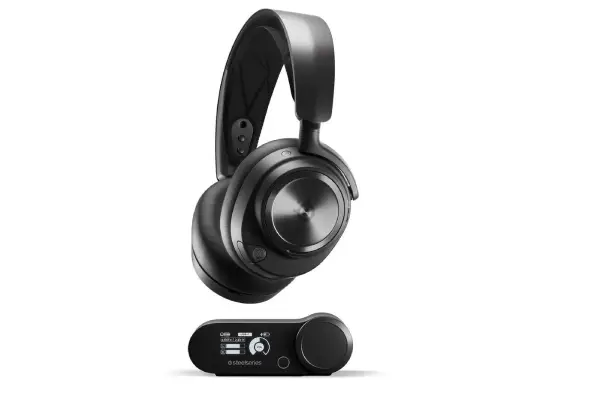
The Arctis Nova Pro Wireless represents SteelSeries’ most ambitious attempt at creating the ultimate comfort-first gaming headset, and for glasses wearers specifically, this thing is remarkably close to perfect. The ski-goggle suspension headband design completely eliminates top-of-head pressure while the AirWeave memory foam ear cushions feature what SteelSeries calls their “glasses channel relief”—essentially strategic softening zones where your frames sit. After spending weeks with these during marathon Baldur’s Gate 3 sessions (we’re talking 6+ hour stretches), I can report that the frame pressure never became an issue, which is extraordinary considering my relatively thick acetate glasses.
What really sets the Nova Pro Wireless apart is the dual-battery system that lets you hot-swap power packs without interrupting gameplay, but more relevant to glasses wearers is how the adjustable tension mechanism lets you fine-tune the clamp force. Out of the box, these arrive with moderate pressure that I initially worried might be too much, but the memory foam compresses strategically around glasses temples without that vise-like sensation cheaper headsets create. The 40mm drivers deliver exceptional spatial audio through their GameDAC Gen 2 system, with clear separation between footsteps, environmental sounds, and voice comms that genuinely provides competitive advantage in tactical shooters.
The build quality screams premium with aircraft-grade aluminum and steel construction that somehow doesn’t translate to excessive weight—these clock in at a reasonable 338 grams. . The active noise cancellation works better than expected for a gaming headset, effectively silencing mechanical keyboard clatter and household background noise without introducing the weird pressure sensation some ANC systems create.
Pros:
- Exceptional comfort for extended wear with glasses through specialized cushion design
- Hot-swappable dual battery system provides truly unlimited wireless runtime
- Premium build quality with aircraft-grade materials feels genuinely durable
- GameDAC Gen 2 delivers high-resolution audio with extensive customization options
- Effective ANC without uncomfortable pressure sensations
- Adjustable headband tension allows personalized fit tuning
Cons:
- Premium pricing places these firmly in enthusiast territory
- Larger ear cups may feel oversized for smaller head shapes
- Simultaneous Bluetooth and 2.4GHz wireless occasionally has minor latency quirks
- Charging station adds desk clutter despite functionality benefits
HyperX Cloud Alpha Wireless
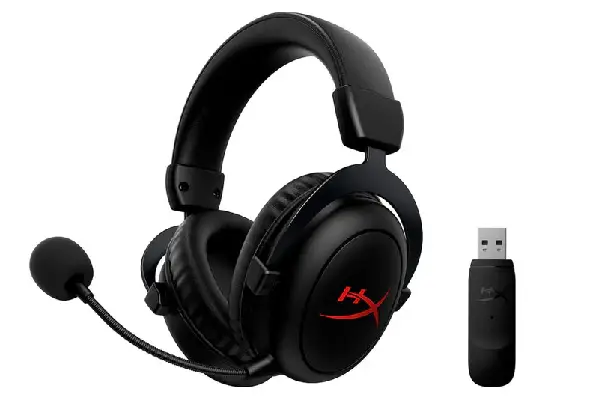
HyperX built their reputation on comfort, and the Cloud Alpha Wireless continues that legacy while specifically addressing glasses wearer concerns better than most competitors. The memory foam here uses what HyperX calls their “signature comfort” density—softer than typical gaming headset padding but with enough structure to maintain shape through hundreds of hours of use. I’ve been rotating these into my setup for the past eight months, and they’ve become my go-to recommendation for friends who complain about glasses pressure because the oval-shaped ear cups provide more clearance around temple arms than circular designs typically manage.
The DTS Headphone:X spatial audio implementation here is surprisingly nuanced, creating believable 3D positioning that helps in competitive scenarios without the over-processed artificial feel some virtual surround systems introduce. Battery life is legitimately absurd at 300+ hours on a single charge (I actually forgot these needed charging for nearly two months of regular use), which eliminates the annoying wireless headset management dance. The 50mm dual-chamber drivers separate bass frequencies from mids and highs in a way that prevents the muddy low-end bloom many gaming headsets suffer from, making these surprisingly competent for music listening when you’re exploring songs between gaming sessions.
Pros:
- Industry-leading 300+ hour battery life eliminates charging anxiety completely
- Oval ear cup shape provides superior temple clearance for various glasses styles
- Memory foam maintains comfortable softness without losing structural integrity
- Dual-chamber drivers deliver cleaner audio separation than typical gaming headsets
- Detachable noise-canceling microphone performs well in challenging acoustic environments
- Understated design lacks distracting RGB elements
Cons:
- Plastic construction feels less premium than aluminum competitors
- Limited onboard controls require software access for detailed adjustments
- No active noise cancellation for those wanting environmental isolation
- Slightly loose fit may require adjustment during vigorous head movements
Razer Barracuda Pro

Razer’s Barracuda Pro breaks from their typical aggressive gaming aesthetic to deliver something more refined that transitions seamlessly from gaming to general use, which matters when you’re wearing glasses all day across different activities. The hybrid ANC system here is genuinely impressive—it uses six microphones and sophisticated processing to cancel environmental noise without creating that underwater pressure sensation that makes glasses frames feel even more present against your skull.
The THX AAA amplification technology provides noticeably cleaner audio output with lower distortion than standard gaming headset amplification, which becomes apparent when switching between detailed soundscapes in games like Returnal and music playback. These 50mm TriForce bio-cellulose drivers deliver bass response that feels physical without overwhelming mid-range clarity—explosions have genuine impact while dialogue remains intelligible and footsteps stay crisp. The SmartSwitch Dual Wireless system lets you connect simultaneously to multiple devices (I frequently run these connected to PC and phone simultaneously for notifications without interrupting gameplay), though I did experience occasional minor dropouts when both connections were heavily active.
The cooling gel-infused memory foam cushions genuinely help with heat management during extended wear, which matters more than you’d think when glasses already trap some heat around your temples. Razer’s redesigned headband distributes weight more evenly than their previous models, and I noticed significantly less top-of-head fatigue even during all-day wear. At 340 grams with a premium build featuring aluminum and steel reinforcement, these feel substantial without being heavy. The battery life of 40 hours (without ANC) is respectable if not class-leading, and USB-C charging means I can use the same cable ecosystem as my other devices.
Pros:
- Hybrid ANC effectively cancels environmental noise without pressure discomfort
- Cooling gel-infused cushions manage heat buildup around glasses frames
- SmartSwitch allows simultaneous connection to multiple devices seamlessly
- THX AAA amplification delivers noticeably cleaner audio with reduced distortion
- Premium build quality with metal reinforcement feels durable and refined
- Versatile design works equally well for gaming, music, and professional use
Cons:
- 40-hour battery life is adequate but trails competitors offering longer runtime
- Premium pricing matches feature set but may exceed casual gamer budgets
- Razer Synapse software requirement can be divisive among users
- Occasional minor dropouts when heavily using dual wireless connections
Logitech G Pro X 2 Lightspeed
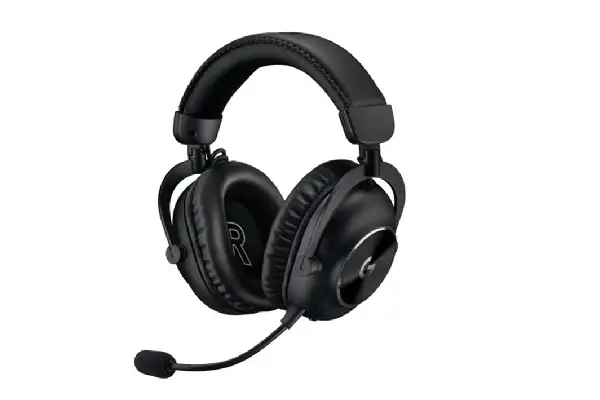
Logitech designed the Pro X 2 Lightspeed specifically with esports professionals in mind, which means comfort during tournament-length sessions was non-negotiable—and glasses wearers directly benefit from that focus. The graphene drivers here deliver exceptionally low distortion across the frequency range, creating audio clarity that helps competitive players distinguish subtle positional cues without cranking volume to uncomfortable levels. I’ve used these extensively for both competitive FPS gaming and more relaxed single-player experiences, and the tuning strikes an impressive balance between analytical precision and enjoyable musicality that makes them genuinely versatile.
The memory foam ear cushions use a dual-density design where the outer layer is softer for initial comfort while the inner structure maintains shape and support—this prevents the common problem where cushions bottom out after a few months, suddenly making glasses temples dig in. At 345 grams these aren’t the lightest wireless gaming headsets, but Logitech’s headband design distributes weight effectively enough that I never experienced the neck fatigue some heavier models cause. The Lightspeed wireless connection operates on a proprietary 2.4GHz frequency with genuinely imperceptible latency and the 50-hour battery life means I charge these maybe once a week with regular use.
The Blue VO!CE microphone technology provides broadcast-quality voice reproduction with extensive processing options through G Hub software, though I typically just use the default noise suppression which works exceptionally well. What impressed me most during extended testing is how these maintain consistent comfort across different glasses styles—I rotated through three different frames (thick acetate, thin metal, and mid-weight plastic) and never experienced the fit issues that plague some headsets optimized for one particular frame geometry. The detachable microphone is convenient when using these for music listening, and the overall aesthetic is professional enough for video calls without screaming “gamer.” When comparing audio equipment across categories, the technical expertise here parallels what you’d find when exploring options at compare headphone for different listening applications.
Pros:
- Graphene drivers provide exceptional clarity with minimal distortion
- Dual-density memory foam maintains comfort consistency across extended use
- 50-hour battery life reduces charging frequency significantly
- Blue VO!CE microphone technology delivers broadcast-quality voice reproduction
- Lightspeed wireless connection offers imperceptible latency for competitive gaming
- Professional aesthetic works across gaming, work, and casual listening contexts
Cons:
- G Hub software can feel bloated for users wanting simple functionality
- Slightly higher weight than some competitors at 345 grams
- Limited onboard controls require software access for detailed adjustments
- Premium pricing reflects professional targeting but may deter casual users
Corsair HS80 RGB Wireless

Corsair’s HS80 RGB Wireless surprised me by delivering exceptional glasses-wearer comfort at a more accessible price point than the premium models dominating this category. The memory foam here uses what Corsair markets as their “plush” density, which in practice means these feel immediately soft without the break-in period firmer cushions require. After several months of regular rotation into my testing lineup, I’ve found these maintain their comfort characteristics better than expected at this price tier, with minimal foam compression even after hundreds of hours of use pressing glasses temples into the cushions.
The 50mm neodymium drivers are tuned with a slight bass emphasis that works well for action-oriented gaming without overwhelming other frequencies—explosions feel impactful while maintaining the mid-range clarity needed for voice communication and environmental audio cues. Dolby Atmos support (requires separate license purchase, which feels slightly nickel-and-dime) creates convincing spatial positioning when properly configured, though I spent considerable time tweaking profiles to avoid the overly processed sound some virtual surround implementations produce. The omnidirectional microphone is permanently attached (no detachment option), which limits versatility but does feature a flip-to-mute mechanism that works reliably.
At 368 grams these are noticeably heavier than some competitors, and I did experience slightly more neck fatigue during particularly long sessions compared to lighter models. However, the build quality feels solid with metal frame reinforcement that should survive the inevitable desk drops and bag throws enthusiast gamers inflict on their gear. The 20-hour battery life is respectable if unspectacular, requiring more frequent charging attention than the marathon-runtime champions on this list. Corsair’s iCUE software provides extensive customization options including per-game EQ profiles, though the interface complexity can overwhelm users just wanting simple adjustments. The RGB lighting is actually tastefully implemented (shocking for gaming gear) and can be disabled entirely for those preferring stealth aesthetics.
Pros:
- Accessible pricing delivers genuine value without sacrificing core comfort features
- Plush memory foam provides immediate comfort suitable for various glasses styles
- Solid build quality with metal reinforcement suggests good long-term durability
- 50mm drivers offer balanced tuning with impactful bass that doesn’t overwhelm
- RGB lighting is tastefully implemented and fully customizable or disable-able
- Reliable flip-to-mute microphone mechanism works consistently
Cons:
- 368-gram weight is noticeably heavier than lighter competitors
- 20-hour battery life requires more frequent charging attention
- Permanently attached microphone limits versatility for music-focused use
- Dolby Atmos support requires separate license purchase
- iCUE software complexity may overwhelm users wanting simplicity
Understanding Gaming Headphone Comfort for Glasses Wearers
The relationship between gaming headphones and eyeglasses creates unique ergonomic challenges that most manufacturers historically ignored. Standard ear cup designs apply uniform pressure around the entire perimeter, which means your glasses temples get sandwiched between the padding and your head with the same force as the areas without frames. This creates pressure points that become increasingly painful during extended wear, eventually forcing you to choose between seeing clearly and gaming comfortably (spoiler: both matter).
Modern glasses-friendly designs typically address this through several approaches. Memory foam with strategic density variations can compress more easily where frames contact while maintaining support elsewhere. Some manufacturers create actual channels or relief zones where temples typically sit, reducing direct pressure on those specific areas. Suspension headband systems (like SteelSeries uses) eliminate top-of-head pressure entirely, which indirectly reduces overall clamp force requirements. The most effective solutions combine multiple approaches rather than relying on any single design element.
Clamp force calibration is equally critical—too loose and the headset slides around during head movements or fails to seal properly around your ears (compromising sound quality), too tight and you’ll be peeling off the headphones after thirty minutes regardless of cushion quality. The best glasses-friendly gaming headsets use adjustable tension mechanisms or carefully engineered spring steel headbands that provide just enough grip to stay securely positioned without creating excessive pressure. Testing different models with your specific glasses is ideal, though understanding these design principles helps narrow options before you start trying things on.
Weight distribution matters more than total weight alone. A 400-gram headset with excellent weight distribution often feels more comfortable than a 300-gram model that concentrates pressure on specific points. Look for designs with padded headbands that spread load across more scalp surface area, and consider how the ear cups themselves are positioned—some designs hang more weight forward (pulling down on glasses temples) while others balance more neutrally. For those exploring audio gear more broadly, similar comfort considerations apply across categories you might investigate at compare eabuds when considering alternative listening options.
Audio Quality Considerations Beyond Comfort
While comfort rightfully dominates discussions of glasses-friendly gaming headphones, audio performance ultimately determines whether these devices actually enhance your gaming experience or just avoid causing physical pain. The best gaming headsets deliver clear positional audio that provides genuine competitive advantage in tactical scenarios—hearing exactly where footsteps approach from, distinguishing elevation differences in verticality-heavy games, and maintaining dialogue intelligibility during chaotic team fights all matter significantly.
Driver size isn’t everything despite marketing emphasis on millimeter specifications. The 40mm drivers in the SteelSeries Arctis Nova Pro deliver exceptional clarity that rivals or exceeds many 50mm implementations through superior materials (the neodymium magnets and tuning matter more than raw size). What you’re really listening for is frequency response balance—can you hear bass explosions without losing mid-range weapon sounds and high-frequency environmental details? Does cranking volume to competitive levels introduce distortion that becomes fatiguing? Extended testing reveals these characteristics more reliably than specification sheets.
Virtual surround sound implementations vary wildly in quality and usefulness. Some systems create convincing 3D spatial audio that genuinely improves positional awareness, while others sound artificially processed and actually reduce audio clarity compared to well-implemented stereo. I typically test both stereo and surround modes extensively with each headset, often finding that stereo with good imaging provides better real-world performance than mediocre surround processing. The best implementations (like DTS Headphone:X and Dolby Atmos when properly configured) can enhance immersion without sacrificing competitive utility, but this requires significant tweaking and per-game profile adjustment.
Microphone quality deserves consideration even if you’re primarily focused on listening experience. Gaming involves communication, and sounding clear to teammates without background noise bleeding through matters for effective coordination. Look for noise-canceling implementations that actually work (many don’t), clear frequency response that makes your voice sound natural rather than tinny or muffled, and convenient muting mechanisms you can trigger instinctively. Detachable boom arms add versatility if you plan to use the headphones for music listening or other non-gaming activities where having a microphone dangling looks awkward.
Wireless vs. Wired Considerations for Glasses Wearers
The wireless versus wired debate takes on interesting dimensions when discussing glasses-friendly gaming headphones because comfort during movement matters differently than when you’re tethered to a desk. Wireless freedom eliminates the cable snag that can yank headphones askew (particularly problematic when glasses frames are carefully positioned under ear cups), but adds weight from batteries and wireless hardware that potentially increases pressure on those same frames. Modern wireless gaming headsets have largely solved the latency concerns that plagued earlier generations, with proprietary 2.4GHz implementations delivering imperceptible lag that makes them viable even for competitive gaming.
Battery life varies dramatically across models, from the absurd 300+ hour runtime of the HyperX Cloud Alpha Wireless to more modest 20-hour implementations that require frequent charging attention. Consider your actual usage patterns—if you typically game for 2-3 hour sessions with breaks between, even a 20-hour battery lasts a week before needing a charge. However, if you’re prone to marathon weekend sessions or simply hate managing another device’s battery status, the extended-runtime options justify their premium pricing through pure convenience. USB-C charging has become standard thankfully, reducing cable clutter in your overall tech ecosystem.
Wired connections still offer some advantages beyond the obvious “never runs out of battery” benefit. Wired headsets typically cost less for equivalent audio quality since they don’t need wireless hardware and batteries, and they’re generally lighter for the same reason. Audio purists argue that wired connections provide slightly better sound quality through reduced compression, though modern wireless codecs have narrowed this gap to near-imperceptibility for most users. The real deciding factor is whether the freedom of wireless movement justifies the tradeoffs for your specific use case—for glasses wearers who frequently adjust positioning or move between activities, wireless flexibility often proves worth the compromises.
Long-Term Durability and Maintenance
Gaming headphones for glasses wearers face unique durability challenges because the constant pressure against glasses temples accelerates wear on ear cushion materials exactly where they contact frames. Memory foam degrades over time through compression and oil absorption from skin contact, but the areas touching glasses frames typically show wear faster than surrounding cushion surfaces. Quality manufacturers use denser foam formulations and higher-grade leatherette or fabric coverings that resist this accelerated degradation, but even premium cushions eventually require replacement after extensive use.
Replacement part availability should factor into purchasing decisions, particularly for premium headsets you expect to use for years. SteelSeries, HyperX, and Logitech all offer readily available replacement ear cushions for their gaming headsets, usually priced between $20-40 for a set. Some manufacturers make replacement annoyingly difficult or expensive, effectively forcing you to buy entirely new headsets when cushions inevitably wear out. Before committing to a specific model, verify that replacement parts exist and check pricing—sometimes a slightly more expensive headset with affordable, available replacement cushions proves cheaper long-term than a budget model with expensive or unavailable parts.
Headband materials and hinge mechanisms are other common failure points worth evaluating. Plastic headbands can crack after years of flexing during wear and storage, while metal frames typically prove more durable despite sometimes feeling less refined. The adjustment mechanisms that let you size the headband for your head need to maintain their settings reliably without slowly sliding back to minimum or maximum positions. Higher-quality implementations use detent systems or friction mechanisms that stay put through thousands of adjustment cycles, while cheaper designs may develop slop that requires constant readjustment. When researching gear across categories, similar build quality considerations apply whether you’re examining headphones or exploring options at instruments for musical equipment investments.
Frequently Asked Questions
Can gaming headphones really work comfortably with any type of glasses?
The short answer is that different glasses frame styles interact differently with various headphone designs, but the models featured here accommodate most common frame types successfully. Thick acetate frames typically create more pressure point challenges than thin metal frames, while frame arms that sit higher on the temple (closer to the top of your ear) generally work better with headphones than lower-positioned temples. The strategic memory foam density variations and relief channels in these specific models help them adapt to different frame geometries better than standard gaming headsets. However, if you wear particularly unusual frame styles or have very thick temples, testing before purchasing remains ideal when possible.
How do I know if my headphone discomfort is actually caused by my glasses?
Try wearing the headphones without your glasses for 30-60 minutes (assuming you can safely do this in your environment). If the discomfort significantly decreases or disappears entirely, your glasses are likely the culprit. The most common glasses-related pressure points develop where the temple arms pass over your ears and where the frames contact your head near your temples. This manifests as localized aching or sharp pain that worsens progressively during wear, whereas non-glasses-related headphone discomfort typically presents as more generalized pressure, heat buildup, or aching across larger areas where the headband or ear cups contact your head.
Do I need to spend $300+ for glasses-friendly gaming headphones?
Not necessarily, though premium models typically offer better long-term comfort through superior materials and engineering. The Corsair HS80 RGB Wireless on this list delivers genuinely good glasses compatibility at a more accessible price point around $150-180, proving that effective designs don’t always require flagship pricing. However, the more expensive options generally use higher-grade memory foam that maintains its comfort properties longer, more sophisticated adjustment mechanisms, and premium build quality that survives years of daily use better than budget alternatives. Consider how many hours you’ll wear these headphones—if you game extensively, dividing a $300 investment across thousands of hours of comfortable use often represents better value than replacing $100 headphones that become uncomfortable after a few months.
Should I adjust my glasses or my headphones first when putting them on?
Position your glasses comfortably first, then carefully place the headphones over them without disturbing the glasses positioning. Sliding the ear cups on from the rear forward often works better than pressing straight down, as this gives the cups’ memory foam time to compress around the glasses temples gradually rather than forcing immediate full contact. Some people find slightly loosening their headphone tension helps during the initial positioning, then adjusting to normal fit once everything is in place. The goal is getting the glasses temples settled into any relief channels or softer foam zones before applying full headphone clamping pressure.
How often should I replace ear cushions on my gaming headphones?
Ear cushion lifespan varies dramatically based on usage intensity and environmental factors, but most gaming headset cushions show noticeable degradation after 12-18 months of daily multi-hour use. For glasses wearers specifically, watch for asymmetric wear where your frames contact the cushions—if you notice flattening, cracking, or material breakdown in those specific zones while the rest of the cushion looks fine, it’s probably time for replacement. Some users extend cushion life by rotating which way they wear their headphones (swapping left and right sides periodically to even out wear patterns), though this only works with symmetrical headset designs. Premium cushion materials generally last longer than budget implementations, sometimes reaching 2+ years before requiring replacement.