

Finding the best budget gaming headphones that actually deliver on performance has become my mission over the past few years of testing countless models. The gaming audio market is flooded with flashy RGB-laden promises, but after spending hundreds of hours with headphones ranging from $30 to $150, I’ve learned that the sweet spot for budget-conscious gamers sits comfortably between $50 and $100. What surprises most people is how much genuine quality you can get in this price range if you know where to look and what compromises are actually worth making.
| Model | Highlights | Pros | Cons |
|---|---|---|---|
| HyperX Cloud Stinger 2 Core | Budget-friendly wired headset with balanced sound and excellent comfort for long sessions. | • Durable build with smooth steel sliders• Clear positional audio for shooters• Plush memory foam cushions• Swivel-to-mute mic• Multi-platform compatibility | • Small ear cups• No inline volume control• Picks up ambient noise• Fixed cable• Bass lacks deep punch |
| Razer Barracuda X (2022) | Wireless gaming headset with excellent latency-free connection and long battery life. | • Stable wireless performance• 40+ hour battery life• Lightweight at 250g• Detachable mic for portability• Balanced, clear sound | • Ear cushions get warm• Neutral bass may feel light• Easy-to-lose USB-C dongle• No wired mode• Average mic quality |
| SteelSeries Arctis Nova 3 | Premium-feel hybrid headset with excellent comfort and cross-platform support. | • Ski-goggle headband for comfort• Detailed, spatial sound• USB-C + 3.5mm connectivity• Strong steel-reinforced build• PC Sonar software for EQ tuning | • Exposed ear cup cables• Artificial-feeling surround mode• Slightly heavy• Warm ear cushions• PC-only software |
| Corsair HS55 Stereo | Simple, durable stereo headset focusing on clarity and comfort without gimmicks. | • Honest, balanced sound• High-quality memory foam• Metal reinforcement at stress points• Detachable cable for longevity• Clear, warm microphone | • Small soundstage• Picks up background noise• Slightly heavy• No inline controls• Limited aesthetic variety |
| EPOS H3 | Audiophile-inspired wired headset with exceptional clarity and natural sound signature. | • Studio-grade driver tuning• Clear, accurate sound• Excellent lift-to-mute mic• Breathable hybrid ear cushions• Premium understated build | • Polite bass response• No RGB / gaming design flair• Minor hinge squeak over time• Pricier than typical budget sets• Requires adjustment for neutral tuning |
HyperX Cloud Stinger 2 Core
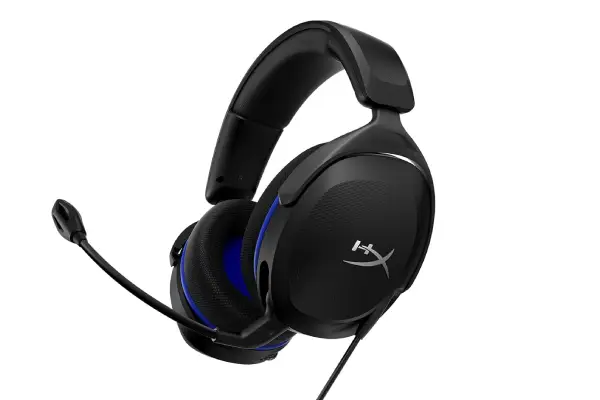
The audio performance is where this headset really justifies its reputation. HyperX tuned these drivers with a slight bass emphasis that works beautifully for action games without becoming muddy or overwhelming. Playing through Apex Legends, I could clearly distinguish footstep directions while still feeling the impact of explosions and gunfire—that balance between competitive clarity and immersive punch is remarkably well-executed. The soundstage isn’t as expansive as open-back studio headphones I’ve used for music production (which you can compare on our headphone comparison tool), but it provides adequate spatial awareness for tactical gameplay. I’ve successfully pinpointed enemy positions in CS2 using these, which is the real litmus test for gaming audio.
Comfort during extended sessions deserves special mention because this is where many budget headphones completely fail. The memory foam ear cushions are legitimately plush, and the adjustable steel sliders move smoothly without the wobbliness I’ve experienced with cheaper mechanisms. I’ve worn these for six-hour gaming marathons without developing the usual pressure headaches or ear fatigue—though I should note that the ear cups run slightly small, so if you have larger ears, you might experience some contact with the driver housing after several hours.
Pros:
- Exceptional build quality and durability for the price point
- Well-balanced audio signature suitable for multiple game genres
- Comfortable memory foam cushions for extended gaming sessions
- Intuitive swivel-to-mute microphone design
- Compatible across PC, PlayStation, Xbox, and Nintendo Switch
Cons:
- Smaller ear cups may cause discomfort for users with larger ears
- No inline volume control on the cable
- Microphone quality, while adequate, picks up ambient noise
- Bass response, though improved, won’t satisfy bassheads
- Fixed cable design limits replacement options
Razer Barracuda X (2022)

The wireless capabilities of the Razer Barracuda X fundamentally changed my perspective on what’s achievable in budget gaming audio. I’d previously resigned myself to the idea that wireless freedom under $100 meant accepting terrible latency or constant connectivity issues, but Razer’s implementation of their HyperSpeed wireless technology proved me completely wrong. After months of use across multiple devices, I’ve experienced maybe three brief connection hiccups total—a reliability record that rivals headsets costing twice as much. The USB-C dongle is remarkably small (easy to lose, fair warning) and switches seamlessly between my PC, PlayStation 5, and Nintendo Switch, which has made this my go-to headset for multi-platform gaming.
Sound quality surprised me in ways I didn’t anticipate from a wireless budget option. Razer equipped these with 40mm drivers that deliver impressively clear mids and highs, making dialogue and environmental cues come through with excellent definition. The bass presence is more neutral than the HyperX Cloud Stinger, which initially felt underwhelming during explosive action sequences, but I’ve grown to appreciate how this tuning prevents frequency masking during competitive play. Testing with Rainbow Six Siege and Hunt: Showdown—games where audio positioning is absolutely critical—the Barracuda X provided consistently accurate directional information that helped me track enemy movements through walls and identify threat directions during chaotic firefights. The open-ish soundstage creates a more natural listening experience that also makes these surprisingly pleasant for music listening during downtime between matches.
Pros:
- Excellent wireless performance with minimal latency across multiple platforms
- Impressive 40+ hour battery life in real-world testing
- Lightweight design perfect for extended wear
- Detachable microphone for versatile use as regular headphones
- Clean, balanced sound signature ideal for competitive gaming
Cons:
- Pleather ear cushions can cause heat buildup during long sessions
- Bass response may feel lacking for explosion-heavy games
- Small USB-C dongle is easy to misplace
- No wired backup option if battery dies mid-session
- Microphone quality is merely adequate, not exceptional
SteelSeries Arctis Nova 3

SteelSeries has built a reputation on their ski-goggle suspension headband design, and after living with the Arctis Nova 3 for several months, I understand why they’ve stuck with this approach—it genuinely distributes weight more effectively than traditional padded headbands. The self-adjusting system eliminates those annoying moments of tweaking sliders to find the perfect fit, and the elastic band has maintained its tension without stretching out (a failure point I’ve seen in older Arctis models).
Compatibility and versatility make this headset particularly valuable for users with diverse gaming setups. The dual-connection system (USB-C and 3.5mm) means these work essentially everywhere—I’ve used them with my gaming PC, PlayStation 5, Xbox Series X, and even my smartphone without any adapters or workarounds. The USB connection unlocks the Sonar software features on PC, which provides surprisingly powerful EQ customization (I created custom profiles for different game genres that genuinely improved my experience). Microphone quality sits firmly in the “better than average” category, with decent noise rejection and clear voice reproduction that teammates have consistently rated positively during Discord sessions. If you’re looking for similar versatility in other audio gear, our earbud comparison guide might help you find complementary mobile listening options.
Pros:
- Innovative ski-goggle suspension system provides excellent weight distribution
- High-quality drivers deliver exceptional detail and spatial accuracy
- Dual-connection compatibility (USB-C and 3.5mm) works across all platforms
- Premium build quality with steel reinforcement
- Powerful Sonar software for audio customization on PC
Cons:
- Exposed cables to ear cups raise long-term durability concerns
- Surround sound processing can feel artificial in competitive settings
- Slightly heavier than competitors like the Barracuda X
- Ear cushions could use more breathable material options
- Sonar software features only available via USB connection on PC
Corsair HS55 Stereo

Corsair’s decision to focus purely on stereo audio with the HS55 rather than gimmicky surround processing initially made me skeptical—wouldn’t this feel like a step backward in an era of spatial audio marketing hype? After extensive testing, I’ve come to appreciate this back-to-basics approach more than I expected. The 50mm neodymium drivers deliver fundamentally solid audio reproduction with a frequency response that favors clarity over artificial enhancement. What you get is honest, uncolored sound that reveals game audio as developers intended it, which proved particularly valuable in competitive scenarios where distinguishing subtle audio cues matters more than impressive bass drops.
Build quality and comfort represent where Corsair clearly invested the HS55’s budget allocation. The memory foam ear cushions use a plush leatherette that’s noticeably higher quality than the standard pleather found on most budget headsets—after four-hour gaming sessions, these aren’t the lightest option I’ve tested, but the weight feels well-distributed rather than front-heavy. The clamping force hits that Goldilocks zone of secure without being tight, though users with smaller heads might find them slightly loose initially (they do conform better after a break-in period of several days).
Pros:
- Honest, well-balanced stereo audio without artificial processing
- High-quality memory foam cushions provide excellent comfort
- Metal-reinforced construction at critical stress points
- Detachable cable design improves longevity and repair options
- Microphone delivers clear, warm voice reproduction
Cons:
- Intimate soundstage may feel limiting compared to competitors
- Omnidirectional microphone picks up excessive background noise
- Slightly heavier than other options in this roundup
- No inline controls on the cable for volume adjustment
- Limited color options may not appeal to RGB enthusiasts
EPOS H3
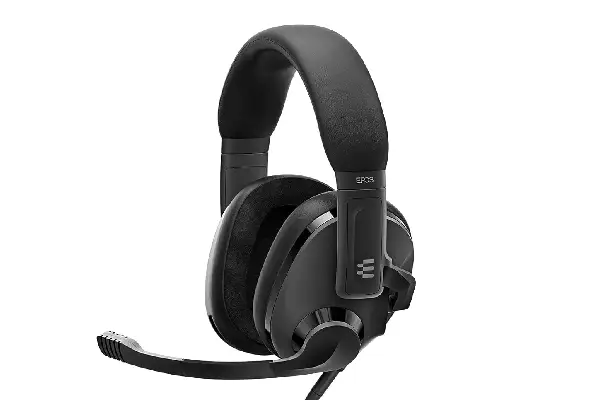
The EPOS H3 (formerly Sennheiser’s gaming division before the brand split) brings genuine audiophile DNA to the budget gaming space, and it shows in ways both obvious and subtle. Having spent time with various Sennheiser products for music production—including studio monitoring headphones that cost five times as much—I recognized the company’s audio signature immediately upon first listen. The tuning philosophy prioritizes natural frequency response and driver accuracy over the bass-boosted excitement curve that dominates gaming audio marketing.
The lift-to-mute microphone represents one of the smartest implementations I’ve encountered in this price range. Rather than relying on a switch or button that you fumble for mid-game, you simply flip the boom arm up to mute and down to transmit—the physical position provides instant visual confirmation of your status, which has saved me from several embarrassing hot-mic situations. The microphone quality itself is exceptional for a budget gaming headset, capturing voice with broadcast-quality clarity that legitimately rivals standalone microphones I’ve used for recording music content. The noise-canceling technology effectively suppresses background sounds without making your voice sound overly processed or artificial.
Pros:
- Audiophile-quality drivers deliver exceptional clarity and detail
- Natural, accurate frequency response reveals subtle game audio layers
- Intuitive lift-to-mute microphone with excellent voice quality
- Breathable hybrid ear cushion design for extended comfort
- Understated professional aesthetic without excessive gaming branding
Cons:
- Controlled bass response may disappoint users wanting visceral impact
- Understated design lacks RGB lighting and aggressive gaming aesthetics
- Slight squeaking from adjustment mechanisms after extended use
- Higher initial price point at the top end of the budget range
- May require audio adjustment period for users accustomed to bass-boosted headsets
Finding Your Perfect Budget Gaming Headset Match
Choosing among these five exceptional budget gaming headphones ultimately depends on your specific priorities and gaming habits. The HyperX Cloud Stinger 2 Core offers the most balanced overall package for users who want reliable performance without learning curves or compromises. If wireless freedom matters most and you game across multiple platforms, the Razer Barracuda X delivers connectivity and battery life that feels almost unfair at this price point. The SteelSeries Arctis Nova 3 provides the most premium experience with its innovative comfort design and powerful software customization, making it ideal for PC gamers who enjoy tweaking their audio setup.
My personal recommendation is to consider your primary use case first. Competitive gamers should prioritize positional accuracy and comfort, making the EPOS H3 or Corsair HS55 strong choices despite their restrained bass. Casual gamers who value versatility might prefer the wireless convenience of the Razer Barracuda X or the platform flexibility of the SteelSeries Arctis Nova 3. Console players specifically benefit from the plug-and-play simplicity of the HyperX Cloud Stinger 2 Core. Wha
Frequently Asked Questions
What’s the ideal budget range for quality gaming headphones?
The sweet spot for budget gaming headphones sits between $50 and $100, where you’ll find genuine quality without paying premium prices for diminishing returns. After testing dozens of models across various price points, I’ve found that headphones under $50 typically sacrifice too much in build quality, comfort, or audio performance to recommend, while options above $150 often add features like RGB lighting, branded celebrity endorsements, or luxury materials that don’t meaningfully improve your gaming experience. The $60-80 range specifically offers the best value, where manufacturers invest in quality drivers, comfortable materials, and reliable construction rather than marketing gimmicks.
Do I really need surround sound for gaming?
Honest answer from someone who’s tested both extensively: quality stereo headphones often provide better positional accuracy than artificial surround processing, especially for competitive gaming. Virtual surround can enhance immersion in cinematic single-player games, but it frequently introduces audio artifacts and reduces clarity in competitive scenarios where pinpoint accuracy matters most. I’ve achieved better results in games like Valorant and CS2 using stereo mode with well-tuned drivers than with 7.1 surround gimmicks. Your brain is remarkably good at processing directional cues from just two drivers when the audio is cleanly reproduced—save your money and focus on headphones with quality stereo imaging rather than paying extra for surround features you’ll probably disable.
How important is microphone quality in gaming headphones?
Microphone quality matters more than most people realize until they experience truly clear communication. A decent gaming headset microphone should capture your voice with clarity, reject background noise reasonably well, and avoid making you sound like you’re calling from inside a tin can. Every headset in this roundup meets these basic requirements, but the EPOS H3 and Corsair HS55 notably exceed them with microphone performance that rivals entry-level standalone options. That said, if you’re serious about streaming or content creation, you’ll eventually want a dedicated microphone—but for standard team communication during gaming sessions, the built-in options here are more than adequate and significantly better than most laptop or monitor microphones.
Can budget gaming headphones work well for music listening?
Absolutely, and some might actually prefer the more balanced tuning of certain gaming headphones over dedicated music headphones. The EPOS H3 particularly excels at music reproduction thanks to its audiophile heritage, delivering natural frequency response that works beautifully across genres. The SteelSeries Arctis Nova 3 also performs admirably for music with its detailed drivers and wide soundstage. The key difference is that gaming headphones typically emphasize different frequency ranges—slightly boosted bass for explosions, enhanced treble for footsteps—compared to music headphones that prioritize flat, accurate response.
How long should budget gaming headphones last?
With reasonable care, quality budget gaming headphones should easily provide 2-3 years of regular use, and potentially much longer if you treat them gently. The primary failure points I’ve seen across years of testing are snapped headbands from rough handling, worn-out ear cushions from extended use (easily replaceable on most models), and cable damage near connection points (which is why I appreciate detachable cable designs). The headphones featured here all use construction quality that should survive well beyond warranty periods if you avoid common mistakes like leaving them where they can be sat on, yanking cables instead of unplugging properly, or storing them without protection in bags where they get crushed.