

When searching for the best Thunderbolt audio interfaces, you’re looking at the pinnacle of professional recording technology. After spending countless hours in various studio environments testing these units, I’ve learned that Thunderbolt connectivity offers something USB simply can’t match—ultra-low latency and the bandwidth to handle massive track counts without breaking a sweat. Whether you’re tracking a full band or running processor-intensive virtual instruments, these interfaces deliver the performance serious producers demand.
The investment in a Thunderbolt interface represents a commitment to professional-grade audio production. Unlike their USB counterparts, these units leverage the sheer speed of Thunderbolt 2 or Thunderbolt 3 protocols to provide direct-to-disk recording with latencies so low you’ll forget you’re even monitoring through a computer. I’ve found this particularly transformative when recording vocalists who are sensitive to monitoring delays or when tracking drummers who need to feel locked into the rhythm without any digital lag.
| Interface | Key Features | Pros | Cons |
|---|---|---|---|
| Universal Audio Apollo Twin X Duo | Unison preamps, premium AD/DA, onboard DSP for UAD plugins, Console software | Authentic vintage preamp modeling, real-time DSP processing, excellent audio quality, solid build, workflow-friendly monitor controls | Expensive, UAD plugins cost extra, only 2 preamps, PC compatibility can vary |
| Audient iD44 | 4 Class-A console preamps, JFET DI, ScrollControl, ADAT expandability | Ultra-transparent preamps, workflow-boosting ScrollControl, expandable I/O, excellent value, stable drivers | Only 4 preamps without expansion, no DSP, some controls require software, simple aesthetics |
| Antelope Audio Zen Tour Synergy Core | FPGA + DSP processing, advanced clocking, large I/O, amp sims, re-amping | Superior imaging from clocking, powerful onboard FX, flexible routing, realistic amp modeling, versatile studio connectivity | Complex software, premium pricing, occasional driver variability, feature-heavy for beginners |
| PreSonus Quantum 2626 | Ultra-low latency Thunderbolt, 26 I/O, XMAX preamps, Studio Control | Industry-leading latency, huge I/O count, clean preamps, strong build, great value for performance | No DSP, preamps lack character, basic software UI, Thunderbolt 2 limits some setups |
| RME Fireface UFX II | TotalMix FX, rock-solid drivers, transparent preamps, large I/O, MADI expansion | Best-in-class driver stability, unmatched routing flexibility, clean high-headroom preamps, durable build, highly scalable | Expensive, steep TotalMix learning curve, neutral (not colored) sound, functional design |
Universal Audio Apollo Twin X Duo
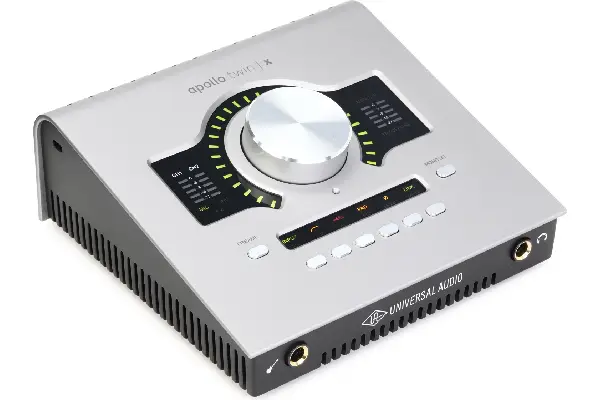
The Apollo Twin X Duo continues to dominate conversations in professional studios, and after extensive use across multiple projects, I understand why. This interface combines pristine AD/DA conversion with Universal Audio’s renowned Unison preamp technology, allowing you to record through emulations of classic Neve, API, and Manley preamps that genuinely transform the character of your source material. What sets this apart isn’t just the specs—it’s how the interface integrates into your creative workflow, making professional sound accessible without requiring a rack full of vintage gear.
The onboard DSP processing handles UAD plugins with barely any CPU impact, which means you can track through a 1176 compressor or LA-2A leveling amplifier in real-time without taxing your computer. The build quality feels substantial, with smooth-operating preamp knobs and a reassuring heft that suggests this interface will survive years of daily studio use. The monitor control section offers quick access to different output levels, and the ability to switch between speaker sets has streamlined my mixing workflow considerably (something I appreciate every time I’m comparing mixes on different monitoring systems).
Pros:
- Exceptional Unison preamp modeling technology that captures authentic vintage gear characteristics
- Onboard DSP processing allows running UAD plugins without computer CPU impact
- Premium AD/DA conversion delivering transparent, professional-grade audio quality
- Solid construction with professional-grade components and reliable performance
- Comprehensive Console software with low-latency monitoring and flexible routing
Cons:
- Higher price point requires significant initial investment
- DSP plugin library requires separate purchases beyond included bundles
- Limited to two microphone preamps without expansion options
- Mac-centric design means PC users may experience occasional compatibility updates
Audient iD44
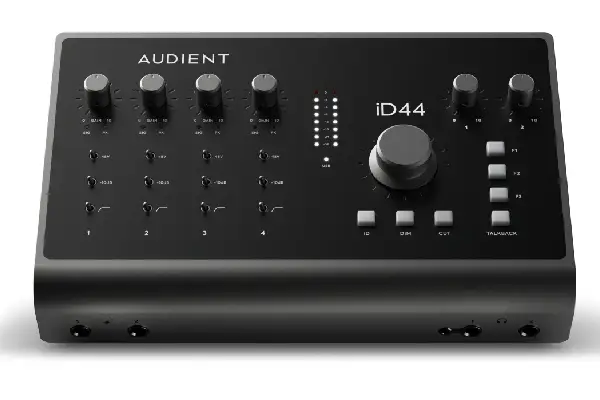
The Audient iD44 impressed me immediately with its combination of professional features and practical design sensibility. This interface provides four of Audient’s Class-A console-grade preamps—the same circuits found in their high-end mixing consoles—and the transparency they deliver has become my benchmark for clean, uncolored recording. When I tracked acoustic guitars through these preamps alongside more expensive units, the iD44 held its own with remarkable clarity and detail that captured every nuance of the instrument’s tone without imposing any unwanted color.
What separates the iD44 from many competitors is the ScrollControl feature that transforms the monitor volume knob into a controller for your DAW parameters. This seemingly simple addition has changed how I work, allowing me to adjust plugin parameters or fader levels without reaching for my mouse, keeping me focused on the music rather than the mechanics of operation. The JFET instrument input on the front panel handles high-impedance sources beautifully, and I’ve found it particularly excellent for tracking bass guitar direct, capturing the full low-end weight without any muddiness. The optical inputs expand your I/O when needed, and the unit’s ability to integrate additional ADAT preamps means your studio can grow without replacing your core interface. If you’re exploring different recording setups for various musical styles, having access to quality instruments makes a tremendous difference in the final production quality.
Pros:
- Console-grade Class-A preamps deliver exceptional transparency and detail
- Innovative ScrollControl feature enhances workflow efficiency significantly
- Expandable via ADAT for growing studio requirements
- Excellent value proposition for professional-grade conversion and preamps
- Reliable drivers with stable performance across Mac and Windows platforms
Cons:
- Only four physical microphone preamps without expansion hardware
- No onboard DSP processing for plugin hosting during recording
- Monitor control software requires computer interaction for some functions
- Aesthetics are functional rather than visually striking
Antelope Audio Zen Tour Synergy Core
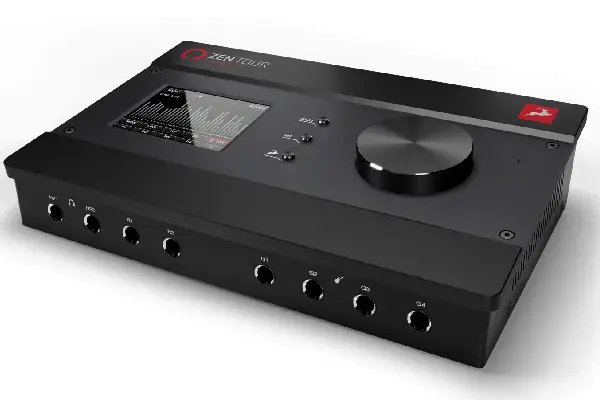
The Antelope Audio Zen Tour Synergy Core represents a fascinating approach to interface design, combining pristine conversion with extensive onboard effects processing powered by both FPGA and DSP architectures. After testing this unit across various recording scenarios, I’ve come to appreciate how Antelope’s clocking technology—drawn from their master clock designs—provides a clarity and three-dimensional imaging that elevates everything you record through it. The difference becomes obvious when tracking detailed sources like acoustic piano or orchestral instruments, where the spatial information and harmonic detail remain intact throughout the signal chain.
The Synergy Core processing allows running both vintage gear emulations and modern effects with impressive authenticity, and I’ve successfully tracked complete projects using only the onboard processing for compression, EQ, and reverb. This capability transforms the interface into a comprehensive recording system rather than just a connectivity device. The guitar amplifier and speaker cabinet emulations sound convincingly realistic, making this interface particularly appealing for producers working with guitarists who want to track direct without sacrificing tonal authenticity. The extensive I/O configuration includes re-amping capabilities, multiple digital input options, and flexible routing that accommodates complex recording setups. The learning curve can feel steep initially—there’s considerable depth to explore in the control software—but once you’ve invested the time to understand the routing possibilities, this interface becomes incredibly versatile.
Pros:
- Exceptional clocking technology provides superior imaging and clarity
- Extensive onboard effects processing with Synergy Core FPGA and DSP
- Comprehensive I/O configuration accommodates complex studio setups
- High-quality guitar amp modeling for direct recording applications
- Re-amping capabilities expand creative processing options
Cons:
- Software interface complexity requires investment in learning time
- Premium pricing reflects professional-oriented feature set
- Some users report driver stability variations across system updates
- Overwhelming feature depth may exceed casual user requirements
PreSonus Quantum 2626
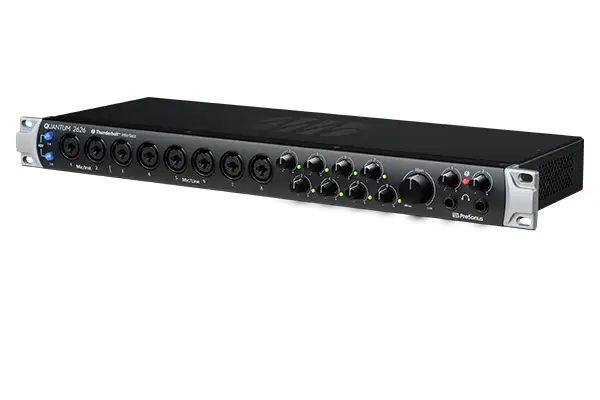
The PreSonus Quantum 2626 distinguishes itself through pure speed, offering the lowest round-trip latency I’ve measured in any interface at this price point. When you need to track virtual instruments that are CPU-intensive or run software synthesizers without any perceptible delay, this interface delivers performance that keeps you focused on playing rather than adjusting buffer settings.
The twenty-six inputs and outputs provide remarkable flexibility for studios handling multiple musicians simultaneously or producers integrating hardware synthesizers and outboard processors. The XMAX preamps offer clean, transparent amplification that captures sources faithfully without imposing character (which I prefer for most applications, though some might miss the color that transformer-coupled designs provide). The combination of Thunderbolt speed and thoughtful feature implementation makes this interface particularly suitable for hybrid workflows combining analog gear with digital processing. The build quality feels professional without excessive weight, and the front-panel controls provide quick access to essential functions without requiring constant software interaction. Studio Control software offers straightforward routing and monitoring configuration, though it lacks the visual polish of some competitors’ offerings. For producers who frequently work with the comparative aspects of different monitoring systems or need to reference their mixes across various playback devices, having flexible routing options becomes essential to maintaining perspective during mixing.
Pros:
- Industry-leading low latency performance enables comfortable software instrument tracking
- Extensive I/O configuration with twenty-six channels of connectivity
- XMAX preamps deliver clean, transparent signal amplification
- Solid construction appropriate for professional studio environments
- Competitive pricing for the channel count and performance specifications
Cons:
- Preamps lack the character and color some producers prefer
- No onboard DSP processing for effects during tracking
- Software interface feels utilitarian compared to premium competitors
- Limited to Thunderbolt 2 connectivity versus newer Thunderbolt 3 standard
RME Fireface UFX II
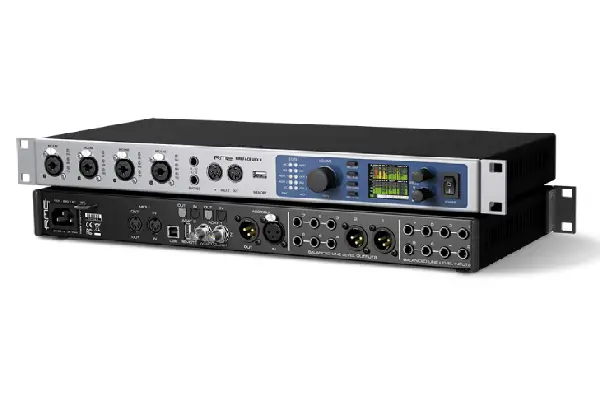
The RME Fireface UFX II has earned legendary status among audio professionals, and after working with this interface extensively, I can confirm that its reputation is thoroughly deserved. RME’s driver stability is simply unmatched—this interface works consistently across system updates, DAW upgrades, and the inevitable chaos of modern computer environments without the driver headaches that plague lesser units. When you’re working on deadline and need everything to function perfectly without troubleshooting sessions, that reliability becomes priceless.
The TotalMix FX software represents one of the most comprehensive mixing and routing environments available in any interface, offering submixes, effects sends, and monitoring configurations that rival dedicated digital mixers. I’ve used this capability to create multiple headphone mixes for session musicians, each with their own balance and effects, while simultaneously managing studio monitors and various recording routes. The flexibility seems limitless once you understand the routing paradigm. The preamps deliver clean amplification with good headroom, and while they might not have the distinctive character of boutique designs, their transparency allows your microphone choices to shine through without interface coloration.
Pros:
- Legendary driver stability across all operating systems and updates
- Comprehensive TotalMix FX software provides unprecedented routing flexibility
- Transparent preamps allow microphone character to remain uncolored
- Exceptional build quality designed for professional touring and studio use
- Extensive I/O options with MADI expansion capabilities for large-format projects
Cons:
- Higher price point reflects professional-grade engineering and reliability
- TotalMix software requires learning investment to maximize capabilities
- Preamps prioritize transparency over character and sonic signature
- Utilitarian design aesthetics focus on function rather than visual appeal
Choosing Your Ideal Thunderbolt Interface
Selecting the best Thunderbolt audio interface depends entirely on your specific workflow requirements and sonic preferences. The Universal Audio Apollo Twin X Duo appeals to producers who value plugin integration and vintage gear emulation during tracking, while the Audient iD44 serves engineers prioritizing pristine preamps and practical workflow enhancements. The Antelope Audio Zen Tour Synergy Core targets producers wanting extensive onboard processing and premium conversion, whereas the PreSonus Quantum 2626 suits electronic musicians and producers requiring ultra-low latency with expansive I/O. The RME Fireface UFX II remains the choice for professionals demanding absolute reliability and comprehensive routing flexibility regardless of project complexity.
Your budget considerations should extend beyond the initial interface purchase to include the ecosystem you’re building—whether that means UAD plugins, additional ADAT preamps, or the peace of mind that comes from battle-tested reliability. I’ve found that investing in quality connectivity pays dividends throughout your production journey, providing the foundation for professional results that translate accurately across different playback systems. The Thunderbolt protocol itself ensures these interfaces remain relevant as computer technology evolves, offering bandwidth that exceeds current requirements with headroom for future developments.
Frequently Asked Questions
What makes Thunderbolt audio interfaces better than USB options?
Thunderbolt interfaces provide significantly lower latency and greater bandwidth compared to USB alternatives, which becomes crucial when tracking with software instruments or running large session projects with high track counts. The direct PCIe connection that Thunderbolt provides ensures stable performance under demanding conditions, and I’ve noticed this especially when running processor-intensive virtual instruments or recording multiple channels simultaneously. The buffer sizes you can achieve with Thunderbolt often reach performance levels that USB connections simply cannot match, translating to more comfortable monitoring during recording and better responsiveness when playing virtual instruments live.
Do I need Mac or does Thunderbolt work with Windows computers?
While Thunderbolt technology originated in Apple’s ecosystem, modern Windows computers increasingly include Thunderbolt 3 ports, making these interfaces compatible with both platforms. However, you’ll want to verify your specific Windows computer includes actual Thunderbolt connectivity rather than standard USB-C ports, as the physical connectors look identical but provide vastly different performance characteristics. Most manufacturers now provide drivers for both operating systems, though historically Mac support has been more stable across the interface category. Before purchasing, confirm your computer’s specifications and check the manufacturer’s website for driver compatibility with your specific operating system version.
How many microphone inputs do I actually need for home studio recording?
Most solo producers and songwriters find two to four microphone preamps sufficient for typical recording workflows, allowing simultaneous capture of vocals with acoustic guitar or stereo microphone techniques for instruments. When I’m tracking in my home studio, I rarely need more than four inputs simultaneously, though having expansion capability through ADAT provides growth potential without replacing your core interface. Larger input counts become relevant when recording drum kits with multiple microphones, capturing full bands simultaneously, or integrating numerous hardware synthesizers and outboard gear into hybrid production setups. Consider your actual recording scenarios rather than hypothetical maximum capacity when determining appropriate input counts.
Should I choose an interface with onboard DSP processing?
Onboard DSP processing provides significant advantages when tracking performers who benefit from hearing polished, produced sounds in their monitoring mix, particularly vocalists who gain confidence from compression and reverb during recording. The ability to run plugins without computer CPU impact becomes increasingly valuable in larger sessions where processing demands accumulate quickly. However, DSP-equipped interfaces typically command premium pricing, and you’ll need to evaluate whether the workflow advantages justify the additional investment for your specific production style. I’ve found DSP processing most valuable when tracking talent who aren’t comfortable with raw, unprocessed monitoring, whereas experienced session musicians often prefer hearing the pure sound of their performance without processing coloration.
How important is converter quality in modern audio interfaces?
While converter quality matters significantly for professional production, the differences between quality interfaces have narrowed considerably in recent years, with even mid-priced units offering transparent conversion that exceeds the resolution of most monitoring environments. The more critical considerations often involve preamp quality, driver stability, and workflow features that affect your daily production experience more directly than subtle converter differences. That said, premium interfaces like those from Universal Audio, Antelope Audio, and RME do provide conversion quality that reveals itself in cumulative improvements across complex mixes, offering superior imaging, detail resolution, and low-level transparency. When evaluating converters, consider whether your monitoring environment and production requirements can actually reveal the differences that premium conversion provides.