

Shopping for studio monitors under $200 isn’t about settling anymore—it’s about being strategic. The entry-level market has evolved dramatically, with manufacturers finally understanding that bedroom producers and aspiring engineers need honest frequency response just as much as established professionals do.
The reality of budget monitor shopping is that you’re making calculated compromises. You won’t get the extended low-end of $800 monitors or the holographic imaging of high-end systems, but what you can get is remarkably accurate midrange reproduction and enough detail to make solid mixing decisions. These are speakers I’d actually recommend to friends starting their production journey—and in several cases, speakers I’ve personally relied on for client work when traveling or setting up temporary workspaces.
| Model | Key Features | Pros | Cons |
|---|---|---|---|
| PreSonus Eris E3.5 BT | 3.5″ Kevlar LF driver, silk-dome tweeter, Bluetooth, front-panel volume & headphone out, acoustic tuning controls | – Clear midrange ideal for vocals- Compact and desk-friendly footprint- Front controls streamline workflow- Useful acoustic tuning switches- Bluetooth helpful for reference checks- Loud for their size with minimal distortion | – Limited low-end extension- Smaller sweet spot- Rear bass port needs wall spacing- Bluetooth latency not suitable for production |
| JBL 305P MkII | 5″ woofer, 1″ tweeter, Image Control Waveguide, boundary EQ controls, magnetic shielding | – Very flat, honest frequency response- Wide sweet spot from JBL waveguide- Boundary EQ helps with room placement- Professional build quality- Strong headroom with clean playback- Excellent translation across playback systems | – Rear volume knob less convenient- Placement still needs care- Slightly forward presence at first- Heavier and harder to reposition |
| Mackie CR4-X | 4″ polypropylene woofer, silk-dome tweeter, front-panel volume, aux input, front headphone out, wood finish | – Extremely workflow-friendly front controls- Attractive studio-friendly design- Smooth, non-fatiguing highs- Automatic speaker mute via headphone jack- Reliable midrange once learned- Great value for multimedia + production hybrid users | – Slight low-mid boost affects neutrality- Bass lacks depth for heavy genres- Fixed speaker cables limit flexibility- Very limited room-correction options |
| Edifier R1280T | Dual RCA inputs, bass/treble controls, remote control, bookshelf-style design, removable grilles | – Warm, comfortable midrange- Remote allows at-seat adjustments- Dual RCA inputs for multiple sources- Blends well with studio/home aesthetic- Forgiving sound for long sessions- Outstanding build for the price | – Warm coloration requires mixing compensation- No XLR/TRS for pro interfaces- Fixed power cable- Analog tone knobs lack precision |
| Behringer Studio 50USB | Integrated USB audio interface, 5″ woofer, ¾” silk tweeter, 70W bi-amped design, RCA + TRS inputs, front port | – Built-in USB interface saves money- Strong bass extension for the price- Flexible front-ported placement- Multiple input options included- Clear stereo imaging for mix depth- Exceptional feature set for beginners | – USB interface is functional but basic- Slight coloration vs. neutral monitors- Build feels less premium- Occasional USB stability quirks |
PreSonus Eris E3.5 BT: The Compact Overachiever
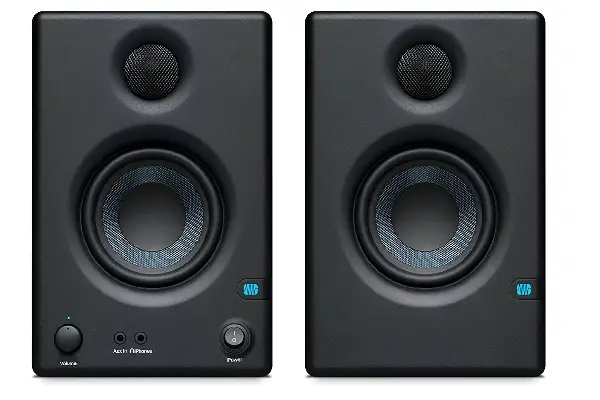
The PreSonus Eris E3.5 BT surprised me more than any monitor in this price bracket. When I first unboxed these 3.5-inch speakers, I honestly thought they’d be too small for serious work—but after mixing several projects on them during a studio renovation, I realized they punch well above their weight class. The Kevlar woven composite drivers deliver a midrange clarity that’s essential for vocal production, and the silk dome tweeters provide just enough air without becoming fatiguing during long sessions.
What makes these monitors special is their honest translation. Mixes that sound balanced on the E3.5 BT consistently translate well to other playback systems, which is ultimately what we’re all chasing. The front-panel volume control and headphone output make these incredibly practical for desktop setups, and the Bluetooth connectivity is genuinely useful for quick reference checks against commercial tracks. The acoustic tuning controls on the back panel aren’t just decorative either—the high and low frequency adjustments actually help you compensate for less-than-ideal room placement, though I’d still recommend proper positioning first.
The limitation here is low-end extension. These are 3.5-inch drivers, and physics is physics. You’re rolling off significantly below 80Hz, which means you’ll need to reference bass-heavy material on headphones or check it elsewhere. But for everything from midrange vocals to guitar tones to synth patches, these little monitors reveal detail that I’ve honestly missed on more expensive systems when I wasn’t listening critically.
Pros:
- Exceptionally clear midrange perfect for vocal mixing
- Compact footprint ideal for small studio spaces
- Front-panel controls make workflow adjustments quick
- Acoustic tuning switches help optimize for room placement
- Bluetooth connectivity adds reference listening flexibility
- Surprisingly loud for their size without distortion
Cons:
- Limited low-end extension requires headphone or subwoofer supplementation
- Smaller sweet spot demands careful listening position
- Bass port design requires some space from wall boundaries
- Bluetooth introduces latency for production work
JBL Professional 305P MkII: The Studio Standard Scaled Down
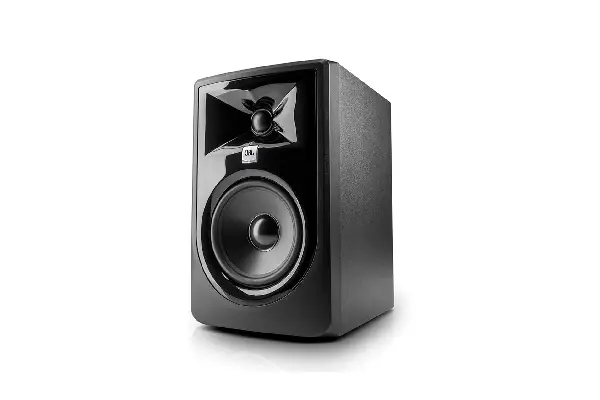
The JBL 305P MkII represents something special in budget monitoring—it’s essentially professional JBL engineering squeezed into an affordable package. After spending three months with these as my primary near-fields during a mix-heavy period, I can confidently say they offer the most neutral, uncolored sound I’ve experienced under $200. The 5-inch woofer and 1-inch tweeter combination creates a balanced presentation that doesn’t lie to you, which is exactly what monitoring is supposed to do.
JBL’s patented Image Control Waveguide technology isn’t marketing fluff—it genuinely creates a wider sweet spot than conventional designs. The boundary EQ controls (-2dB, 0dB, +2dB settings for both high and low frequencies) have become essential in my setup, helping me compensate for a less-than-ideal corner placement that room dimensions forced on me.
The build quality feels substantial—these aren’t the plasticky budget monitors of previous generations. The magnetic shielding means you can place them near computer screens without issues, and the slip-resistant rubber pads on the bottom keep them stable during bass-heavy playback. If I could change one thing, I’d add a front-panel volume control like the PreSonus offers, but that’s honestly a minor workflow preference rather than a real limitation.
Pros:
- Remarkably flat frequency response for honest mixing decisions
- Image Control Waveguide creates wider accurate listening area
- Boundary EQ controls help optimize for various placements
- Professional build quality that feels like it’ll last years
- Ample amplifier headroom prevents distortion at volume
- Excellent translation to consumer playback systems
Cons:
- Rear-panel volume control requires reaching behind monitors
- Requires careful placement away from walls despite EQ controls
- Slightly forward presence that takes brief acclimation period
- Heavier weight makes repositioning less convenient
Mackie CR4-X: The Multimedia Multitasker
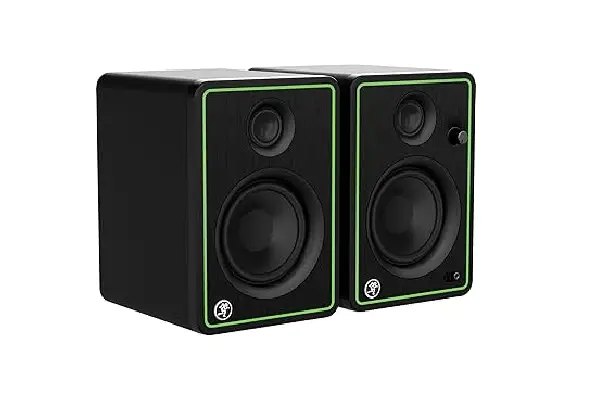
The Mackie CR4-X occupies an interesting space—they’re marketed as “multimedia monitors,” but after using them for actual production work, I’ve found they’re more capable than that label suggests. Yes, they have a slightly hyped low-mid response that makes casual listening enjoyable, but once you understand their character, you can make reliable mixing decisions. I’ve used these extensively when comparing headphones for reviews on our comparison tool, and their accuracy in the critical midrange helps identify sonic differences between models.
The front-panel features make the CR4-X incredibly practical for modern workflows. The volume knob is butter-smooth with a satisfying taper, and having an aux input alongside the main studio connections means you can quickly A/B reference tracks from your phone without cable swapping. The headphone output on the front is actually one of my favorite features—it automatically mutes the speakers when you plug in, making late-night production sessions neighbor-friendly without requiring an additional monitor controller.
The wood veneer finish looks considerably more expensive than these monitors cost, which matters if your studio doubles as a content creation space or if you simply appreciate aesthetics. The silk dome tweeters deliver smooth highs without the harshness some budget monitors exhibit, and the 4-inch polypropylene woofers provide surprisingly solid bass down to about 60Hz in my moderately treated room.
Pros:
- Front-panel controls and inputs streamline daily workflow
- Aesthetically appealing wood finish elevates studio’s appearance
- Smooth high-frequency response prevents listening fatigue
- Automatic speaker muting with headphone connection
- Predictable sonic character once you learn its tendencies
- Excellent value for multimedia and production hybrid use
Cons:
- A slight presence boost requires mixing compensation
- Bass response lacks extension for hip-hop and electronic genres
- Speaker cables fixed rather than detachable create cable management challenges
- Limited boundary controls for room optimization
Edifier R1280T: The Surprising Underdog
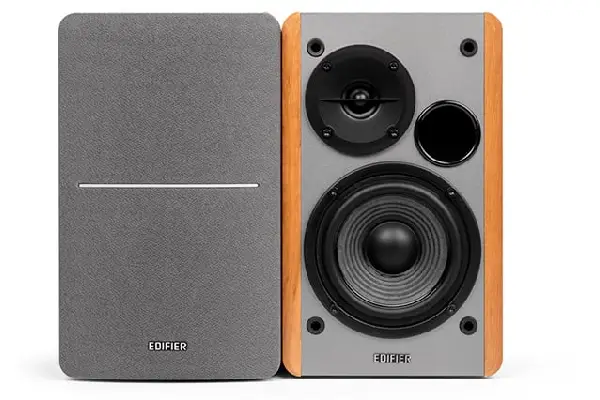
The Edifier R1280T when I first encountered them, they’re often marketed toward casual hi-fi listeners rather than producers. But after a friend mixed an entire EP on these while traveling, I borrowed a pair to understand what was happening. What I discovered was a monitor with surprisingly accurate midrange reproduction and a forgiving character that makes long mixing sessions genuinely comfortable. They’ve become my recommendation for producers who create diverse instrumental music and need to hear tonal balance clearly without spending hours fighting ear fatigue.
The analog controls feel refreshingly direct in an increasingly digital world. The dual RCA inputs on the back mean you can keep both your audio interface and a secondary source permanently connected, and the treble and bass adjustment knobs actually provide useful sonic shaping rather than just extreme boosts or cuts. I found the bass control particularly helpful for compensating when desk placement forced me to position these monitors closer to a wall than ideal—a subtle reduction brought the low end back into balance without killing the fullness.
The remote control inclusion might seem gimmicky, but I’ve grown to appreciate it more than expected. Being able to adjust volume from the listening position without breaking focus is actually valuable during critical listening sessions. The bookshelf-style design with removable grilles gives you acoustic options—I preferred them with grilles off for the slightly more direct high-frequency response, though your preferences and room characteristics might differ. At their price point, these represent exceptional value for someone building their first dedicated production space.
Pros:
- Warm midrange prevents fatigue during marathon sessions
- Remote control enables convenient volume adjustment from listening position
- Dual RCA inputs accommodate multiple source connections
- Bookshelf design blends into various studio aesthetics
- Forgiving sonic character helps evaluate harsh digital recordings
- Exceptional build quality for price point
Cons:
- Warm coloration requires conscious mixing adjustment
- No XLR or TRS inputs limits professional interface connectivity
- Fixed power cable complicates international use
- Bass and treble controls somewhat imprecise compared to digital EQ
Behringer Studio 50USB: The Feature-Packed Value Play
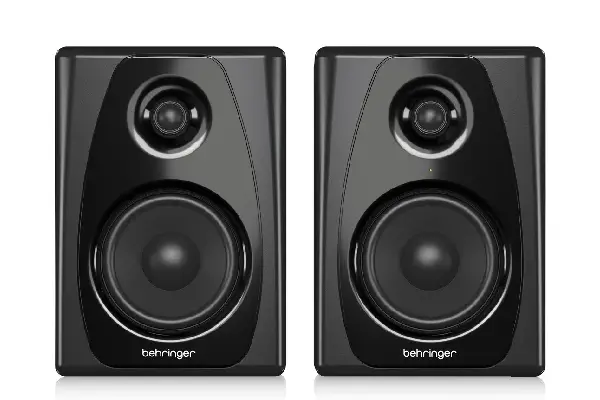
The Behringer Studio 50USB deserves attention for a specific reason—it’s the only monitor in this price range with integrated USB audio interfacing. While I wouldn’t call the onboard 2-in/2-out interface pro-quality, it’s perfectly adequate for someone just starting out, and having it integrated eliminates another purchase from your studio budget. I tested these extensively when setting up a secondary production station, and they delivered consistent results across genres from the indie rock tracks I mixed to the diverse songs I reference during production.
The 5-inch woofers provide more substantial bass response than the smaller monitors in this roundup, reaching down to approximately 50Hz in my room—low enough to make reasonable judgments about kick drum tuning and bass guitar balance without constantly reaching for headphones. The 3/4-inch silk dome tweeters offer smooth high-frequency extension without the exaggerated brightness some budget speakers exhibit. Behringer’s amplifier design provides 50 watts to the woofer and 20 watts to the tweeter per speaker, creating enough headroom that you never feel like you’re straining the electronics.
The included USB connectivity removes a significant barrier for beginners—you can literally connect these to a laptop and start producing without any additional gear. The bus-powered setup draws from computer USB power, though I found plugging into a powered hub improved overall stability during long sessions. The RCA and TRS inputs on the back accommodate professional and consumer gear alike, making these adaptable to various setups. While audiophiles might scoff at Behringer’s reputation, the reality is they’ve engineered genuinely competent monitors here that serve beginners well and remain useful even as supplementary speakers when you eventually upgrade.
Pros:
- Integrated USB audio interface eliminates separate purchase
- 5-inch woofers provide more substantial bass than smaller monitors
- Front-ported design allows greater placement flexibility
- Multiple input options accommodate various connectivity needs
- Solid stereo imaging reveals mix depth and panning clearly
- Exceptional feature set for entry-level price point
Cons:
- USB interface quality adequate but not exceptional
- Slightly colored response requires reference against other systems
- Build quality feels less premium than competing options
- USB audio occasionally glitches with specific computer combinations
Making Your Monitor Choice Work
The monitors I’ve recommended here all require proper placement to perform their best—even the most accurate speakers can’t overcome fundamental acoustic problems. I’ve learned through numerous setup iterations that getting monitors at ear height, forming an equilateral triangle with your listening position, and pulling them away from walls significantly improves what you hear. Simple acoustic treatment, even just bass traps in corners, reveals detail these monitors are already producing but room reflections were masking.
Understanding that no single monitor tells the complete truth has made me a better mixer. I regularly check mixes on my studio monitors, then listen through the earbuds I’ve compared, in my car, and on cheap phone speakers. This multi-reference approach compensates for any individual system’s limitations and builds confidence that your mixes translate everywhere. The monitors in this price range give you honest information in their frequency range—your job is knowing where their limitations are and checking those areas through other means.
The most important factor isn’t which monitor you choose from this list, but how well you learn the specific sound of your chosen monitors. I’ve heard great mixes created on objectively inferior speakers simply because the mixer knew intimately how their system translated. Spend time with whatever you purchase—mix on them, reference commercial tracks you know well on them, and gradually build that essential understanding of how your monitors present information. That knowledge becomes as valuable as the hardware itself.
Frequently Asked Questions
Do I really need studio monitors or can I just use regular speakers?
Studio monitors differ fundamentally from consumer speakers in their design philosophy—they’re engineered for accuracy rather than enhancement. After mixing on both, I’ve found that studio monitors reveal problems in your mix (harsh sibilance, muddy low-mids, imbalanced stereo field) that consumer speakers deliberately smooth over. Regular hi-fi speakers typically boost bass and treble to make everything sound immediately pleasing, which means you’ll overcorrect in the opposite direction during mixing. Your tracks might sound great in your studio but translate poorly everywhere else. Even budget studio monitors like these provide the neutral reference point you need for mixes that work across playback systems.
Should I buy a subwoofer to extend the bass of these monitors?
I held off on a subwoofer for years, and honestly, I’m glad I developed my mixing skills without one first. These monitors provide enough low-frequency information to make reasonable bass decisions, especially if you supplement with quality headphone checking. When you eventually add a subwoofer, you’ll appreciate it more and use it more effectively because you’ve already learned to work within constraints. That said, if you primarily produce bass-heavy genres like hip-hop, EDM, or modern pop, a subwoofer becomes more essential earlier in your journey. Just ensure you can properly integrate and calibrate it—a poorly configured subwoofer causes more problems than it solves.
How important is acoustic treatment compared to buying better monitors?
This is where I’ve learned expensive lessons—acoustic treatment improves your monitoring environment more dramatically than upgrading from $200 monitors to $500 monitors. I spent years fighting room reflections that colored what I heard, making consistent mixing decisions nearly impossible. Basic treatment (bass traps in corners, absorption at first reflection points) transformed my $150 monitors into tools I could actually trust. If you’re choosing between slightly better monitors and basic acoustic panels, buy the cheaper monitors and invest in treatment. You can upgrade monitors later, but no speaker overcomes terrible room acoustics.
Can I use these monitors for casual music listening too?
Absolutely, though your experience will differ from consumer speakers. Studio monitors initially sound somewhat flat or boring because they’re not hyping frequencies to create artificial excitement—they’re showing you what’s actually in the recording. After a week of listening, you start appreciating the honesty and detail, and going back to consumer speakers feels exaggerated and fatiguing. Many producers (myself included) exclusively use studio monitors for all listening because once you adjust to accurate sound, you don’t want to go back. The PreSonus and Mackie options are particularly enjoyable for casual listening while maintaining their professional utility.
How loud should I be monitoring while mixing?
I’ve found that most mixing should happen at conversational volume levels—around 70-85 dB at your listening position. All these monitors handle that level comfortably without distortion. The temptation to mix loud is real (everything sounds more impressive at volume), but it leads to ear fatigue, poor decision-making, and potentially hearing damage over time. I use loud listening for brief checks of how the mix holds together at volume and to verify bass information feels right, but the detailed work happens at moderate levels. Your ears stay fresher longer, you make better tonal decisions, and you protect your long-term hearing health.
Do I need monitor isolation pads or stands?
After testing with and without isolation, I’d say proper stands or substantial isolation pads significantly improve monitor performance, especially in the lower frequencies. Budget monitors often transmit vibrations into desks or furniture they’re sitting on, causing phase cancellation and muddy bass response. I noticed immediately clearer low-mids and tighter bass when I moved my monitors from direct desk placement to proper isolation. You don’t need expensive solutions—dense foam pads or basic desktop stands make a meaningful difference. Position them so tweeters aim at your ears when you’re seated, and you’ve optimized your monitoring situation considerably without breaking your budget.