

The studio monitors you choose become your most trusted reference point for every mix decision, every EQ tweak, and every compression adjustment you make. I’ve spent countless hours comparing frequency responses, testing transient reproduction, and yes, making plenty of mixing mistakes that taught me exactly what to listen for in a great pair of monitors. Whether you’re producing electronic music, tracking live instruments, or mixing podcasts, the monitors I’m sharing here have proven themselves in actual home studio environments where acoustic treatment is limited and neighbors exist.
| Model | Key Strengths | Key Weaknesses | Best For |
|---|---|---|---|
| Yamaha HS8 | • Exceptional midrange clarity• Honest, revealing frequency response• 8-inch woofer gives real low-end (38Hz)• Room control + high trim switches | • Very revealing—may discourage beginners• Large size requires space• Bass can overwhelm untreated rooms• Needs proper cables/placement | Engineers wanting honest mixes that translate well across systems |
| KRK Rokit 5 G4 | • DSP room correction with app/mic• Front port allows flexible placement• Wider sweet spot than older models• Motivating yet accurate sound• Excellent value | • DSP setup takes time• Slightly hyped low-mids• 5-inch woofer limited for deep bass genres• Features may be overkill for beginners | Producers needing intelligent room correction and flexible placement in small rooms |
| Adam Audio T7V | • Ribbon tweeter = excellent high-frequency detail• Natural midrange and strong imaging• Performs well at low volumes• Balanced sound with minimal EQ needed | • Rear-ported, needs space from walls• 7-inch woofer may lack deep sub-bass• Ribbon tweeter exposes harsh recordings• Less common in US studios | Mixers who value detailed highs, imaging, and accurate vocals/instruments |
| JBL 306P MkII | • Wide sweet spot (Image Control Waveguide)• Surprisingly strong low end• Clear at low volumes (apartment-friendly)• Great price-to-performance ratio | • Rear port needs wall distance• Build feels less premium• Needs isolation pads for best results• Limited aesthetic options | Beginners or producers wanting pro performance on a tight budget |
| PreSonus Eris E5 XT | • Extensive acoustic tuning options• Smooth, non-fatiguing highs• Multiple input options (XLR/TRS/RCA)• Focused center imaging | • Slightly “polite” sound may hide mix issues• 5.25” woofer lacks deep bass• Tuning requires experimentation• Less detailed highs vs ribbon tweeters | Home studios needing strong tuning controls for difficult rooms |
Yamaha HS8 – The Honest Reference That Changed Home Mixing
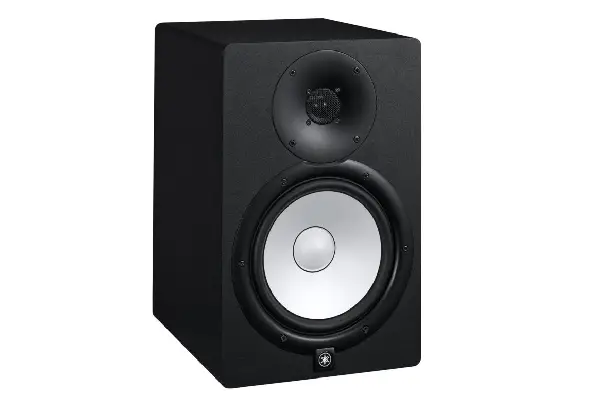
The Yamaha HS8s 8-inch woofer monitors have become legendary in home studios for one simple reason: they reveal the truth about your mix without sugar-coating anything. The white cone design isn’t just distinctive aesthetically; it’s a bi-amplified system that delivers 75 watts to the woofer and 45 watts to the tweeter, creating a powerfully accurate representation across the frequency spectrum.
What makes the HS8s particularly valuable for home studios is their room control and high trim response controls on the back panel. The bass response extends down to 38Hz, which means you’re getting genuine low-end information without needing a subwoofer for most mixing tasks. The slightly forward midrange presentation takes some adjustment if you’re coming from consumer speakers, but this is exactly what helps you make better vocal and instrument balance decisions. After working with these monitors extensively, mixes translate remarkably well to cars, earbuds, and other playback systems—which is ultimately the entire point of accurate monitoring.
Pros:
- Exceptional midrange clarity for vocal and instrument mixing
- Room control features adapt to different acoustic environments
- Honest frequency response reveals mix issues clearly
- 8-inch woofer provides genuine low-end extension without subwoofer
- Industry-standard reference sound that translates well across systems
Cons:
- Revealing nature can be initially discouraging for developing engineers
- Requires quality amplification and balanced cables for best performance
- Larger footprint demands adequate desk space and proper positioning
- Bass response can overwhelm smaller, untreated rooms
KRK Rokit 5 G4 – The Home Studio Workhorse with Modern Intelligence
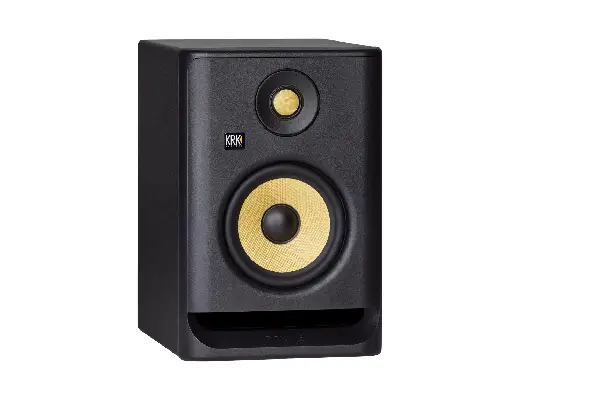
The fourth generation of KRK’s Rokit series brought substantial improvements that addressed many criticisms of earlier versions, and I’ve been genuinely impressed with how these perform in typical home studio scenarios. The built-in DSP-driven room correction system represents a significant evolution—using the included measurement microphone and smartphone app, these monitors actually analyze your room and adjust their response accordingly. I’ve set these up in a room with problematic bass nodes, and the room correction made an immediately audible difference in how evenly the low end responded across the frequency range.
The 5-inch Kevlar woofer delivers a surprisingly robust low end that extends to 43Hz, and the front-firing bass port design gives you more placement flexibility than rear-ported monitors (which need significant space from walls). KRK redesigned the waveguide on the G4 series to improve the sweet spot, and I’ve noticed these maintain their imaging better when you move around compared to earlier Rokit generations. The bi-amped system provides 55 watts total, which is plenty for near-field monitoring in home environments. For producers working on contemporary genres who want monitors that sound exciting without being deceptive, the Rokit 5 G4s strike an excellent balance. The LCD screen on the back provides visual feedback for all settings, which sounds gimmicky but actually makes adjustments much easier than memorizing switch positions.
Pros:
- Built-in DSP room correction adapts to your specific space
- Front-firing port allows flexible placement near walls
- Improved sweet spot and imaging over previous generations
- Motivating sound signature while maintaining accuracy
- Excellent value for features and performance offered
Cons:
- Room correction setup requires smartphone and additional time investment
- Slightly hyped low-mids may require conscious mixing compensation
- 5-inch woofer has limitations for genres requiring deep sub-bass monitoring
- DSP features may be overkill for users seeking purely passive monitoring
Adam Audio T7V – European Precision for American Home Studios
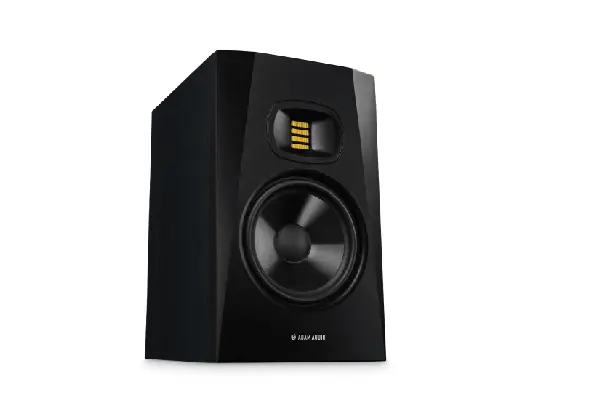
Adam Audio brought their decades of professional monitor experience down to an accessible price point with the T Series, and the T7V represents the sweet spot of that lineup. The U-ART (Accelerated Ribbon Technology) tweeter is a simplified version of the ribbon tweeters found in Adam’s high-end monitors, and it delivers an extended high-frequency response up to 25kHz with remarkable detail. I’ve found this particularly valuable when working with acoustic instruments and vocals—the air and presence frequencies have a natural, unexaggerated quality that helps you make subtle EQ decisions with confidence.
The 7-inch polypropylene woofer is designed with a High Frequency Propagation (HFP) feature that extends its range upward to blend more seamlessly with the tweeter, creating a cohesive soundstage. With 50 watts powering the woofer and 20 watts for the tweeter, these monitors deliver clear, dynamic sound even at lower volumes—which is crucial for home studios where you can’t always monitor at professional levels. The rear-panel controls include high and low shelf filters that help you adapt to room acoustics, though the T7Vs sound remarkably balanced even without adjustment in moderately treated spaces. The stereo imaging is particularly impressive; instruments occupy distinct spatial positions in the mix without sounding artificially separated. If you’re looking to understand what European monitor design philosophy brings to the table compared to more common American or Asian alternatives, the T7V provides an excellent introduction at a reasonable investment.
Pros:
- Ribbon tweeter delivers exceptional high-frequency detail and extension
- Natural, uncolored midrange reproduction for accurate instrument timbre
- Impressive stereo imaging and soundstage depth
- Performs well at lower monitoring volumes for apartment-friendly mixing
- Coherent frequency response requires minimal room correction
Cons:
- Rear-ported design requires careful placement away from walls
- 7-inch woofer may need subwoofer support for bass-heavy genres
- Ribbon tweeter may reveal harsh recordings more than dome tweeters
- Less common in American studios, potentially affecting mix translation references
JBL 306P MkII – Surprising Performance from a Budget Champion
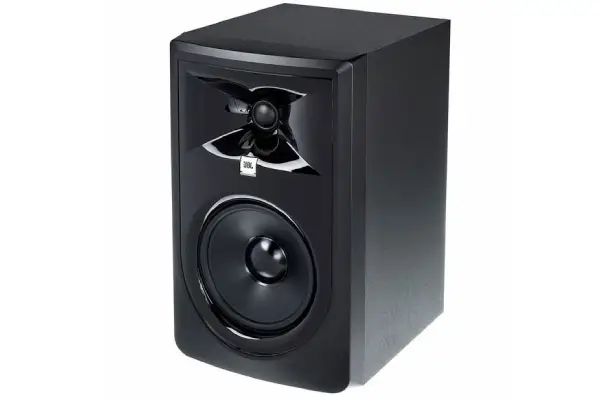
Don’t let the accessible price point fool you—the JBL 306P MkII punches well above its weight class and has become my go-to recommendation for producers just starting to build a serious home studio. These monitors incorporate waveguide technology derived from JBL’s professional cinema and touring systems, creating an impressively wide sweet spot that forgives less-than-perfect positioning. The Image Control Waveguide design ensures that the 6.5-inch woofer and 1-inch dome tweeter remain coherent across a broad listening area, which is particularly valuable in home studios where acoustic treatment and precise positioning may be limited.
The 56-watt woofer amplifier and 28-watt tweeter amplifier create a punchy, dynamic presentation that translates particularly well for electronic music, hip-hop, and rock productions. What makes these monitors special for home studio applications is how they maintain clarity even when you’re monitoring at lower volumes during late-night sessions. The boundary EQ controls on the rear panel help you compensate for placement near walls or corners, adding versatility for different room configurations. These monitors have gained a cult following among bedroom producers for good reason—they provide genuine professional monitoring capability without requiring you to choose between paying rent and upgrading your studio. For anyone exploring different approaches to music production techniques across various genres, having accurate monitors at this price point opens up creative possibilities that simply weren’t accessible to home producers a decade ago.
Pros:
- Exceptional value proposition with professional-grade performance
- Wide sweet spot forgives imperfect positioning and room acoustics
- Powerful bass response from 6.5-inch woofer without muddiness
- Maintains clarity at lower volumes for apartment-friendly production
- Boundary EQ controls adapt to various placement scenarios
Cons:
- Rear port requires some space from walls for optimal performance
- Build quality feels less premium than higher-priced competitors
- May benefit from isolation pads to reduce desk vibration transmission
- Limited aesthetic options compared to more style-conscious brands
PreSonus Eris E5 XT – The Acoustic Tuning Powerhouse
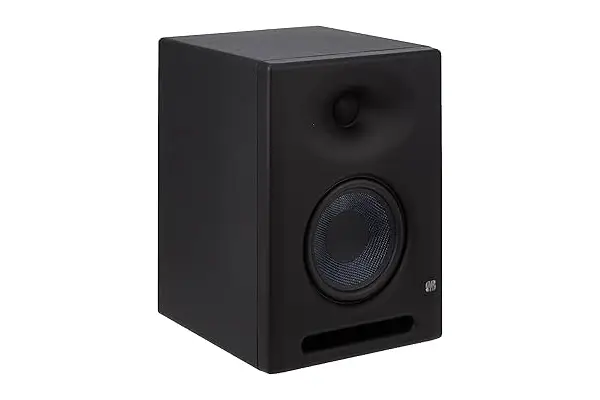
PreSonus designed the Eris E5 XT with home studios specifically in mind, and the extensive acoustic tuning controls on the rear panel reflect that focus. These monitors provide high and low frequency adjustments, midrange presence controls, and acoustic space settings that help you compensate for everything from corner placement to wall proximity. I’ve found these controls genuinely useful rather than gimmicky—the ability to tame the midrange slightly helped these monitors work in a particularly reflective room where other monitors sounded harsh and fatiguing.
The 5.25-inch woven composite woofer delivers a tight, controlled bass response down to 48Hz, and the 1-inch silk dome tweeter provides smooth high-frequency reproduction that doesn’t fatigue your ears during extended mixing sessions. The custom-designed wave guide helps maintain coherent imaging between the drivers, creating a focused center image that’s particularly valuable when mixing vocals or lead instruments. With 80 watts of Class AB bi-amplification, these monitors have plenty of headroom for dynamic material and can fill a typical home studio room without strain. I’ve appreciated how the Eris E5 XT presents a slightly polite perspective compared to more brutally honest monitors—they’re accurate enough to make good mixing decisions but forgiving enough that you don’t dread turning them on. For engineers who also need to do client playback or produce content that requires extended listening sessions, this balance between accuracy and listenability proves valuable. The inclusion of balanced XLR, balanced TRS, and unbalanced RCA inputs means these monitors easily integrate with any interface or audio setup you’re likely to encounter in a home studio environment.
Pros:
- Extensive acoustic tuning controls adapt to challenging room environments
- Smooth, fatigue-free sound signature for extended mixing sessions
- Multiple input options accommodate various studio configurations
- Coherent imaging with focused center soundstage
- Excellent balance between accuracy and musical enjoyment
Cons:
- Slightly polite presentation may mask harshness in mixes
- 5.25-inch woofer provides limited deep bass extension
- Acoustic space controls require experimentation to optimize
- Less detailed high-frequency reproduction compared to ribbon tweeter designs
Understanding Studio Monitor Placement and Your Room
The monitors you choose represent only half of the monitoring equation—how you position them and treat your room determines whether you’ll actually hear their true performance. I’ve heard expensive monitors sound terrible in poorly treated rooms and budget monitors deliver surprisingly good results when properly positioned with basic acoustic treatment. The fundamental principle is creating an equilateral triangle between your listening position and each monitor, with the tweeters at ear height when you’re seated at your production desk.
Most home studios benefit from placing monitors away from walls and corners when possible, as boundary reinforcement can cause excessive bass buildup that skews your mixing decisions. If wall proximity is unavoidable (as it often is in home environments), using the room correction controls found on many modern monitors helps compensate for these acoustic challenges. I’ve found that even basic acoustic treatment—absorption panels at the first reflection points on side walls and bass traps in corners—makes a more dramatic improvement than upgrading to more expensive monitors in an untreated room. When comparing different monitoring options for your setup, remember that the interaction between monitors and your specific room creates the sonic signature you’ll actually mix with.
The size of your room should influence monitor selection as well. Larger woofers (7-8 inches) provide extended bass response but can overwhelm smaller rooms, creating bass nodes and standing waves that make accurate low-end mixing nearly impossible. In rooms smaller than 10×12 feet, 5-inch monitors often provide better results because they don’t excite as many problematic room modes. I’ve mixed in various spaces, and I’ve learned that matching monitor size to room volume prevents more mixing problems than choosing the most expensive monitors without considering this relationship.
The Role of Monitor Controllers and Audio Interfaces
The signal path feeding your studio monitors significantly impacts what you ultimately hear, and I’ve been surprised by how much difference a quality audio interface makes to monitor performance. Your interface’s digital-to-analog converters and output amplifier stages directly affect the clarity, dynamic range, and noise floor of what reaches your monitors. I’ve heard the same monitors sound noticeably different when fed by budget interfaces versus professional converters, with improvements in stereo imaging, low-level detail, and transient reproduction.
A dedicated monitor controller provides valuable features beyond simple volume control—features like mono summing (essential for checking mix compatibility), dim functions (for quickly reducing volume during conversations), and multiple source switching become part of your daily workflow. I’ve found that being able to quickly switch between different monitoring levels helps prevent ear fatigue and allows you to hear mix balance from different perspectives. Some engineers prefer passive monitor controllers that don’t introduce any electronics into the signal path, while others appreciate the features and convenience of active controllers with built-in D/A conversion. For home studio applications where you’re likely monitoring at moderate volumes rather than pushing systems to their limits, either approach works well as long as you’re using quality components. When evaluating different audio equipment for your production setup, consider the entire signal chain rather than focusing exclusively on monitors in isolation.
Studio Monitor Myths and Real-World Mixing
The internet contains plenty of monitor mythology that doesn’t hold up to practical experience, and I’ve fallen for some of these misconceptions myself over the years. The most persistent myth is that you need absolutely flat frequency response for accurate mixing—but perfectly flat monitors don’t exist, and even if they did, your room would color the sound anyway. What matters is consistency; learning how your monitors present different frequency ranges and how your mixes translate to other systems. I’ve made professional-sounding mixes on modest monitors after learning their characteristics, and I’ve heard terrible mixes made on expensive “flat” monitors by engineers who didn’t understand their tools.
Another common misconception is that bigger monitors automatically sound better. Larger woofers provide extended bass response, but in untreated home studios, this extra bass often creates more problems than it solves. The bass you hear includes both the monitor’s output and your room’s acoustic response, and larger monitors excite more room modes in smaller spaces. I’ve achieved better bass accuracy with 5-inch monitors in a moderately treated bedroom than with 8-inch monitors in the same space, simply because the smaller monitors didn’t overload the room’s limited acoustic capabilities.
The “monitors need to sound bad” philosophy—the idea that monitors should be brutally revealing and unpleasant to encourage better mixing—doesn’t align with my experience or the practices of successful mix engineers. Accurate monitors should reveal problems in your mix without making well-recorded, well-arranged music sound unpleasant. If your monitors make professionally mixed reference tracks sound bad, that’s a sign of monitor inaccuracy or room problems, not superior revealing capability. The best monitors for home studios provide honest feedback while remaining musical enough that you want to spend time with them. When exploring various mixing approaches and techniques for different musical styles, having monitors you enjoy working with encourages the extended listening sessions necessary to develop critical listening skills.
Frequently Asked Questions About Studio Monitors for Home Studios
What size studio monitors should I choose for a small bedroom studio?
For bedrooms and smaller home studios (typically under 150 square feet), 5-inch monitors generally provide better results than larger options. The smaller woofers don’t excite as many problematic low-frequency room modes, giving you more accurate bass response in untreated or minimally treated spaces. I’ve mixed in 10×12 foot bedrooms where 5-inch monitors delivered clearer, more reliable bass information than 7 or 8-inch models in the same room. If you primarily produce bass-heavy music and feel limited by 5-inch monitors, adding a quality subwoofer with proper calibration provides better results than jumping to larger monitors that overload your room. The listening distance also matters—in near-field setups where monitors are 3-4 feet from your ears, 5-inch drivers provide adequate volume and dynamic range for critical mixing decisions.
Do I need a subwoofer with my studio monitors?
Whether you need a subwoofer depends on your musical genres, room size, and monitor selection. I’ve found that 7-8 inch monitors in properly sized rooms (roughly 150+ square feet) provide sufficient low-end extension for most mixing tasks, reaching into the 35-45Hz range where fundamental bass energy lives. However, if you’re producing electronic music, hip-hop, or other bass-heavy genres with substantial sub-bass content below 40Hz, a subwoofer helps you hear and control those frequencies accurately. The challenge with subwoofers in home studios is placement and room integration—poorly positioned or calibrated subwoofers create more problems than they solve. I’ve heard many home studios where the subwoofer was too loud or poorly crossed over, leading to bass-heavy mixes that sound thin on normal playback systems. If you decide to add a subwoofer, invest time in proper calibration using measurement tools and pink noise to ensure the subwoofer integrates seamlessly with your monitors.
Should I buy two different sets of monitors for comparison?
Having multiple monitor references can be valuable, but I’d prioritize getting one quality set of monitors and treating your room before investing in a second set. Professional mix engineers often use multiple monitors to check how mixes translate across different perspectives, but this practice is most valuable after you’ve deeply learned your primary monitors’ characteristics. The exception is adding a small pair of consumer-level speakers (often called “grotboxes” in professional studios) to check how your mix sounds on typical computer or TV speakers. A modest set of multimedia speakers reveals midrange balance and how your mix performs with limited frequency extension, complementing rather than replacing your primary studio monitors.
How loud should I monitor when mixing in a home studio?
Monitoring at modest levels—typically around 75-85 dB SPL—provides the most accurate perspective for mixing decisions and protects your hearing during extended sessions. I’ve learned that mixing too loud creates several problems: your ears fatigue quickly, your perception of frequency balance shifts (the Fletcher-Munson curves mean we hear bass and treble as relatively quieter at lower volumes), and you lose perspective on how your mix sounds at the levels most people actually listen. Many home studio producers mix too loud because untreated rooms sound more balanced at higher volumes (the direct sound from monitors overpowers room reflections), but this creates mixes that sound thin and harsh at normal listening levels. Using a SPL meter or measurement app helps you maintain consistent monitoring levels and avoid the gradual volume creep that naturally occurs during extended sessions.
Can I use studio monitors without acoustic treatment in my home studio?
You can certainly use studio monitors without extensive acoustic treatment, and most home studio producers work with limited or modest treatment rather than comprehensive acoustic design. However, even basic acoustic treatment—particularly bass traps in corners and absorption panels at first reflection points—makes a substantial difference in what you hear from your monitors. I’ve heard the same monitors sound dramatically different between untreated and modestly treated rooms, with improvements in bass accuracy, stereo imaging, and overall clarity. If you’re just starting out, I’d recommend allocating budget for both decent monitors and basic acoustic treatment rather than buying the most expensive monitors and using them in a completely untreated room. The improvement from basic treatment in a typical bedroom studio is more noticeable than the difference between mid-level and high-end monitors in many cases. Simple solutions like placing your monitors on stands rather than directly on your desk, adding thick curtains over windows, and positioning your listening setup away from parallel wall centers all help without requiring expensive acoustic products. When researching different approaches to building your studio setup, remember that the acoustic environment shapes what you hear just as much as the monitors themselves do.