

The right studio desk transforms how you interact with your gear. It positions your monitors at the optimal listening height, keeps your MIDI controllers within arm’s reach, manages cable chaos, and provides a stable platform for those late-night mixing sessions. I’ve tested dozens of studio desks over the years, from budget-friendly options to professional-grade workstations, and I’ve come to appreciate the nuances that separate a mediocre setup from one that genuinely enhances your creative process.
In this comprehensive guide, I’m sharing my top five studio desk recommendations based on extensive hands-on experience. Whether you’re producing electronic music, recording live instruments as discussed in our instruments section, or mixing tracks you’ve been discovering in our songs category, these desks will elevate your production environment.
| Desk | Best For | Key Strengths | Main Limitations |
|---|---|---|---|
| Output Platform Desk | Producers who want a premium, ergonomic all-in-one workstation | Built-in 4U rack at arm’s reach, three-tier monitor stand, excellent cable management, strong build quality | Expensive, large footprint, heavy and time-consuming to assemble, fixed width |
| Studio RTA Producer Station | Budget-conscious home producers who still need rack space | Smooth sliding keyboard tray, 12-space rack bay, compact size, good value | Cable management is basic, glass surface feels less premium, monitor height needs adjustment |
| Omnirax Presto Studio Desk | Hybrid producers with lots of gear and large controllers | Massive 88-inch surface, deep 88-key keyboard tray, monitor bridge with storage, pro-grade build | Very large and heavy, expensive, complex to assemble, takes lots of room |
| Studio Trends 30-inch Desk | Small rooms, minimalist or laptop-based producers | Ultra-compact, affordable, lightweight, built-in 2U rack, easy to move | Very limited space, only 2U rack, not suitable for large setups |
| Zaor Miza M | Professional mixing engineers who value sound, ergonomics, and aesthetics | Solid wood build, acoustically angled monitor shelf, modular design, elegant cable management | Very expensive, heavy, complex assembly, requires large studio space |
Output Platform Desk
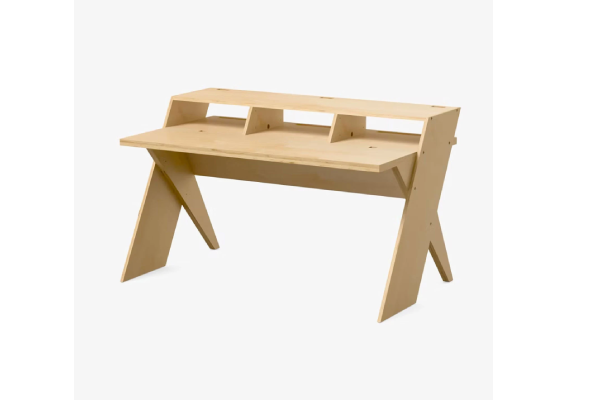
The Output Platform Desk has become something of a legend in bedroom and professional studios alike, and after using one for over two years, I completely understand why. This isn’t just furniture—it’s a thoughtfully engineered workspace designed by people who clearly understand modern production workflows.
The genius of this desk lies in its modularity and thoughtful details. The 4U rack bay positioned at arm’s length has become indispensable for my audio interface, preamps, and monitor controller. Instead of bending down to adjust input gain or headphone levels like I did with my previous setup, everything sits at the perfect ergonomic position. The integrated three-tier stand elevates my monitors to exactly ear height when I’m seated, creating an ideal listening triangle without requiring separate monitor stands that eat up desk space.
Cable management on the Platform is exceptional. The desk features a full-width rear tray that keeps power cables, audio cables, and MIDI connections organized and out of sight. After years of fighting cable spaghetti with zip ties and prayers, having a dedicated management system built into the desk feels luxurious. The strategically placed cutouts allow cables to route exactly where you need them without the usual wrestling match.
The work surface provides ample room for my keyboard controller, drum pad, and laptop while still leaving space for notebooks, coffee, and those random pieces of gear that somehow accumulate during sessions. I particularly appreciate the slight elevation of the monitor platform—it creates a visual separation between my workspace and listening position that helps me mentally shift between tracking and mixing modes.
One aspect I didn’t fully appreciate until extended use is how the desk’s design encourages better posture. The keyboard tray positions my MIDI controller at an ideal height, reducing shoulder tension during long sessions. My monitor placement is now consistent every time I sit down, which means my ears have developed reliable references for how mixes should sound in this position (similar to how you develop preferences when you compare headphones for mixing).
Pros:
- Exceptional build quality with solid wood and steel construction that eliminates wobble
- Integrated 4U rack bay puts essential gear at perfect ergonomic height
- Three-tier monitor stand creates optimal listening position without external stands
- Comprehensive cable management system keeps workspace clean and professional
- Modular design allows configuration adjustments as your studio evolves
- Generous work surface accommodates multiple controllers and accessories
Cons:
- Premium price point may stretch budgets for beginner producers
- Substantial footprint requires dedicated studio space (not ideal for tiny bedrooms)
- Assembly requires two people and several hours for proper setup
- Fixed width doesn’t accommodate ultra-wide multi-monitor setups without modifications
Studio RTA Producer Station
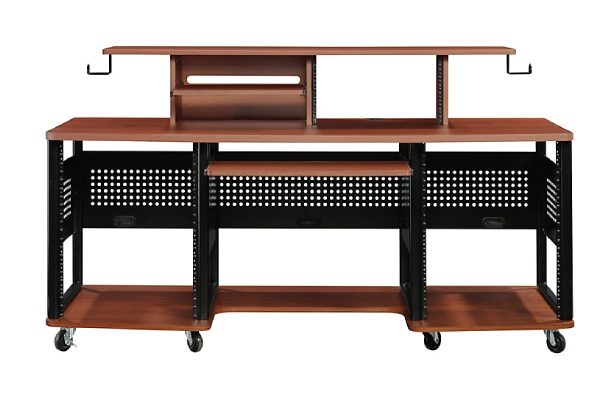
The Studio RTA Producer Station represents that sweet spot where affordability meets genuine functionality, making it an excellent choice for producers who need professional features without the boutique price tag. I recommended this desk to a friend setting up his first serious home studio, and after watching his workflow transform, I spent several weeks testing one myself to understand its strengths and limitations.
The sliding keyboard tray is a feature I’ve grown to deeply appreciate. Unlike many budget desks where the keyboard shelf feels like an afterthought, this one glides smoothly and locks securely at your preferred position. During tracking sessions when I’m playing keyboard parts, I pull it out for optimal playing position. When I’m mixing and need mouse access, I slide it back to create more desk space. This flexibility adapts to different workflow phases in ways fixed-surface desks simply can’t.
The integrated 12-space rack bay is positioned on the right side, which works perfectly for my workflow (though left-handed producers might find this less ideal). I’ve loaded it with my audio interface, patch bay, and effects processors, and having everything visible and accessible at arm’s reach has significantly reduced the friction in my creative process. No more crawling under desks to patch in a compressor or adjust interface settings.
Cable management on the Producer Station is adequate rather than exceptional. There are grommets for routing cables through the work surface, and a rear panel helps conceal cable runs, but it doesn’t approach the comprehensive system found on more expensive desks. I spent an afternoon with velcro straps and cable channels to properly organize everything, but once sorted, it stays tidy.
The monitor shelf elevates speakers to a reasonable height, though I found I needed to add small isolation pads underneath to achieve perfect ear-level positioning for my seated position. The shelf is deep enough to accommodate most nearfield monitors and provides a stable platform that doesn’t transmit vibrations back through the desk structure.
Pros:
- Excellent value proposition delivers professional features at accessible price point
- Smooth sliding keyboard tray adapts to different workflow requirements
- Integrated 12-space rack bay keeps gear organized and accessible
- Tempered glass surfaces are surprisingly durable and easy to clean
- Reasonable footprint fits in smaller studio spaces without overwhelming the room
- Assembly is straightforward and manageable for one person
Cons:
- Glass surfaces may feel less premium than solid wood alternatives
- Cable management requires additional accessories for truly clean setup
- Slight flex during aggressive keyboard playing compared to heavier desks
- Rack bay position on right side may not suit all workflow preferences
- Monitor shelf may require additional risers for optimal listening height
Omnirax Presto Studio Desk
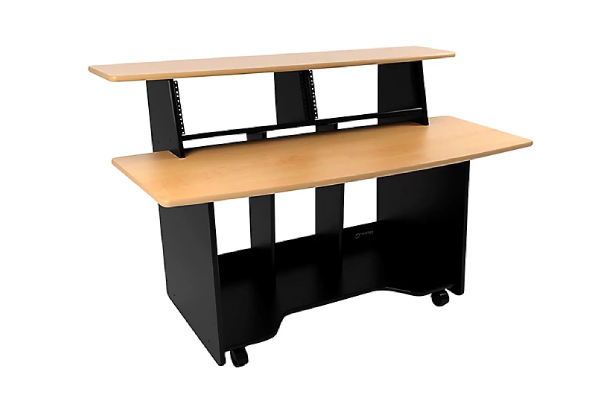
The Omnirax Presto entered my studio during a period when I was transitioning from primarily electronic production to incorporating more live recording, and I needed a desk that could accommodate both workflows without compromise. After eighteen months with the Presto, it’s become clear that Omnirax understands the specific demands of hybrid production environments.
The immediately noticeable feature is the Presto’s spacious work surface. At 88 inches wide, this desk provides genuinely expansive real estate for multiple keyboards, controllers, and the inevitable collection of gear that accumulates during active sessions. I can comfortably set up a 61-key controller, drum pads, a laptop, and still have room for lyric sheets and coffee without playing Tetris with my equipment. For producers who work on multiple projects simultaneously or collaborate with other musicians in the space, this room to breathe is invaluable.
The sliding keyboard tray on the Presto is notably deep and robust compared to many competitors. It accommodates my full-size 88-key controller without overhanging, and the soft-close mechanism prevents the jarring slam that cheaper trays produce. I appreciate being able to position the keyboard at the ideal ergonomic height separate from the main work surface—it reduces forearm strain during extended playing sessions.
Monitor placement on the Presto deserves special mention. The bridge design positions speakers at an excellent height while creating useful storage underneath for audio interfaces, headphone amps, or smaller controllers. The bridge shelf is deep enough that monitors sit stable and secure, and there’s sufficient room behind them for proper speaker breathing space. I’ve noticed improved clarity in my monitoring since switching to this desk, partly because the consistent positioning has allowed my ears to develop reliable references.
Cable management is handled through multiple rear access panels and routing channels. It’s not the most elegant system I’ve encountered, but it’s practical and effective. I spent an evening organizing cables when I first set up the desk, and maintenance has been minimal since then. The rear panels provide easy access when I need to reconfigure connections without requiring complete cable management reconstruction.
Pros:
- Expansive 88-inch work surface accommodates extensive gear collections
- Configurable rack rail system adapts to individual workflow requirements
- Robust sliding keyboard tray accommodates full-size 88-key controllers
- Monitor bridge creates optimal speaker positioning with storage underneath
- Professional-grade construction ensures long-term durability and stability
- Laminated surfaces resist damage from the inevitable studio wear and tear
Cons:
- Substantial width requires dedicated studio room with adequate space
- Premium construction comes with correspondingly premium pricing
- Assembly is complex and definitely requires two people minimum
- Cable management system is functional but not as refined as some competitors
- Weight makes repositioning or studio rearrangement a significant undertaking
Studio Trends 30-inch Studio Desk
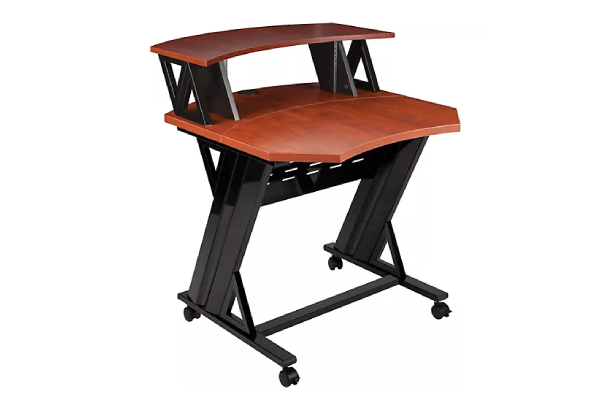
Sometimes less is genuinely more, and the Studio Trends 30-inch desk proves this philosophy. I initially brought this compact desk into my studio as a secondary workspace for a specific project, but it’s become my go-to recommendation for producers working in genuinely tight spaces or those who prefer minimalist setups focused on in-the-box production.
The 30-inch width might sound limiting, but Studio Trends has maximized every inch with thoughtful design choices. The main work surface comfortably accommodates a compact MIDI controller, laptop, and audio interface with enough remaining space for notebooks and immediate-access gear. For producers who work primarily with software instruments and virtual effects rather than extensive hardware collections, this footprint provides everything necessary without the spatial waste common in larger desks.
The integrated 2U rack space is positioned intelligently below the main work surface, providing accessible gear mounting without consuming precious desktop real estate. I’ve seen producers mount their audio interface here for easy access to input controls, while others use it for headphone amplifiers or MIDI interfaces. The positioning means you can reach rack gear without awkward reaching or leaving your seated position.
The desk’s portability is an unexpected benefit. I’ve moved it between rooms several times, and it’s light enough to reposition without recruiting helpers. For producers who might need to relocate studios or reconfigure spaces, this flexibility matters more than you might initially consider (much like how some producers prefer compact solutions when they compare earbuds for mobile production work).
Pros:
- Compact 30-inch footprint fits genuinely tight spaces without compromise
- Two-tier design maximizes vertical space efficiency
- Integrated 2U rack space provides accessible gear mounting
- Accessible pricing makes professional furniture available to budget-conscious producers
- Lightweight construction allows easy repositioning and studio reconfiguration
- Forces intentional gear choices that can actually improve workflow focus
Cons:
- Limited work surface may feel restrictive for producers with extensive hardware
- Two-tier design limits dual-monitor computer setups
- Compact footprint provides less overall stability than larger, heavier alternatives
- Rack space limited to 2U restricts gear expansion possibilities
- May outgrow the desk as studio and production needs expand
Zaor Miza M
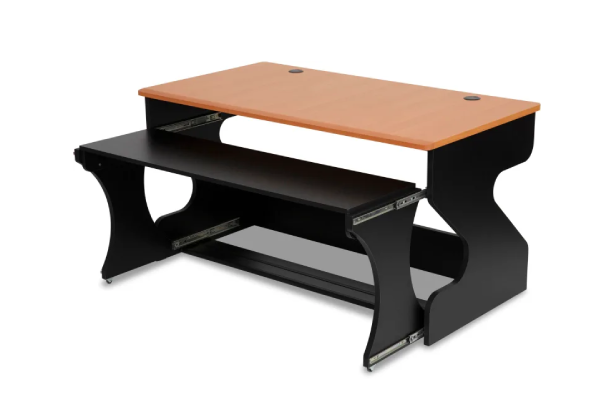
The Zaor Miza M represents European design sensibility applied to studio furniture, and after experiencing one in a professional mixing studio and subsequently setting one up for extended testing, I understand why it’s become a favorite among mix engineers and producers who prioritize both function and aesthetics.
What immediately distinguishes the Miza M is its beautiful construction. Zaor uses solid wood throughout, and you can feel the difference immediately compared to laminated or veneered alternatives. The precision German engineering is evident in every joint, every alignment, and every surface finish. This isn’t furniture that apologizes for its presence—it’s a centerpiece that elevates the entire studio aesthetic while delivering serious functional benefits.
The ergonomics of the Miza M reflect deep understanding of mixing workflows. The main work surface positions at a height that accommodates comfortable mousing and keyboard work, while the integrated monitor platform elevates speakers to the critical ear-level position for accurate stereo imaging. I’ve noticed that the precise 15-degree upward angle of the monitor platform helps reduce early reflections from the desk surface, creating cleaner stereo imaging. This isn’t just furniture—it’s acoustically informed design.
One consideration is the assembly complexity. Zaor desks arrive as component systems that require careful assembly, and I’d strongly recommend professional installation or at minimum having experienced hands helping. The precision engineering means components fit together beautifully when properly aligned, but achieving that alignment requires patience and attention to detail.
Pros:
- Premium solid wood construction delivers exceptional build quality and longevity
- Ergonomically optimized design supports healthy posture during extended sessions
- Modular system allows extensive customization to individual workflows
- Acoustically informed monitor platform positioning improves stereo imaging accuracy
- Elegant cable management maintains professional aesthetic while ensuring functionality
- Beautiful design elevates studio environment into inspiring creative space
Cons:
- Premium pricing positions it beyond reach for many home studio budgets
- Complex assembly requires experience, patience, or professional installation
- Substantial footprint demands dedicated studio space with adequate square footage
- Weight makes repositioning or studio reconfiguration a significant undertaking
- May be overbuilt for producers who frequently change or upgrade studio layouts
FAQ
How much should I spend on a studio desk for music production?
Studio desk budgets should align with your overall studio investment and production goals. For beginners establishing their first dedicated workspace, desks in the $300-$600 range like the Studio RTA Producer Station provide genuine functionality without overwhelming initial budgets. Intermediate producers with growing gear collections benefit from investing $800-$1,500 in desks like the Output Platform that accommodate expansion and improve ergonomics. Professional producers and serious enthusiasts can justify premium desks in the $2,000+ range like the Zaor Miza M, where superior construction quality, acoustic considerations, and long-term durability provide value over decades of use.
Do I really need a dedicated studio desk, or will any desk work?
I’ve produced music on everything from folding tables to premium studio desks, and the difference in workflow efficiency and physical comfort is genuinely substantial. Regular office desks lack the specific features that support music production workflows—monitor positioning at proper listening height, rack mounting for outboard gear, cable management systems that handle the unique density of studio connections, and keyboard trays positioned for comfortable playing rather than just typing. If you’re casually making beats occasionally, any stable desk suffices, but if you’re spending regular extended sessions producing music, a dedicated studio desk quickly justifies its cost through improved productivity and reduced physical discomfort.
What desk depth do I need for studio monitors?
Monitor placement determines ideal desk depth requirements based on your listening position and speaker size. For nearfield monitors in the 5-6 inch range, a desk depth of 24-30 inches provides adequate space for speakers plus breathing room behind them while maintaining the critical listening triangle distance of 3-4 feet from your ears. Larger 7-8 inch monitors benefit from 30-36 inch depths to achieve proper positioning without crowding. I’ve found that elevated monitor platforms work better than placing speakers directly on the work surface, as the height adjustment allows maintaining ear-level positioning regardless of exact depth. If you’re considering monitors on stands rather than desk-mounting, depth becomes less critical, but you’ll want at least 24 inches to comfortably accommodate keyboards, controllers, and workspace materials. Remember that the acoustic triangle matters more than absolute depth—your head and two speakers should form an equilateral triangle for optimal stereo imaging.
How important is rack space in a studio desk?
Rack space importance depends entirely on your production workflow and hardware preferences. If you work primarily in-the-box with virtual instruments and plugins, minimal or no rack space suffices—focus instead on work surface area for controllers and accessories. For producers incorporating outboard gear like audio interfaces, preamps, compressors, or hardware synth modules, integrated rack space dramatically improves ergonomics by positioning gear at accessible height rather than requiring floor racks that necessitate constant bending. I’ve found 4-8U of rack space handles most home studio needs without excessive bulk, accommodating an audio interface, monitor controller, and a few choice processors or synths. The positioned rack space at arm’s level reduces workflow friction—adjusting input gain, changing headphone routing, or tweaking outboard compression becomes immediate rather than interruptive. Consider your current gear plus reasonable expansion room, but avoid over-building rack capacity you’ll never utilize.
Should I prioritize cable management features when choosing a studio desk?
Cable management might seem like aesthetic luxury until you’ve spent hours troubleshooting an intermittent connection that turned out to be a cable you accidentally dislodged in the rats’ nest under your desk. Proper cable management provides both practical and sonic benefits that justify prioritizing it in desk selection. Organized cables reduce electromagnetic interference that can introduce noise into audio signals, make troubleshooting and reconfiguration straightforward rather than nightmarish, and prevent accidental disconnections during sessions. While you can add cable management to any desk with zip ties and adhesive channels, integrated systems work better and look more professional. If you’re choosing between otherwise similar desks, prioritize the one with superior cable management—your future self will thank you during every reconfiguration and troubleshooting session.