

Stepping into the world of sampling feels like unlocking a secret door in music production. The best samplers for beginners offer that magical combination of accessibility and creative power—instruments that don’t overwhelm you on day one but still reveal new possibilities months down the line. After spending countless hours chopping breaks, layering textures, and building beats across various hardware and software platforms, I’ve developed strong opinions about which samplers actually deliver for newcomers versus those that just look impressive in marketing materials. The sampling landscape has transformed dramatically over the past few years. What used to require expensive studio equipment and technical expertise now fits in your backpack, though navigating the options remains genuinely challenging.
| Sampler | Best For | Key Strengths | Main Limitations |
|---|---|---|---|
| Teenage Engineering PO-33 K.O! | Beginners, beat sketching, ultra-portable sampling | Built-in mic, pocket-sized, very cheap, fun creative effects, long battery life | Very short sample time, tiny buttons, mono output, no USB-MIDI |
| Elektron Digitakt | Serious producers and live performers | Powerful sequencer, deep sound design, great time-stretching, MIDI control, tour-grade build | Expensive, learning curve, limited sample memory, small screen |
| Akai MPC One | Producers who want a full standalone studio | Touchscreen workflow, 16 pads, huge sample memory, full song arrangement, plugins & effects | Large and less portable, fan noise, menu-heavy in places |
| Roland SP-404MKII | Lo-fi, beatmakers, and live performance artists | Legendary effects, fast sampling, portable, performance-oriented workflow | Limited memory, pattern-based only, mono sampling, no individual outputs |
| Native Instruments Maschine MK3 | DAW-based producers who want hands-on control | Massive sound library, tight DAW integration, great pads, expandable ecosystem | Needs a computer, software complexity, less immediate than standalone gear |
Teenage Engineering PO-33 K.O! Micro Sampler

The PO-33 K.O! looks like a calculator had a baby with a synthesizer, and honestly, that quirky aesthetic perfectly captures its personality. I was skeptical when I first picked one up—how good could something this small and inexpensive actually be? Turns out, remarkably capable. The built-in microphone lets you sample anything immediately, and I mean anything. I’ve recorded coffee shop ambience, sampled my own beatboxing, and captured melodic ideas hummed into it at 2am when inspiration struck. Those spontaneous moments are where the PO-33 absolutely shines.
The 40-second total sampling time sounds limiting on paper, but the constraint actually forces creative decisions in productive ways. You learn to be selective, to find the most essential parts of sounds rather than just dumping everything in. The sequencer feels intuitive once you spend about twenty minutes with it—16 steps that you can chain together, with parameter locks for pitch, filter, and effects. The punch-in effects (bit crusher, delay, and a few others) range from subtly useful to gloriously destructive, which is exactly what you want when learning sound design principles.
Build quality surprised me given the price point. Yes, it’s plastic and feels somewhat toy-like, but mine has survived being tossed in backpacks, dropped on studio floors, and used by countless workshop participants without issues. The metal faceplate protects the controls reasonably well. Battery life extends for weeks of regular use, making it genuinely portable in ways that larger samplers simply aren’t. The biggest limitation? No individual outputs and the speaker is purely functional rather than hi-fi. You’ll want headphones or to run it through better speakers for serious work, though that built-in speaker is perfect for quick sketching.
Pros:
- Incredibly affordable entry point under $100
- Instant gratification with built-in mic sampling
- Legitimately pocket-portable with excellent battery life
- Surprisingly deep feature set considering size and price
- Forces creative constraints that build good production habits
- Active community sharing patterns and techniques
Cons:
- 40-second sample memory fills quickly with longer sounds
- Monophonic output limits stereo field manipulation
- Small buttons require precision (challenging for larger hands)
- No MIDI over USB (requires adapter cables)
- Can feel limiting once you’ve mastered its workflow
- Built-in speaker quality suitable only for monitoring basics
Elektron Digitakt
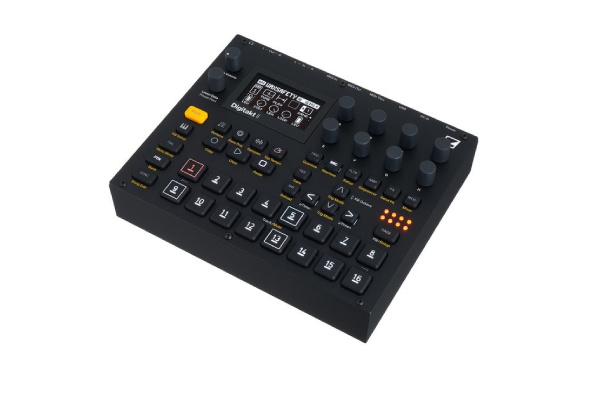
The Digitakt represents where many serious sampling journeys eventually lead, but it’s also where I increasingly recommend beginners start if budget allows. Yes, it costs significantly more than other options here, but the investment pays dividends in longevity and capability. After reviewing dozens of samplers over the years, the Digitakt’s workflow just makes sense to me in ways that overcomplicated menu systems never do. Eight tracks might not sound like much compared to DAW-based sampling, but the focused approach actually helps you finish ideas rather than getting lost in infinite possibilities.
What impressed me most during extended testing was how the Digitakt handles both precise, surgical sampling and loose, experimental sound mangling equally well. The time-stretching algorithm sounds musical across a wide range of material—something I can’t say about many hardware samplers. I’ve pitched drum breaks down two octaves without them turning into muddy mush, and stretched vocals into ethereal textures that sit beautifully in ambient productions. The filter section feels responsive and warm, modeled after classic analog designs but with modern precision.
The sequencer deserves special mention because it’s where Elektron’s decades of experience really shows. Parameter locks let you change virtually any parameter per step, creating evolving sequences that feel alive and organic. Conditional triggers add controlled randomness, and the separate MIDI sequencing tracks mean you can control external gear simultaneously. I’ve built entire live sets around the Digitakt serving as the central brain, sequencing both its own samples and external synthesizers. The learning curve exists—probably two weeks of regular use before it feels natural—but the “Elektron way” of working becomes second nature surprisingly quickly.
If you’re exploring music production more broadly, understanding how different pieces of gear fit together becomes crucial. Speaking of integration, if you’re also considering monitoring solutions for your setup, our detailed headphone comparisons can help you find the right listening environment for critical sampling work.
Pros:
- Professional-grade sound quality with excellent converters
- Deep sequencer with parameter locks and conditional triggers
- Eight sample tracks plus eight MIDI tracks for external control
- Song mode for arranging complete tracks
- Overbridge integration with DAWs for multitrack recording
- Robust metal construction built for touring and heavy use
- Strong resale value maintains investment
Cons:
- Significant price jump from beginner-tier options
- Steeper learning curve requires patience and dedication
- No built-in synthesis engine (samples only)
- 64MB sample memory requires regular project management
- Small screen can feel cramped for detailed editing
- No individual track outputs without Overbridge connection
Akai MPC One
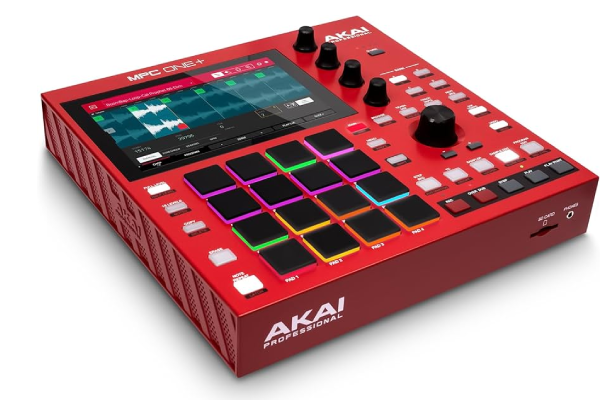
The MPC lineage carries serious weight in sampling history, and the MPC One distills that legacy into a surprisingly accessible package. When I first powered it up, the touchscreen interface immediately felt more approachable than button-heavy alternatives. You can navigate most functions through direct manipulation on the screen, which translates knowledge from smartphone use into music production workflow. That said, the 16 velocity-sensitive pads remain the heart of the experience—they’re responsive enough for expressive finger drumming while still being forgiving for beginners developing their timing.
What makes the MPC One particularly valuable for newcomers is the complete production environment it provides. You’re not just getting a sampler—you’ve got drum synthesis, plugin hosting, effects processing, mixing capabilities, and arrangement tools all integrated. I’ve watched beginners start with simple drum programming, then naturally progress to sampling their own material, adding melodic elements, and eventually producing complete tracks entirely within the MPC ecosystem. That pathway from simple to complex happens organically because everything connects logically within the same interface.
The sampling capabilities themselves run deep without requiring advanced knowledge to access. Auto-sampling from hardware synthesizers works smoothly (once you’ve watched a tutorial), and the time-stretching performs admirably on most source material. I particularly appreciate the audio track functionality—you can import full songs, chop them up visually on the waveform display, and extract samples with precision that rivals DAW-based editing. The built-in effects range from clean and transparent to heavily colored character processors, giving you serious sound-shaping power without requiring external gear.
Storage deserves mention because it’s genuinely generous—2.5GB of sample RAM and expandable SD card storage means you won’t hit walls quickly. The standalone operation appeals to many beginners who find DAW environments overwhelming or simply prefer hands-on hardware interaction. I’ve taken the MPC One to parks, coffee shops, and friend’s apartments for impromptu collaboration sessions—something you simply can’t do with desktop-bound setups.
Pros:
- Intuitive touchscreen navigation lowers entry barriers
- Complete production environment beyond just sampling
- Expressive, performance-ready velocity-sensitive pads
- Generous sample memory and expandable storage
- Strong community resources and tutorial content
- Regular firmware updates add new features
- True standalone operation with battery option available
Cons:
- Larger footprint reduces true portability
- Touchscreen can feel less immediate than dedicated controls
- Fan noise occasionally noticeable in quiet environments
- Some advanced features hidden in menu systems
- WiFi connectivity can be temperamental
- Price point stretches some beginner budgets
Roland SP-404MKII
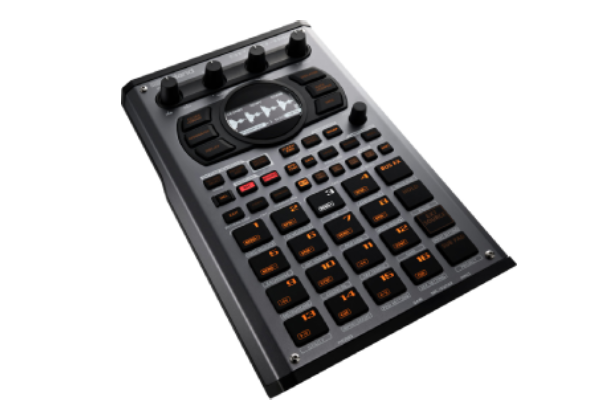
Roland completely reimagined the SP-404 with this MKII version, and having spent extensive time with both the classic and this modern iteration, the improvements go way beyond cosmetic updates. The original SP series cultivated a devoted following among lo-fi hip-hop producers and experimental musicians specifically because of its characterful sound and immediate workflow. The MKII preserves that essential vibe while addressing virtually every legitimate complaint about the original’s limitations.
The sampling process feels effortless—record from the inputs, resample internal audio, or load samples via USB or SD card. What I love about the SP-404MKII’s approach is how quickly you move from idea to execution. The dedicated buttons for core functions mean you’re not diving through menus when inspiration strikes. The new OLED screen provides just enough visual feedback without becoming a crutch that pulls your eyes away from the performance pads. Those pads themselves offer excellent response and durability; I’ve been genuinely hammering on mine during beat-making sessions without any signs of wear.
The effects section is where the SP-404 really establishes its identity. The new DJFX Looper creates stutter effects, pitch shifts, and rhythmic manipulations in real-time that sound absolutely massive in practice. Classic SP effects like the vinyl simulator and ring modulator maintain their character while benefiting from improved processing. I’ve processed not just drums but entire mixes through the SP-404MKII, using it as a creative effects unit for material produced elsewhere. That versatility extends its usefulness well beyond pure sampling applications.
For musicians developing their craft across different formats, understanding how various instruments contribute to your overall sound becomes increasingly important. Our instruments category explores how different sound sources can inspire unique sampling approaches and production techniques.
The pattern-based sequencer encourages loop-based composition, which some producers prefer over linear arrangement but others find limiting. I fall somewhere in the middle—it’s perfect for sketching ideas and performing live sets, but I typically export patterns into a DAW for final arrangement. The built-in chromatic mode lets you play samples melodically across the pads, opening up melodic possibilities beyond just triggering one-shots.
Pros:
- Immediate, performance-oriented workflow
- Characterful effects processing with creative potential
- Excellent build quality with tour-ready construction
- Battery-powered portability (with optional adapter)
- Pattern-based approach suits loop-focused production
- Strong resale value in used market
- Active user community sharing techniques and sample packs
Cons:
- Relatively small sample memory compared to competitors
- Monophonic architecture limits polyphonic sampling
- No individual track outputs for mixing flexibility
- Pattern mode workflow doesn’t suit linear composition styles
- Higher price than some competing portable samplers
- Effects can’t be applied to individual samples simultaneously
Native Instruments Maschine MK3

The Maschine ecosystem occupies a unique space between hardware controller and software sampler, and after years of working with various iterations, I’ve come to appreciate this hybrid approach for specific types of users. If you already work primarily within a DAW environment, Maschine integrates seamlessly while providing tactile, hands-on control that mouse-clicking can never replicate. The MK3 hardware feels substantial—this is professional-grade construction with responsive pads, smooth endless encoders, and a bright color display that actually remains useful in various lighting conditions.
What sets Maschine apart is the included software library. You’re getting thousands of professionally recorded samples, complete drum kits, synthesizers, and effects processors alongside the sampler itself. For beginners, this eliminates the immediate pressure of “where do I find sounds?” You can start making beats within minutes of installation using factory content, then gradually build your personal sample library as you develop your sonic identity. The Factory Library spans virtually every genre, though hip-hop, electronic, and urban styles receive particularly deep coverage.
The tight integration with other Native Instruments products creates an expandable ecosystem. Komplete Kontrol keyboards, additional sound libraries, and effect plugins all work within the same environment. That cohesion matters more than it might seem initially—you’re learning one company’s design philosophy rather than juggling multiple disconnected systems. The trade-off? You’re locked into Native Instruments’ ecosystem and require a computer to function, unlike truly standalone hardware samplers.
For producers working across multiple sound sources and production approaches, discovering new music that inspires your sampling choices becomes part of the creative process. Our songs category can introduce you to diverse musical styles worth exploring for sample material.
Pros:
- Massive included sound library provides immediate creative resources
- Deep DAW integration maintains computer-based workflow
- Professional build quality with excellent pad response
- Regular software updates add features and improvements
- Expandable through additional NI products and libraries
- Color-coded workflow aids organization and navigation
- Strong educational resources and tutorial content
Cons:
- Requires computer connection (not standalone)
- Subscription model for complete Komplete ecosystem adds costs
- Software can feel overwhelming with feature depth
- Hardware primarily functions as controller (brain is software)
- Initial installation and library downloads time-consuming
- Less immediate than dedicated hardware samplers
- Computer performance affects overall experience
Frequently Asked Questions
What’s the difference between a sampler and a drum machine?
This question comes up constantly, and the line has definitely blurred with modern equipment. Traditional drum machines play pre-loaded sounds triggered by pads or sequencers—you’re working with what the manufacturer included. Samplers let you record and manipulate your own sounds, giving you complete sonic control. That said, many modern devices combine both functions. The MPC One and Maschine both include drum synthesis alongside sampling, while the SP-404MKII and Digitakt focus purely on sampling. For beginners, I generally recommend samplers over pure drum machines because they offer more long-term creative flexibility, though some people prefer the immediate gratification of preset sounds when starting out.
Do I need a sampler if I already use a DAW?
From my experience working with both hardware and software, they serve different creative purposes despite overlapping functionality. DAW-based sampling offers unlimited tracks, non-destructive editing, and deep integration with other plugins. Hardware samplers provide tactile interaction, immediacy, and often force creative constraints that lead to happy accidents. I use both regularly—DAWs for detailed production work and arrangement, hardware samplers for sketching ideas and performance. If you’re struggling with analysis paralysis in your DAW, a hardware sampler might unlock new creative approaches. If you’re perfectly happy with software workflow, investing in better plugins or sound libraries might serve you better than hardware.
How much sample memory do I actually need?
This depends entirely on your workflow, but I’ve found most beginners overestimate their memory requirements. The PO-33’s 40 seconds sounds impossibly limiting until you realize most drum hits last under a second, and you rarely need longer than 4-bar loops for sampling purposes. That said, if you’re planning to sample full songs for chopping, or want to load massive multi-sample instruments, more memory helps. The Digitakt’s 64MB handles typical beat-making comfortably but requires project management for complex productions. The MPC One’s 2.5GB essentially removes memory as a concern for most users. Start with your intended use case—if you’re mainly chopping breaks and layering one-shots, even modest memory works fine.
Can I use headphones or do I need studio monitors?
Absolutely you can use headphones, especially when starting out. I’ve produced complete tracks using nothing but decent headphones, and many professional producers work primarily on headphones for various practical reasons. The key is using quality headphones with relatively flat frequency response rather than bass-boosted consumer models. That said, monitors provide spatial information and low-frequency detail that even excellent headphones struggle to reproduce accurately. For beginners on a budget, invest in good headphones first, then add monitors when finances allow. If you’re considering upgrading your monitoring situation, our earbud comparisons can help identify quality listening options across different price points, though I’d generally recommend over-ear headphones for serious production work.
Should I learn sampling on hardware or software first?
I’ve taught sampling to dozens of people using both approaches, and honestly, the best answer depends on your existing skills and preferences. Software sampling (like Ableton’s Simpler/Sampler or Logic’s Quick Sampler) costs less upfront and integrates with production tools you might already use. It’s also more forgiving—infinite undo, visual editing, and easier project recall. Hardware sampling feels more musical and immediate for many people, encouraging experimentation over perfectionism. The tactile interaction often leads to faster workflow once you’ve learned the basics. My general recommendation: if you’re comfortable with computers and already have DAW experience, start with software sampling to understand concepts before investing in hardware. If you find software overwhelming or prefer hands-on interaction, start with something affordable like the PO-33 to develop sampling fundamentals, then decide whether to invest in more sophisticated hardware or transition those skills to software.