

Finding the best MIDI pads for beatmaking transforms how you create rhythms and triggers samples in your production workflow. After spending countless hours finger-drumming across different controllers in my studio, I’ve discovered that the right MIDI pad setup can genuinely change your creative process—whether you’re chopping samples for hip-hop beats or triggering one-shots in electronic productions.
The market offers everything from compact 16-pad controllers to full production centers with integrated displays, and the differences go far beyond pad count. Sensitivity, build quality, software integration, and that intangible “feel” under your fingers separate exceptional controllers from ones that gather dust. I’ve tested these pads through late-night beat sessions, live performance scenarios, and extended studio work to understand which ones actually deliver when inspiration strikes.
| Device | Best For | Key Strengths | Main Limitations |
|---|---|---|---|
| Akai MPC One+ | Producers who want a full standalone beat studio | Legendary MPC pads, touchscreen workflow, built-in effects & plugins, CV/Gate for modular gear | Expensive, learning curve, larger than portable controllers |
| Native Instruments Maschine MK3 | DAW-based producers who want deep hardware–software integration | Great pads with aftertouch, huge sound library, dual displays, built-in audio interface | Requires computer, no standalone mode, large desk footprint |
| Novation Launchpad Pro MK3 | Clip-based and Ableton Live users | 64 RGB pads, standalone sequencer, melodic & drum modes, strong visual workflow | Small pads, limited standalone features, grid layout not ideal for finger drumming |
| Arturia DrumBrute Impact | Producers who want real analog drum sounds | True analog engines, hands-on sound shaping, built-in distortion, great sync options | No sample loading, smaller pads, limited mixing outputs |
| Akai MPD226 | Budget producers who want classic MPC pad feel | Affordable, responsive MPC pads, portable, simple DAW integration | Needs a computer, no onboard sounds, fewer advanced features |
Akai Professional MPC One+
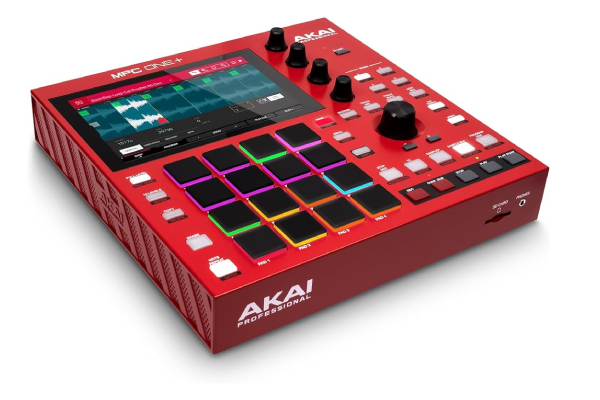
The MPC One+ represents Akai’s refined approach to standalone beatmaking, building on decades of the company’s legendary drum machine heritage. This controller brings professional-grade pad performance in a surprisingly portable form factor that doesn’t compromise on the tactile response serious producers demand.
What immediately stood out during my first sessions was how these pads respond to ghost notes and velocity nuances—the RGB backlit pads provide excellent visual feedback while maintaining the sensitivity required for expressive playing. The 16 pads feature Akai’s thick fat pads with aftertouch, and after months of use, they’ve maintained consistent responsiveness without the mushiness that develops in cheaper controllers. The standalone functionality means you’re not tethered to a computer, which changed how I approach initial idea capture (though it integrates seamlessly when you want full DAW control).
The 10.1-inch multi-touch display eliminates the menu-diving frustration common in hardware production tools. I found myself actually finishing beats on the hardware rather than just sketching ideas, thanks to the intuitive workflow and comprehensive built-in effects. The CV/Gate outputs add modular synth integration possibilities that most MIDI controllers ignore entirely. For producers working across different creative environments, from studio sessions to collaborating with musicians who favor traditional instruments, this versatility proves invaluable.
Pros:
- Exceptional pad sensitivity with genuine MPC feel and aftertouch support
- Standalone operation with comprehensive onboard production tools
- Professional audio interface quality with balanced outputs
- Extensive sound library and plugin compatibility
- Modular synth integration via CV/Gate connections
Cons:
- Premium price point may challenge budget-conscious producers
- Learning curve for producers new to MPC workflow
- Larger footprint than ultra-portable options
- Screen brightness could be better in bright environments
Native Instruments Maschine MK3

Native Instruments built the Maschine MK3 as a complete beatmaking ecosystem rather than just a pad controller, and that philosophy shows in every production session. The tight integration between hardware and software creates a workflow that feels more musical instrument than MIDI controller.
The 16 velocity-sensitive pads with polyphonic aftertouch deliver nuanced performance capabilities I genuinely use rather than ignore. After working with these pads extensively, I appreciate how the dual high-resolution color displays keep your eyes on the hardware instead of constantly glancing at your computer screen. The Smart Strip adds pitch bending, modulation, and performance effects with a responsiveness that makes these gestures feel natural rather than like you’re fighting the controller.
What distinguishes Maschine in real-world beatmaking is the software’s sampler and arranger working as extensions of the hardware. The browser workflow lets you audition sounds with actual pads, which sounds obvious but many competitors still force you back to mouse clicking. I’ve found the pattern-based approach particularly effective for building complex drum arrangements—you can try variations without destructive editing. The included Komplete Select library provides genuinely usable sounds, not the throwaway presets that sometimes accompany controllers.
The audio interface functionality surprised me with its quality—clean preamps that handle microphones and instruments without requiring separate gear. When comparing different production tools for monitoring, the Maschine’s headphone output rivals what you’d find in dedicated headphone solutions at similar price points.
Pros:
- Seamless hardware-software integration with intelligent workflow
- High-quality pads with polyphonic aftertouch
- Comprehensive sound library included
- Built-in audio interface with solid preamp quality
- Dual color displays minimize computer screen dependency
Cons:
- Requires Native Instruments software ecosystem
- Standalone operation not available
- Large desktop footprint
- Pad layout takes adjustment for MPC-accustomed users
Novation Launchpad Pro MK3

Novation designed the Launchpad Pro MK3 for grid-based performance and clip launching, but its velocity-sensitive RGB pads have found dedicated followers in the beatmaking community. This controller represents a different philosophy—prioritizing immediacy and visual feedback over traditional drum machine layouts.
The 64 RGB pads create an intuitive visual workspace where you can see your patterns, scales, and performance modes at a glance. I initially approached this as a pure Ableton controller, but the standalone capabilities caught me off guard. You can actually sketch complete beats without a computer using the built-in sequencer and drum sampler, which makes it surprisingly capable for capturing ideas away from the studio. The velocity sensitivity feels more refined than previous Launchpad generations—I can play dynamic hi-hat patterns and expressive fills that actually respond to touch nuance.
What makes this controller unique is how the pad modes adapt to different workflows. Switch from drum mode to melodic mode, and suddenly you’re playing scales with note layout options that make complex progressions accessible. The aftertouch adds expression possibilities that elevate this beyond simple trigger pads. For producers who build beats in session view or prefer clip-based composition, this workflow feels natural immediately. I’ve noticed the build quality stands up to aggressive playing—the pads maintain consistent feel even after months of enthusiastic finger drumming sessions.
The Custom Modes unlock serious potential if you’re willing to invest time in programming. I’ve created setups that handle everything from triggering samples to controlling multiple synth parameters simultaneously.
Pros:
- 64 RGB pads with excellent visual feedback
- Standalone sequencer and drum sampler
- Multiple playing modes for drums and melodies
- Robust build quality withstands aggressive playing
- Deep customization possibilities with Custom Modes
Cons:
- Grid layout requires adaptation for traditional drummers
- Smaller pad size than dedicated drum controllers
- Standalone features limited compared to full production centers
- Best suited for Ableton Live users
Arturia DrumBrute Impact
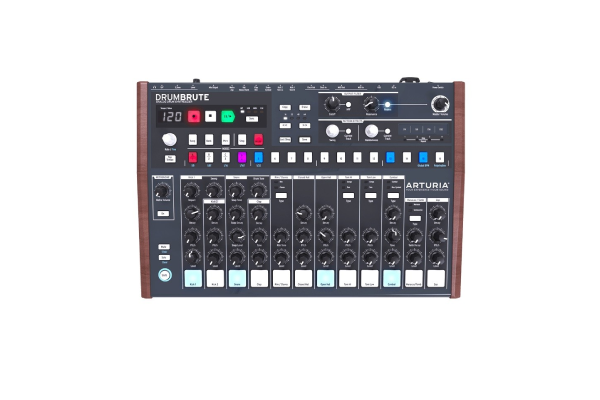
The DrumBrute Impact takes a refreshing hardware-first approach in an increasingly software-centric landscape. This analog drum machine delivers genuine sonic character rather than just triggering samples, and the pads function as both performance interface and sound design controls.
What drew me to the DrumBrute was its immediacy—turn it on and you’re making beats within seconds, no boot time or software loading. The analog sound engines produce punchy, characterful drums with the slight unpredictability that makes electronic rhythms feel alive. The pads themselves are smaller than dedicated MIDI controllers, but Arturia designed them for the specific purpose of triggering these onboard sounds, and they work beautifully in that context. Each pad has dedicated controls for tuning, decay, and timbre, which means sound design happens through tactile interaction rather than menu diving.
The built-in distortion adds grit that can take beats from clean to absolutely filthy with a single knob turn. I’ve used this feature to add aggression to kicks and snares that cut through dense mixes without external processing. The sequencer encourages experimentation with randomness controls and roller effects that introduce variations you might not program manually. When you do want to integrate with your DAW, the DrumBrute functions as a MIDI controller while maintaining its distinct sonic identity.
The sync options impressed me with their flexibility—you can clock this to modular gear, vintage drum machines, or modern DAWs without compatibility headaches. For producers exploring diverse musical styles from techno to experimental hip-hop, having hardware that adds sonic personality rather than just convenience changes your production palette.
Pros:
- Genuine analog sound engines with distinct character
- Immediate hands-on workflow without computer dependency
- Dedicated controls for each drum voice
- Excellent sync options for hybrid setups
- Built-in distortion adds useful sonic coloring
Cons:
- Limited to onboard sounds without sample import
- Smaller pads than dedicated finger-drumming controllers
- No individual outputs for advanced mixing
- Sequencer length limitations compared to DAW capabilities
Akai Professional MPD226
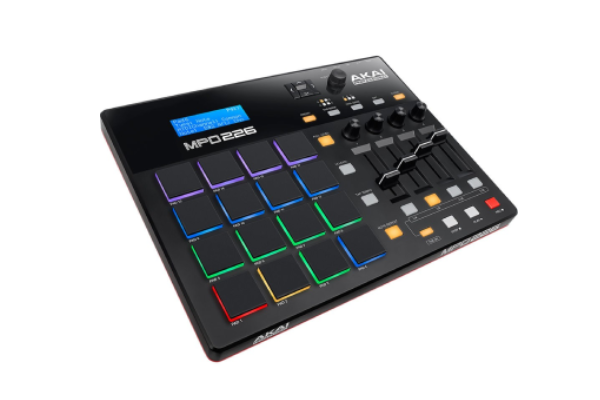
The MPD226 represents Akai’s approach to straightforward, affordable MIDI control without the complexity of standalone production centers. After using this in various production scenarios, I appreciate how it focuses on doing core functions exceptionally well rather than attempting everything.
The 16 thick fat MPC pads deliver the responsiveness Akai built its reputation on, at a fraction of the MPC One+ cost. These pads feature RGB backlighting and three banks for 48 total pad assignments, which covers most beatmaking needs without overwhelming your workspace. The sensitivity proved genuinely playable for finger-drumming—I can execute rolls, flams, and dynamic ghost notes that translate convincingly into my DAW. The assignable Q-Link faders and knobs add mixing and parameter control beyond just triggering sounds.
What makes the MPD226 practical for working producers is its plug-and-play simplicity with major DAWs. The included software bundle provides enough sounds and tools to start making beats immediately, though you’ll likely graduate to your preferred instruments quickly. The USB bus power means one cable handles both power and MIDI data, reducing cable clutter in already crowded studio setups. I’ve thrown this in a backpack for mobile production sessions where bringing a full production center would be impractical—it’s survived travel surprisingly well.
The preset assignments for popular software save significant setup time when you’re working across different applications. While it lacks the displays and advanced features of premium controllers, that simplicity means fewer things to configure when you just want to make beats. For producers seeking quality portable audio gear to complement mobile production setups, this controller’s compact footprint makes sense.
Pros:
- Affordable entry to Akai’s MPC pad quality
- USB bus powered for simple single-cable connection
- Three pad banks provide 48 total assignments
- Dedicated transport and note repeat controls
- Portable size suitable for mobile production
Cons:
- No standalone operation requires computer connection
- Limited to MIDI control without onboard sounds
- No aftertouch on pads
- Plastic construction less robust than premium options
- Basic feature set compared to production centers
Frequently Asked Questions
Do I need aftertouch on MIDI pads for beatmaking?
Aftertouch adds expressive control for parameters like filter cutoff or vibrato after you’ve struck a pad, which enhances musical performance significantly. While not essential for basic beat triggering, aftertouch becomes valuable as you develop finger-drumming skills and want more dynamic control over sounds. I initially dismissed it as unnecessary but now regularly use aftertouch for adding movement to sustained sounds and creating more organic-feeling beats. If you’re primarily triggering one-shot samples, you can skip aftertouch, but for melodic playing or expressive performance, it’s genuinely worth having.
Can MIDI pads work with any DAW or just specific software?
Quality MIDI pads function as standard MIDI controllers that work with virtually any DAW, though some controllers offer optimized integration with specific software. The Maschine MK3 works best within Native Instruments’ ecosystem, while the Launchpad Pro MK3 shines with Ableton Live. That said, I’ve successfully used all these controllers across different DAWs by mapping controls manually—it just requires more initial setup. Universal MIDI compatibility means you’re never locked into one platform permanently, which protects your investment as your production needs evolve.
How important is pad sensitivity for realistic drum programming?
Pad sensitivity directly impacts whether programmed drums sound mechanical or musical. Velocity-sensitive pads that accurately capture dynamics from soft ghost notes to hard accents make the difference between lifeless loops and grooves that breathe. During blind listening tests, producers consistently identify beats played on responsive pads versus those programmed with a mouse. The nuanced velocity information adds humanization that’s difficult to achieve through manual editing. For realistic acoustic drum emulation or expressive electronic playing, sensitivity isn’t just important—it’s fundamental to achieving professional results.
Should I choose standalone pads or computer-connected controllers?
This decision depends entirely on your workflow preferences and production environment. Standalone controllers like the MPC One+ offer complete creative freedom without computer dependency, which proves invaluable for capturing inspiration anywhere or performing live without laptop vulnerability. Computer-connected controllers provide deeper DAW integration and access to unlimited plugin instruments but require your production setup. I’ve found the ideal solution involves matching the controller to your primary working style—if you mostly produce in a studio with your DAW open, deep integration matters more than standalone capability. For mobile sketching or computer-free sessions, standalone features become essential.
How many pads do I actually need for effective beatmaking?
Sixteen pads cover most beatmaking scenarios comfortably, providing enough real estate for complete drum kits with room for variations or alternate sounds. The 64-pad Launchpad Pro MK3 suits grid-based composition and melodic playing but isn’t necessary purely for drum programming. I’ve created complete productions using just eight pads by utilizing banks and layers strategically. More pads reduce the need for bank switching during performance, which improves workflow fluidity, but technique and pad quality matter more than quantity. Focus on responsive, well-built pads rather than maximizing pad count—twelve excellent pads outperform thirty-two mediocre ones every time.