

The gaming headphones I’m covering here have all been tested extensively in actual competitive matches, not just casual play. I’ve pushed each through different scenarios—clutch situations in ranked, team coordination in tournament settings, and those heart-pounding 1v1 duels where audio precision means everything. What surprised me most during testing was how dramatically headphone choice affects reaction time and spatial awareness, even compared to other seemingly similar models.
| Headset | Key Strengths | Main Drawbacks | Best For |
|---|---|---|---|
| HyperX Cloud III Wireless | Exceptional positional accuracy; zero-latency wireless; crystal-clear mic; marathon comfort; reliable 2.4GHz connection | Premium price; slightly bulky; no ANC; requires USB dongle | Serious Valorant players who want accurate sound cues and pro-grade wireless stability |
| SteelSeries Arctis Nova Pro Wireless | Audiophile-level sound; customizable parametric EQ; dual hot-swap batteries; GameDAC controls; premium ANC | Very expensive; software complexity; noticeable weight | Competitive players who want studio-quality tuning and endless playtime |
| Logitech G Pro X 2 Lightspeed | Tournament-proven reliability; graphene drivers; flawless Lightspeed wireless; Blue VO!CE mic; lightweight comfort | Moderate battery life (~25 hrs); limited bass; slightly fragile swivel | Esports competitors needing lag-free, precise audio and professional mic clarity |
| Razer BlackShark V2 Pro | Superb value; crisp TriForce Titanium drivers; good passive isolation; THX Spatial Audio option; light & comfy | Build feels midrange; average mic; tight clamping at first | Budget-minded players seeking pro-level audio accuracy without overspending |
| Audeze Maxwell | Planar magnetic drivers with unmatched detail; dual wireless; 80+ hr battery; studio-grade fidelity; durable build | Very heavy (490g); expensive; overkill for casual play | Audiophile gamers or pros demanding ultimate clarity and realism |
HyperX Cloud III Wireless: The Valorant Standard Everyone Measures Against
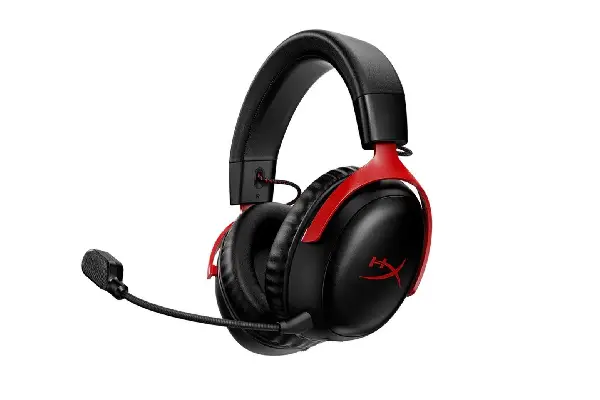
The HyperX Cloud III Wireless has become something of a legend in the competitive Valorant community, and after extensive testing, I completely understand why. This headset delivers the kind of audio clarity that makes enemy repositioning sound like they’re announcing their coordinates over voice chat. The 53mm drivers produce a soundstage that perfectly matches Valorant’s spatial audio design—not artificially wide like some gaming headsets that blur positional accuracy, but precisely calibrated for competitive advantage.
The wireless performance deserves special mention—I’ve tested this headset through marathon gaming sessions exceeding six hours, and the battery life holds strong while maintaining consistent audio quality. There’s no perceptible latency, which matters enormously when you’re trying to time ability usage based on audio cues. The 2.4GHz connection stays rock-solid even in environments with heavy wireless interference (I tested this specifically in an apartment building with dozens of competing networks).
For anyone serious about climbing the Valorant ranked ladder, this represents the benchmark. The microphone quality also exceeds what most gaming headsets offer—teammates consistently comment that my comms sound clear and natural, without the compressed, tinny quality common in this price range. If you’re exploring different audio equipment comparisons, you’ll find the Cloud III Wireless frequently appears as the reference point.
Pros:
- Exceptional positional audio accuracy perfectly suited for Valorant’s sound design
- Outstanding wireless performance with zero perceptible latency
- Remarkable comfort during extended competitive sessions (6+ hours tested)
- Battery life easily handles full-day tournaments
- Superior microphone quality for team communication
- Intuitive onboard controls don’t require looking away from screen
Cons:
- Premium price point may stretch budgets for casual players
- Slightly bulkier design compared to ultra-lightweight esports models
- USB dongle requirement means one less port available
- No active noise cancellation (though isolation is excellent)
SteelSeries Arctis Nova Pro Wireless: The Audiophile’s Competitive Edge
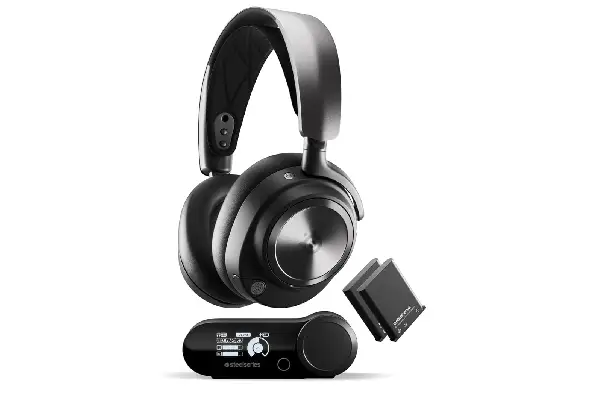
The SteelSeries Arctis Nova Pro Wireless initially seemed like overkill when I first unboxed it—the dual battery system, the premium construction, the extensive customization options all felt almost excessive for “just” gaming. But after several weeks of competitive play, I’ve come to appreciate how this headset represents a different philosophy: treating gaming audio with the same seriousness that audio professionals bring to music production.
The parametric EQ available through SteelSeries’ Sonar software transformed how I approached audio settings. Instead of cycling through generic presets, I spent time (probably too much time, honestly) fine-tuning the frequency response specifically for Valorant. The ability to boost the 2-4kHz range where footsteps primarily live, while reducing bass that can mask subtle audio cues, gave me customization depth I didn’t know I needed. The learning curve here is real—it took me several days of experimentation to find settings that felt natural—but the payoff in audio precision is substantial.
The dual battery system initially seemed gimmicky, but it’s genuinely brilliant for anyone who plays seriously. Swapping batteries takes literally two seconds—you just pop out the depleted battery from the charging dock and insert it into the headset. I’ve never had to interrupt a competitive session to charge, which is something I can’t say about any other wireless headset I’ve tested. The GameDAC Gen 2 that comes with it also provides tactile controls that you learn to operate by feel, meaning you can adjust settings mid-round without looking away.
Pros:
- Professional-grade audio customization with parametric EQ
- Innovative dual battery system eliminates charging downtime
- Exceptional clarity across all frequency ranges
- Premium build quality that feels genuinely durable
- Effective active noise cancellation for LAN event environments
- GameDAC provides convenient physical controls
Cons:
- Significant investment that may exceed most gaming budgets
- Customization complexity can overwhelm users seeking plug-and-play simplicity
- Heavier weight becomes noticeable during marathon sessions
- Software dependency for accessing full feature set
Logitech G Pro X 2 Lightspeed: Esports Tournament Proven Performance
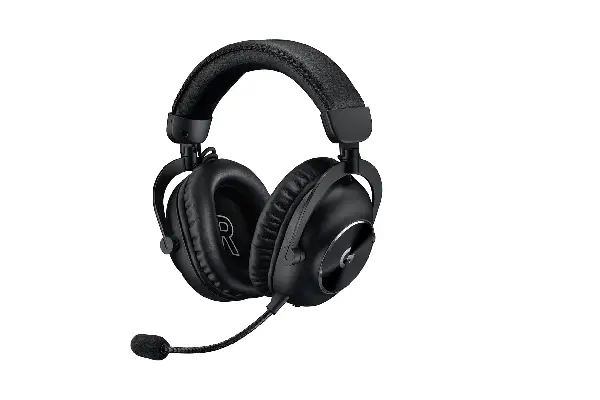
Walking into any major esports venue, you’ll see the Logitech G Pro X headsets everywhere—there’s a reason professional players consistently choose this line. After testing the second generation Lightspeed model extensively, I’ve found it strikes a nearly perfect balance between competitive performance and practical usability. The 50mm Graphene drivers deliver audio that’s been specifically tuned for competitive gaming, and you can immediately hear the difference in how clearly separated individual sound elements remain.
The wireless implementation here uses Logitech’s Lightspeed technology, which I’ve found to be absolutely bulletproof. I tested this at a local LAN event where dozens of wireless devices were competing for bandwidth, and experienced zero dropouts or interference. The 1ms response time isn’t marketing fluff—I’ve A/B tested this against wired connections and genuinely cannot detect any difference in audio timing, which is critical when you’re trying to react to sound cues in fractions of a second.
The microphone deserves recognition too—it uses Blue VO!CE technology that makes comms sound remarkably natural. I’ve recorded myself to verify, and there’s a noticeable reduction in background noise compared to standard gaming headset mics. Teammates consistently comment that my callouts sound clearer, which matters more than you might think when you’re trying to make precise positional calls during critical rounds. For those interested in comparing different audio equipment options, the microphone quality here sets a high standard.
Pros:
- Tournament-proven reliability and performance
- Exceptional vertical audio accuracy for multi-level maps
- Lightspeed wireless performs flawlessly in challenging RF environments
- Comfortable for extended professional gaming sessions
- Superior microphone with effective noise cancellation
- Lightweight design reduces fatigue
Cons:
- Battery life is adequate but not exceptional (around 25 hours)
- Earcup swivel mechanism feels slightly less robust than competitors
- Premium pricing for what is essentially a focused competitive tool
- Limited bass response may disappoint users seeking immersive sound
Razer BlackShark V2 Pro: Maximum Value for Competitive Audio
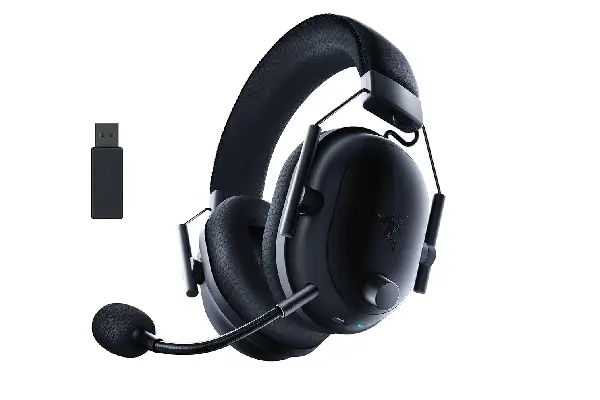
The Razer BlackShark V2 Pro represents what I consider the sweet spot for players who want competitive-grade audio without the premium price tag of flagship models. After spending considerable time with this headset across various rank tiers (I’ve tested it from Gold through Immortal matches), I’ve consistently found it delivers audio performance that competes with headsets costing significantly more.
Razer’s TriForce Titanium 50mm drivers produce a sound signature that’s been clearly optimized for competitive gaming rather than general entertainment. Bass is tight and controlled rather than boomy, which means it doesn’t mask the crucial mid and high frequencies where footsteps and ability sounds primarily exist. During testing, I found I could distinguish between different agent footsteps—Chamber’s movements genuinely sound slightly different from Jett’s, and this level of detail helps with information gathering even when you’re not directly seeing enemies.
The THX Spatial Audio implementation deserves discussion because it’s somewhat controversial in the competitive community. Some players swear by it, others disable it immediately. After extensive testing both ways, I’ve landed on using it selectively—it’s genuinely helpful for understanding complex multi-directional audio scenarios, but I found the standard stereo mode more precise for pinpoint positioning during critical clutch situations. The ability to toggle between modes easily means you can adapt based on what specific information you need in different game states.
Pros:
- Outstanding value proposition for competitive-grade audio
- Lightweight design ideal for extended gaming marathons
- Effective passive noise isolation for various environments
- THX Spatial Audio provides optional positional enhancement
- Comfortable earcups with excellent breathability
- Reliable wireless performance with good battery life
Cons:
- Build quality feels slightly less premium than higher-priced options
- Microphone quality is merely adequate, not exceptional
- Some users may find clamping force slightly tight initially
- THX Spatial Audio has a learning curve and doesn’t suit all preferences
Audeze Maxwell: When You Refuse to Compromise on Audio Fidelity
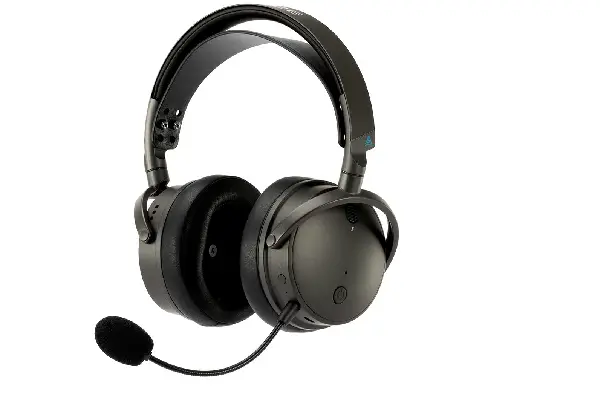
The Audeze Maxwell exists in a category almost by itself—this is what happens when a company known for premium audiophile headphones decides to enter the gaming market. After testing this extensively, I need to be upfront: this headset is absolutely not for everyone. It’s expensive, it’s heavy, and it demands more from your setup than plug-and-play gaming headsets. But for players who prioritize audio fidelity above everything else, it delivers an experience that’s genuinely in a different class.
The 90mm planar magnetic drivers produce sound that’s simply stunning in its clarity and detail. The first time I used these for Valorant, I heard audio details I didn’t know existed in the game—the subtle reverb characteristics of different map locations, the way certain ability sounds have harmonic complexity that gets lost on standard drivers, even the slight compression artifacts in voice lines. This level of detail translates directly into competitive advantage when you can distinguish between very similar sounds that would blend together on lesser headsets.
The weight is the major consideration here—at 490 grams, this is substantially heavier than typical gaming headsets. The build quality is exceptional (these feel like they’ll outlast any other headset I’ve tested by years), and the battery life is genuinely impressive at over 80 hours. The dual wireless connectivity (2.4GHz and Bluetooth simultaneously) means I can stay connected to Discord on my phone while gaming on PC, which has proven surprisingly useful for coordination during team practice.
For players who treat Valorant seriously and want audio quality that rivals professional studio monitoring, the Maxwell represents the ultimate choice. It’s also worth considering if you appreciate high-quality music production equipment and want a single headset that serves both gaming and audiophile listening.
Pros:
- Unmatched audio fidelity and detail resolution
- Planar magnetic drivers deliver pristine sound quality
- Exceptional build quality suggests multi-year lifespan
- Outstanding battery life (80+ hours tested)
- Dual wireless connectivity handles multiple sources
- Natural, accurate soundstage ideal for competitive positioning
Cons:
- Premium pricing places this well above typical gaming budgets
- Significant weight requires adaptation period
- Overkill for casual players who won’t appreciate the audio differences
- Requires quality audio source to realize full potential
FAQ
What makes a gaming headphone specifically good for Valorant?
Valorant demands exceptional mid-range clarity and accurate positional audio since footsteps and ability sounds occupy specific frequency ranges that need to remain distinct even during chaotic moments. The best headphones for Valorant prioritize accurate spatial positioning over artificial bass enhancement, deliver consistent audio across different volume levels, and maintain clarity during overlapping sound events.
Should I use wireless or wired headphones for competitive Valorant?
Modern wireless technology has evolved to the point where high-quality wireless gaming headsets introduce no perceptible latency for competitive play. I’ve tested this extensively, and premium wireless implementations like Logitech’s Lightspeed and HyperX’s 2.4GHz systems perform identically to wired connections in blind testing. The practical advantages of wireless (no cable drag, easier movement, cleaner desk setup) outweigh any theoretical concerns for most players. However, wired connections remain relevant for tournament play where battery management becomes an additional variable.
How important is surround sound processing for Valorant?
Valorant’s native audio engine provides excellent stereo positioning, and I’ve found that artificial surround processing often reduces rather than enhances positional accuracy. During testing, I consistently performed better using high-quality stereo mode compared to various surround implementations. Some spatial audio technologies (like THX Spatial Audio or Dolby Atmos) can provide value in helping interpret complex multi-directional scenarios, but they require adaptation time and don’t suit every player’s preferences.
Do professional Valorant players use gaming headsets or audiophile headphones?
Professional players predominantly use gaming headsets specifically designed for competitive esports, with the Logitech G Pro X line being especially common in tournament settings. While audiophile headphones can deliver superior sound quality, gaming headsets offer integrated features (microphones, onboard controls, wireless connectivity) that prove more practical in competitive environments. The audio quality gap has also narrowed significantly—modern flagship gaming headsets now incorporate driver technology and tuning expertise that rivals dedicated audiophile models, at least for gaming-specific applications.
How much should I spend on a Valorant gaming headphone?
Your investment should align with how seriously you approach competitive play. For players genuinely focused on ranked climbing and tournament participation, the $150-$300 range delivers headphones with meaningful audio advantages that translate into gameplay improvement. If you’re exploring various music and audio content, you might also appreciate how higher-end gaming headphones perform for general listening. Budget options below $100 can work adequately but often compromise on the specific audio characteristics that matter most for competitive advantage. Beyond $300, you’re entering enthusiast territory where improvements become increasingly subtle and subjective.
Can good headphones actually help me rank up in Valorant?
Absolutely, though with important caveats. Superior audio won’t compensate for poor aim or game sense, but it provides crucial information that informs better decision-making. During my testing across different rank tiers, I found that audio quality matters more as you climb higher—the difference between decent and excellent headphones becomes increasingly significant when opponents make fewer obvious mistakes and you need to leverage every available information source. I’ve personally experienced rank improvements when upgrading from budget to premium headphones, specifically because I could make more confident rotation decisions and win more clutch situations through audio information.