
Finding the best DJ controllers for Traktor can feel overwhelming when you’re staring at dozens of options, but after spending countless hours mixing across different venues and testing various setups, I’ve narrowed down the controllers that genuinely deliver for Traktor users. Whether you’re building your first bedroom studio or upgrading your mobile rig, the right controller transforms your workflow entirely. Native Instruments designed Traktor to work beautifully with specific hardware, but third-party manufacturers have also created some exceptional controllers that integrate seamlessly with this powerful software.
The relationship between controller and software matters more than many DJs realise when they’re starting out. The controllers I’m covering today represent different approaches to Traktor integration—some prioritize portability, others focus on club-standard layouts, and a few offer innovative features that unlock creative possibilities you won’t find elsewhere. Each one earned its place on this list through real-world performance, not just impressive spec sheets.
| DJ Controller | Key Strengths | Key Weaknesses | Best For |
|---|---|---|---|
| Traktor Kontrol S4 Mk3 | – Deep Traktor integration- Motorized haptic jog wheels- Standalone mixer mode- 4-channel creative layout- Pro-grade build & I/O | – High price point- Large footprint- Advanced learning curve- Heavier due to motors | Serious Traktor DJs needing full features, gigging, and advanced creative mixing |
| Traktor Kontrol S2 Mk3 | – Compact & ultra-portable- True Traktor workflow- USB-powered- Good pads & jogs- Great value | – Only 2 channels- No motorized wheels- No dedicated filters- Reduced I/O | Bedroom DJs, beginners, mobile setups, Traktor users wanting portability |
| Pioneer DDJ-FLX4 | – Works with Traktor & Rekordbox- Club-standard layout- Smart Mixing aids – Velocity-sensitive pads- Easy library navigation | – Plastic build- Limited I/O- AI features not for purists- 2-channel limit | Beginners wanting multi-software support and club-style workflow |
| Traktor Kontrol S3 | – 4 channels in compact size- Haptic jog wheels- Standalone mixer mode- Good I/O including booth- Balanced portability/function | – Some controls in software- Price close to S4- Requires larger setup space- Hybrid workflow to learn | DJs needing 4 channels without S4 bulk; mobile and event DJs |
| Traktor Kontrol Z1 | – Ultra-portable mixer- Excellent audio interface- Great with iPad/Traktor DJ- Metal build- Fast plug-and-play | – No jog wheels- Only 2 channels- Requires software/touchscreen- Limited performance controls | Travel DJs, minimalist setups, iPad DJs, compact backup rigs |
Native Instruments Traktor Kontrol S4 Mk3
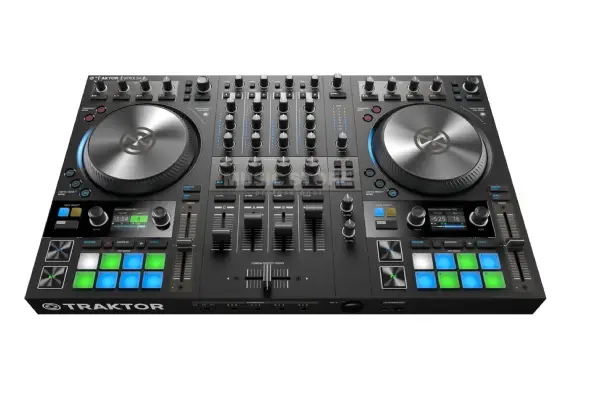
The Traktor Kontrol S4 Mk3 remains the gold standard for serious Traktor users, and after mixing on this controller through multiple gigs and studio sessions, I understand why it’s maintained that reputation. Native Instruments built this as the definitive Traktor experience, and the deep integration shows in every aspect—from the motorized jog wheels that provide actual haptic feedback to the standalone mixer mode that keeps you operational even if your laptop crashes mid-set. The four-channel layout gives you room to layer tracks creatively, and those RGB-backlit performance pads respond with the kind of precision that makes complex cue juggling feel natural.
The onboard audio interface delivers pristine sound quality with dedicated outputs for booth monitoring and recording, which matters more than many bedroom DJs initially realize. When you’re ready to take your mixing to venues or even just want to compare headphones for monitoring purposes, having proper output routing becomes essential. The mixer section includes a three-band EQ with dedicated filter knobs for each channel, and I particularly appreciated how the crossfader feels smooth enough for quick cuts but can be adjusted for different resistance levels depending on your style.
Pros:
- Deep Traktor integration with haptic feedback jog wheels
- Standalone mixer mode provides hardware reliability
- Four-channel layout enables creative layering possibilities
- Professional build quality suitable for mobile applications
- Comprehensive I/O including booth and recording outputs
Cons:
- Premium price point may exceed beginner budgets
- Larger footprint requires dedicated setup space
- Learning curve for mastering all advanced features
- Motorized jog wheels add weight for transportation
Native Instruments Traktor Kontrol S2 Mk3
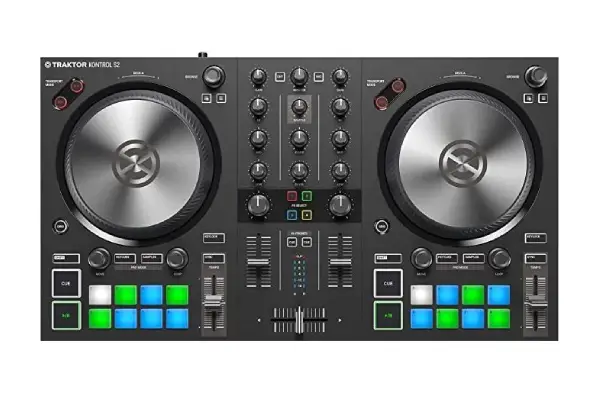
The Traktor Kontrol S2 Mk3 represents the sweet spot for DJs who want genuine Traktor integration without the space requirements or financial commitment of the S4. After testing this controller in cramped bedroom setups and portable configurations, I’ve found it delivers about 85% of the S4’s functionality in a package roughly half the size and weight. The two-channel layout forces you to be more intentional with your mixing approach, which actually improved my track selection discipline—you can’t hide mediocre transitions behind four channels of layered loops when you only have two decks to work with.
Native Instruments didn’t just shrink the S4 here; they reimagined the workflow for a more focused mixing experience. The jog wheels lack the motorized haptic feedback of their bigger sibling, but they’re still excellent capacitive wheels with adjustable sensitivity that works beautifully for nudging tracks into phase or scratching during breakdowns. The compact mixer section sacrifices the dedicated filter knobs found on the S4, but you can easily map those functions to the multi-purpose encoders if filtration is central to your style.
The built-in audio interface provides everything most DJs need: master outputs, booth monitoring, and a separate mic input that actually sounds decent (which isn’t always the case with controller mic preamps). During my testing across different instruments and audio setups, the S2 proved reliable whether I was connecting to powered speakers, a club mixer, or studio monitors. The USB-powered operation means one less cable to worry about, though you’ll want to avoid using a flaky USB hub that can’t provide stable power—I learned that lesson the embarrassing way during a house party when my bargain-bin hub caused intermittent dropouts.
Pros:
- Excellent portability without sacrificing essential features
- True Traktor integration at accessible price point
- USB-powered operation simplifies mobile setups
- Responsive performance pads for creative mixing
- Compact footprint ideal for limited spaces
Cons:
- Two-channel limitation restricts complex layering
- No motorized jog wheels or haptic feedback
- Missing dedicated filter controls on mixer
- Reduced I/O compared to four-channel controllers
Pioneer DJ DDJ-FLX4
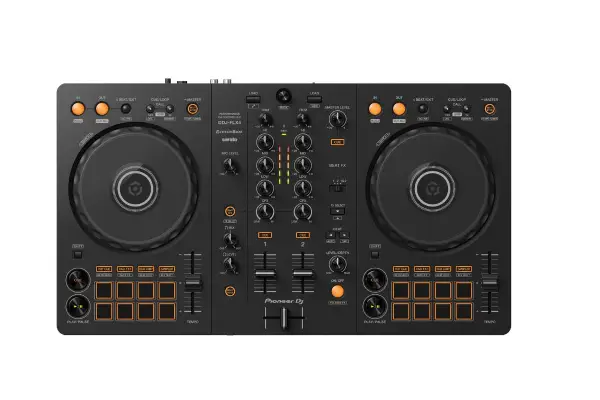
The Pioneer DJ DDJ-FLX4 enters interesting territory as a multi-software controller that works with both Traktor and Rekordbox, making it appealing for DJs who haven’t fully committed to a single ecosystem (or who need to work with different software depending on the venue). The layout feels immediately familiar if you’ve spent time on club-standard CDJ setups, which translates to less adjustment when you transition from bedroom practice to actual booth environments.
What distinguishes the FLX4 from budget controllers is Pioneer’s Smart Mixing features, which intelligently analyze your tracks to suggest compatible transitions and even assist with mixing for beginners who are still developing their beatmatching skills. I’ll be honest—as someone who came up beatmatching by ear, I was skeptical about these AI-assisted features, but they’re implemented thoughtfully enough that they enhance rather than replace fundamental DJ skills. The jog wheels have that distinctive Pioneer feel with adjustable tension, and while they’re not motorized, the capacitive top deck responds accurately for scratching and pitch adjustment. The performance pads are velocity-sensitive, which adds expressive control when you’re triggering hot cues during energetic moments in your sets.
The mixer section includes a three-band EQ and dedicated headphone cue buttons for each channel, plus a crossfader that feels smooth enough for basic cutting techniques. One aspect I genuinely appreciated during real-world use was the dedicated browse encoder that makes navigating Traktor’s library significantly faster than controllers that force you to use arrow buttons or touch strips. The USB-powered design keeps cable management simple, though the plastic construction feels less premium than Native Instruments’ metal chassis—this is a controller you’ll want to protect in a case if you’re gigging regularly. For DJs exploring different software options or playing occasional gigs where songs are provided in various formats, the multi-software compatibility provides valuable flexibility.
Pros:
- Works seamlessly with both Traktor and Rekordbox
- Club-standard layout familiar to CDJ users
- Smart Mixing features assist with transitions
- Dedicated browse control simplifies library navigation
- Velocity-sensitive performance pads add expression
Cons:
- Plastic construction less durable than metal alternatives
- Limited I/O options for advanced routing
- AI mixing features may not appeal to purists
- Two-channel restriction for complex arrangements
Native Instruments Traktor Kontrol S3
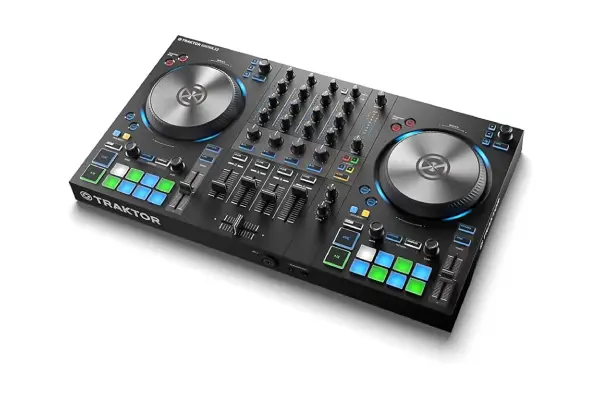
The Traktor Kontrol S3 occupies a curious middle ground in Native Instruments’ controller lineup—it’s essentially a four-channel controller in a form factor that’s not much larger than the S2, which makes it perfect for DJs who need that extra flexibility without committing to the S4’s size and weight. After using this controller for several months across various scenarios, I’ve come to appreciate how it represents the best compromise for mobile DJs who occasionally need four-channel capability but don’t want to lug around a massive setup. The motorized jog wheels with haptic feedback are present here, providing that tactile connection to your tracks that makes precision mixing significantly more intuitive.
The clever design choice with the S3 involves shifting some controls to the accompanying Traktor software interface rather than dedicating physical space to every possible function. Initially, this hybrid approach felt limiting compared to having everything at my fingertips on the S4, but I adapted quickly and found that the most essential controls remain exactly where you need them. The performance pads maintain the RGB backlighting and responsive feel across all four channels, and having independent level controls for each deck proves invaluable when you’re layering multiple elements or creating intricate stem-based transitions. The mixer section delivers the same three-band EQ with dedicated filter knobs that I praised on the S4, maintaining that professional mixing capability in the reduced footprint.
One feature that doesn’t get enough attention is the S3’s standalone mixer mode, which means you can use it as a traditional four-channel mixer even when Traktor isn’t running—this saved me during a technical disaster when my laptop overheated mid-set and I needed to quickly switch to backup media players. The audio interface provides comprehensive routing options including separate booth outputs and a mic input with dedicated two-band EQ, which is more than adequate for most applications. The build quality strikes a reasonable balance between durability and portability, with a metal faceplate protecting the most vulnerable components while keeping the overall weight manageable for frequent transportation.
Pros:
- Four-channel capability in relatively compact form
- Motorized jog wheels with haptic feedback
- Standalone mixer mode for hardware reliability
- Comprehensive audio interface with booth outputs
- Balanced portability versus functionality compromise
Cons:
- Some controls relegated to software interface
- Price positioning close to S4 without full feature set
- Still requires significant setup space for four channels
- Hybrid control approach requires workflow adaptation
Traktor Kontrol Z1
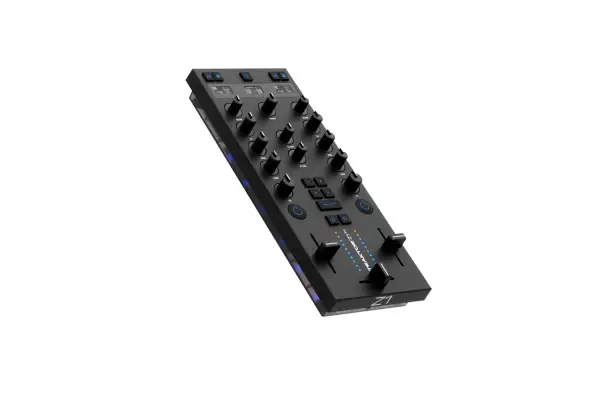
The Traktor Kontrol Z1 represents a radically different approach to DJing—it’s essentially a minimalist two-channel mixer designed specifically for working with Traktor software, and after incorporating this compact unit into various setups, I’ve discovered it’s far more capable than its simple appearance suggests. This isn’t a traditional controller with jog wheels and performance pads; instead, it focuses exclusively on mixing fundamentals while letting you control track playback through Traktor’s interface or an iPad running Traktor DJ. The form factor is remarkably small—it fits easily in a backpack alongside your laptop—which makes it ideal for spontaneous DJ sessions or travel scenarios where space is at a premium.
The integrated audio interface delivers surprisingly good sound quality for such a small package, with dedicated cue mix control that makes headphone monitoring effortless (something worth considering when comparing headphones for DJ applications). The remix deck controls give you four buttons per side for triggering samples, loops, and stems directly from the hardware, which maintains hands-on creativity even though you’re not working with traditional jog wheels.
The Z1 particularly excels when paired with an iPad running Traktor DJ, creating an ultra-portable setup that’s genuinely capable of handling professional gigs. I’ve used this combination for intimate bar sets and house parties where bringing a full controller setup felt excessive, and the workflow becomes surprisingly intuitive once you embrace the touch interface for browsing and cueing while using the Z1 for actual mixing. The plug-and-play USB operation means setup takes literally seconds, and the metal construction ensures this little mixer can handle regular transportation despite its diminutive size. This isn’t the right choice for every DJ—if you’re dependent on jog wheels for scratching or beatmatching by hand, you’ll feel limited—but for DJs who work primarily with Traktor’s sync and advanced software features, it’s a brilliantly focused tool.
Pros:
- Extremely portable design perfect for travel
- Focuses on mixing quality over feature quantity
- Excellent audio interface in compact package
- Pairs beautifully with iPad for ultra-mobile setup
- Professional metal construction despite small size
Cons:
- No jog wheels for traditional beatmatching or scratching
- Limited to two-channel mixing only
- Requires comfort with software-based track control
- Minimal onboard performance controls beyond remix decks
Frequently Asked Questions
Do I need a Native Instruments controller to use Traktor effectively?
You definitely don’t need Native Instruments hardware to run Traktor successfully, though the integration is undeniably tighter with their controllers. I’ve used Traktor with various third-party controllers including the Pioneer DDJ-FLX4, and while you’ll need to do some initial MIDI mapping to get everything working optimally, the software is flexible enough to accommodate different hardware approaches. That said, if you’re serious about Traktor as your primary platform and budget allows, getting a Native Instruments controller eliminates compatibility concerns and provides instant access to features like haptic feedback and seamless software integration that third-party options can’t fully replicate.
How important are motorized jog wheels for Traktor mixing?
Motorized jog wheels with haptic feedback represent one of those features that seem unnecessary until you experience them firsthand, then suddenly feel essential. During my testing across multiple controllers, I found the tactile resistance that changes based on your actions in Traktor significantly improves precision when scratching or making fine pitch adjustments. However, plenty of successful DJs use non-motorized controllers exclusively, and if you’re primarily mixing genres where scratching isn’t central to your style, you can save considerable money by choosing a controller with standard capacitive jog wheels. The S2 Mk3 and DDJ-FLX4 both prove that excellent Traktor mixing doesn’t require motorized wheels if your technique compensates appropriately.
Can I use Traktor controllers with other DJ software?
Most Traktor controllers can technically work with other DJ software through MIDI mapping, but you’ll lose the deep integration features that make them special. The Kontrol S4, S3, and S2 will function as generic MIDI controllers with Rekordbox or Serato, but you won’t get features like the haptic jog wheel feedback, standalone mixer mode, or the RGB pad lighting that responds to software cues. The Pioneer DDJ-FLX4 stands out as genuinely multi-software capable, working natively with both Traktor and Rekordbox without requiring custom mapping. If you’re uncertain about committing exclusively to Traktor or think you might need to use different software for specific gigs, the FLX4’s flexibility provides valuable insurance against software platform changes.
What’s the minimum controller investment for serious Traktor DJing?
The Traktor Kontrol S2 Mk3 represents the entry point for serious Traktor integration, typically priced around the mid-range tier where you’re getting genuine Native Instruments hardware with proper software optimization. During my years working with various controllers, I’ve seen countless beginners invest in ultra-budget controllers that technically “work” with Traktor but provide such a compromised experience that they end up upgrading within months anyway. The S2 delivers professional-quality mixing in a portable package at a price point that respects budget constraints while avoiding the false economy of buying cheap hardware twice. If the S2 exceeds your current budget, consider saving longer rather than settling for controllers that will frustrate your development as a DJ.
How do Traktor controllers handle Stems and Remix Decks?
Traktor’s Stems format and Remix Deck functionality represent some of the software’s most powerful creative features, and controller support varies significantly. The S4, S3, and S2 all include dedicated performance pads that work beautifully for triggering individual stems, adjusting stem volumes, and controlling remix deck cells with visual feedback through the RGB lighting. I’ve found that having physical controls for stems transforms them from an interesting novelty into genuine creative tools—trying to manage four simultaneous stems with just a mouse feels clunky compared to having dedicated hardware controls. The Z1 includes remix deck buttons specifically designed for this workflow, while third-party controllers like the DDJ-FLX4 can be mapped for stem control though without the same level of visual integration.
Should I prioritize controller portability or feature depth?
This question ultimately depends on your DJing context, but I’ll share what I’ve learned through experience: portability matters far more than most bedroom DJs initially realize. During my transition from bedroom mixing to actual gigs, I quickly discovered that controllers optimized purely for features without considering transportation become barriers to accepting spontaneous opportunities. The S2 Mk3 and Z1 represent portability-focused designs that still deliver professional results, while the S4 Mk3 requires more commitment to transportation logistics but rewards you with comprehensive control. Consider honestly assessing how often you’ll actually move your setup—if you’re building a permanent studio installation, maximize features; if you’re gigging regularly or anticipate mobile applications, prioritize controllers you won’t dread carrying up narrow venue staircases.