

After spending countless hours behind the decks with various Rekordbox controllers, I’ve discovered that the right hardware can completely transform your mixing experience. The best DJ controllers for Rekordbox blend intuitive layouts with responsive performance features that make creative mixing feel natural rather than technical. Whether you’re transitioning from vinyl or starting fresh in the digital realm, these five controllers represent the sweet spot between functionality and real-world usability that I’ve come to rely on during both studio sessions and live performances.
The evolution of Rekordbox-compatible controllers has been fascinating to witness firsthand. Pioneer DJ (now AlphaTheta) continues dominating this space, but the competitive landscape has pushed innovation across the board. I’ve tested each of these units in different environments—from bedroom studios to actual club booths—and what follows reflects genuine performance observations rather than theoretical possibilities.
| DJ Controller | Key Strengths | Key Weaknesses | Best For |
|---|---|---|---|
| Pioneer DDJ-FLX4 | – Excellent value for money- Works with Rekordbox & Serato- Smart Fader & smart features- Portable, compact, clean sound | – Fully plastic build- Small jog wheels- No dedicated loop controls- Limited mixer effects | Beginners, bedroom DJs, mixed-software users |
| Pioneer DDJ-400 | – Layout mimics club-standard CDJ/DJM- Larger responsive jog wheels- Strong Rekordbox tutorial integration- Good build quality | – Only 2 channels- No booth output- Needs powered USB- Fewer performance pads | Learners preparing for club gear; Rekordbox-focused DJs |
| Pioneer DDJ-800 | – Premium materials & feel- Built-in waveform display- Sound Color FX + strong mixer section- High audio quality (24-bit/48kHz) | – Still only 2 channels- No standalone mode- Higher price- Pads feel slightly cramped | Serious hobbyists, mobile DJs, small-venue performers |
| Pioneer DDJ-1000 | – Full 4-channel pro layout- Full-size CDJ jog wheels- Magvel faders + full FX section- Club-level build quality | – Heavy and large- High price point- Requires strong laptop- Less portable | Professional DJs, club performers, festival prep |
| Pioneer DDJ-FLX10 | – Hybrid external-input routing- Dual-layer (8-deck) control- Motorized jog tension adjust- Dedicated booth output- Sweep FX & advanced displays | – Expensive- Very large and heavy- Steep learning curve- Overkill for simple sets | Pros needing hybrid DJ setups, live remixers, advanced performers |
Pioneer DJ DDJ-FLX4: The Gateway Controller That Actually Delivers
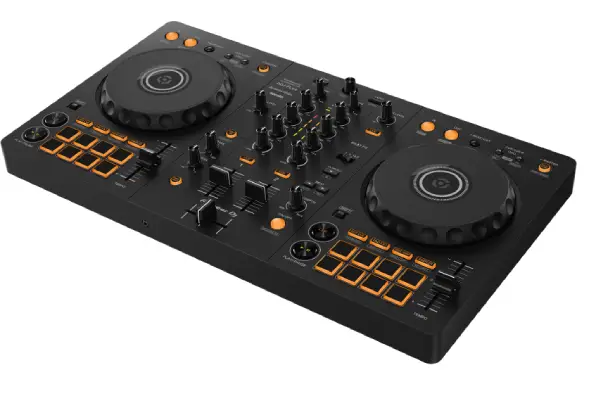
The DDJ-FLX4 surprised me with how much functionality Pioneer crammed into such an affordable package. The two-channel layout feels immediately familiar if you’ve ever touched traditional DJ equipment, and the jog wheels—while compact—respond with surprising precision during scratching and beatmatching practice.
What sets the FLX4 apart is its flexibility (hence the name). It works seamlessly with both Rekordbox and Serato DJ Lite, which proved invaluable when collaborating with DJs who prefer different software ecosystems. The Smart Fader feature, while initially feeling like a gimmick, actually became useful during transitions when I wanted to focus on EQ adjustments rather than timing precision. The built-in soundcard delivers clean audio output that holds up surprisingly well even when pushing volume in smaller venues. The build quality feels solid for the price point—plastic construction throughout, but nothing feels cheap or fragile.
Pros:
- Exceptional value with full-featured layout
- Dual software compatibility (Rekordbox and Serato)
- Compact and genuinely portable design
- Smart features that actually enhance workflow
- Clean audio output quality
Cons:
- Plastic construction won’t satisfy build quality purists
- Smaller jog wheels require adjustment period
- No dedicated loop controls (pad-based only)
- Limited mixer effects compared to higher-end models
Pioneer DJ DDJ-400: The Industry Standard Entry Point
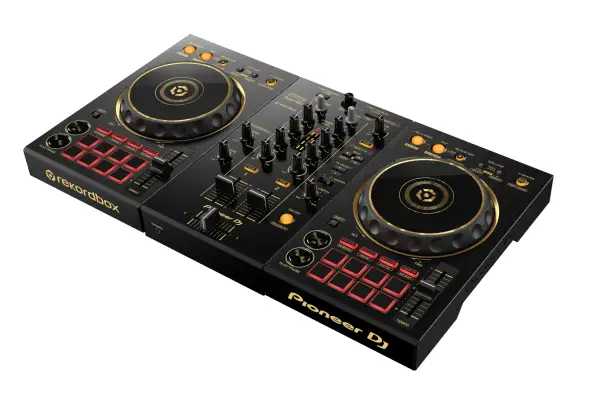
The DDJ-400 has achieved something rare in music gear—near-universal recommendation status that’s actually justified. I’ve used this controller extensively while helping friends learn to mix, and its layout mirrors the club-standard CDJ/DJM setup so perfectly that skills transfer almost immediately to professional equipment. This isn’t coincidental; Pioneer designed this specifically as a training tool for their ecosystem.
The jog wheels deserve special mention. They’re larger than the FLX4’s platters and offer adjustable tension, which made a noticeable difference when practicing scratch techniques I picked up from exploring various instruments in my production work. The touch capacitance responds instantly, and after hundreds of hours use, they still feel precise and responsive. The tutorial mode that highlights active controls in Rekordbox proved genuinely useful when learning advanced features—something I wish existed when I started DJing years ago.
Pros:
- Layout mirrors professional club equipment perfectly
- Responsive jog wheels with adjustable tension
- Comprehensive tutorial integration with Rekordbox
- Excellent build quality for the price
- Includes dedicated Beat FX controls
Cons:
- Only two channels limits creative possibilities
- Requires powered USB connection (no AC adapter option)
- No independent booth output
- Missing performance pads compared to newer models
Pioneer DJ DDJ-800: The Sweet Spot for Serious Hobbyists
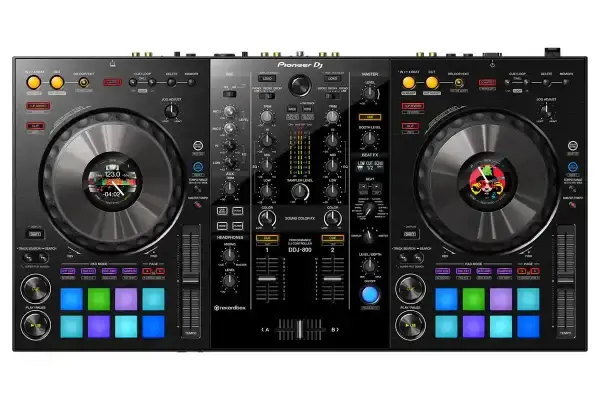
After upgrading from a DDJ-400 to the DDJ-800, I immediately understood why working DJs gravitate toward this controller. The two-channel layout remains, but everything feels more refined and professional. The aluminum top panel and rubberized jog wheel surfaces communicate quality the moment you touch them, and the increased weight (still portable at around 5 pounds) suggests durability that’ll withstand regular transport.
The standout feature is the full-color waveform display screen centered between the jog wheels. Initially, I dismissed this as unnecessary since Rekordbox shows waveforms on the laptop screen anyway. But during actual performances, glancing down at the controller display proved far more practical than constantly checking my laptop—especially in dimly lit booth environments where laptop screens become glaring distractions. The display shows track information, waveforms, and Beat FX parameters simultaneously, creating a more self-contained mixing experience.
The mixer section represents a significant upgrade over entry-level options. The Sound Color FX knobs (Filter, Dub Echo, Pitch, and Noise) add creative texture possibilities that transformed how I approach transitions. Unlike traditional mixer effects that feel tacked-on, these integrate musically with the three-band EQs to create cohesive blends. The built-in soundcard outputs at 24-bit/48kHz, and the difference in audio clarity compared to budget controllers is immediately apparent when monitoring through quality headphones.
Pros:
- Professional build quality with premium materials
- Integrated waveform display reduces laptop dependency
- Sound Color FX provide creative mixing tools
- Superior audio output quality (24-bit/48kHz)
- Responsive jog wheels with excellent touch sensitivity
Cons:
- Higher price point without adding channels
- Still requires external mixer for DVS control
- No standalone functionality without laptop
- Performance pads feel slightly cramped
Pioneer DJ DDJ-1000: The Four-Channel Professional Workhorse
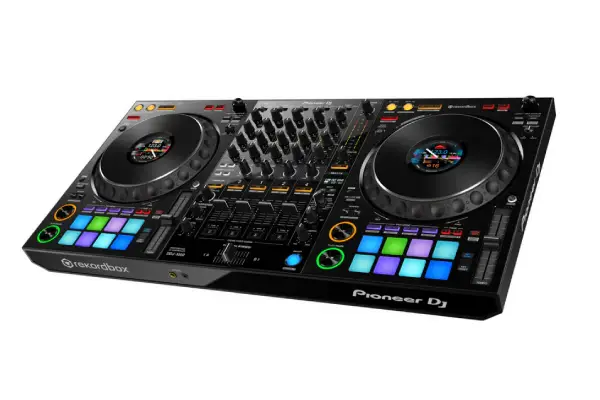
The DDJ-1000 represents the point where hobby equipment transitions into professional tools. After using this controller for everything from intimate bar gigs to festival prep sessions, I can confidently say it’s the most capable Rekordbox controller for DJs who haven’t fully committed to standalone systems. The four-channel layout opens creative possibilities that simply don’t exist on two-channel units—layering multiple tracks, running separate instrumental stems, or managing karaoke vocals alongside music .
The build quality immediately communicates serious intent. The metal chassis weighs around 12 pounds, which isn’t convenient for frequent transport but inspires confidence in longevity. The full-size jog wheels match CDJ dimensions exactly (the seven-inch aluminum platters feel identical to CDJ-2000NXS2 wheels), which made my eventual transition to club-standard equipment completely seamless. The jog display screens show track artwork, BPM, and time information—details that seem minor until you’re mixing in darkened environments where checking your laptop becomes inconvenient.
The mixer section rivals actual DJM mixers in functionality. Four-band EQ (adding high-pass and low-pass filters to the standard three-band) provides surgical control over frequency content, which proved essential when blending tracks with competing basslines. The Sound Color FX and Beat FX sections both include dedicated controls, and the Magvel faders (using magnetic technology instead of traditional electrical contacts) still feel buttery smooth after hundreds of hours behind them. I’ve experienced zero fader bleed or scratchy behavior that plagues cheaper controllers after heavy use.
Pros:
- Professional four-channel layout with full mixing capabilities
- Full-size jog wheels matching CDJ dimensions
- Magvel fader technology for superior reliability
- Comprehensive effects and EQ sections
- Build quality suitable for regular professional use
Cons:
- Significant weight limits portability
- Premium price point approaches standalone options
- Requires powerful laptop for stable performance
- Large footprint demands dedicated workspace
Pioneer DJ DDJ-FLX10: The Hybrid Champion for Modern Workflows
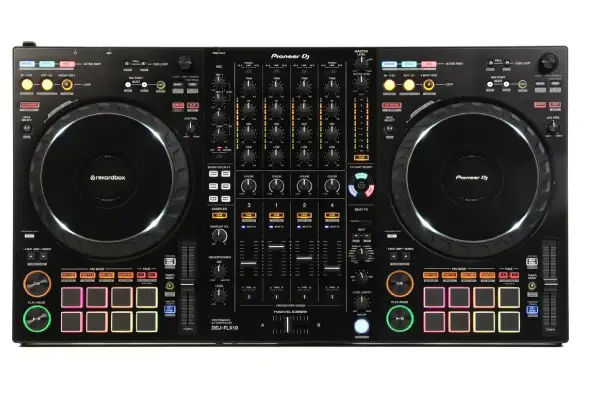
The DDJ-FLX10 represents Pioneer’s most ambitious controller design, and after spending considerable time with it, I understand why it’s generating buzz among professional DJs. This isn’t simply another incremental update—it’s a fundamental rethinking of what DJ controllers can accomplish. The four-channel layout includes independent input switching for each deck, meaning you can route external sources (turntables, CDJs, media players) through any channel while maintaining Rekordbox control on others. This flexibility transformed how I approach b2b sessions and hybrid vinyl/digital sets.
The dual-layer functionality on each deck essentially gives you eight-deck control, though managing that many audio sources simultaneously requires serious concentration. The Sound Color FX knobs now include Sweep FX mode, which gradually applies effects as you turn the knobs rather than the instant application of previous models. This subtle change makes effects feel more musical and less abrupt, particularly noticeable during the experimentation that comes with creating songs and live edits.
The jog wheels incorporate Pioneer’s most refined implementation yet—the motorized tension adjustment via the on-screen display lets you dial in exact resistance preferences, and the high-resolution displays show detailed track information, including artwork, waveforms, and loop points. The mixer section includes independent booth outputs with dedicated level control (finally!), which solved my persistent monitoring issues in rooms with complicated sound systems. The Magvel faders feel identical to the DDJ-1000’s, and the overall build quality suggests this controller will remain relevant for years despite the premium investment.
Pros:
- Hybrid functionality supporting external audio sources
- Dual-layer operation providing eight-deck capabilities
- Motorized jog wheel tension adjustment
- Independent booth output with dedicated control
- Sweep FX mode for musical effect application
Cons:
- Substantial investment approaching standalone systems
- Complex functionality requires significant learning curve
- Heavy and large footprint (similar to DDJ-1000)
- Overkill features for straightforward mixing applications
Choosing Your Rekordbox Controller: Practical Considerations
Selecting the right controller depends heavily on your specific situation and trajectory as a DJ.The DDJ-400 remains the smartest starting point for most people—it provides room to grow without overwhelming initial learning, and the layout prepares you for eventual club equipment transitions.
For DJs already comfortable with basic mixing who want to expand creative possibilities, the DDJ-800 offers the best balance of portability and professional features. The integrated display genuinely reduces laptop dependency, making performances feel more connected to the music rather than the computer screen.
The four-channel options (DDJ-1000 and DDJ-FLX10) serve specific purposes. If you’re regularly playing extended sets where track layering and creative mixing define your style, the DDJ-1000 provides all necessary tools at a reasonable price. The FLX10 makes sense primarily for DJs integrating vinyl collections into digital workflows or those working in production environments where hybrid setups streamline the creative process.
Budget considerations matter, obviously, but I’ve learned that the “buy once, cry once” philosophy generally applies to DJ equipment. Cheaper controllers often get replaced within a year or two as skills develop, while quality units like the DDJ-800 remain relevant indefinitely. That said, the DDJ-FLX4 represents exceptional value if portability and budget constraints are primary concerns—it’s genuinely capable despite the accessible price.
Rekordbox Integration and Workflow Optimization
Every controller featured here offers plug-and-play Rekordbox compatibility, but the experience varies in subtle ways that become apparent during extended use. The DDJ-400 and DDJ-FLX4 include Rekordbox DJ licenses (the full version required for controller use), which represents significant value considering software typically costs around $10 monthly. Higher-end models assume you’ve already committed to Rekordbox, though they include performance features that justify the additional investment.
The workflow efficiency differences between models primarily involve how much information the controller itself displays versus requiring laptop screen reference. This seems trivial until you’re actually performing for an audience—the physical connection to hardware enhances showmanship in ways that laptop-focused mixing doesn’t.
Rekordbox’s recent updates have improved controller responsiveness across the board, but I still recommend using wired USB connections rather than attempting wireless setups for critical performances. I’ve experimented with various wireless solutions, and while they work acceptably for practice sessions, the latency and occasional dropouts aren’t worth the convenience risk during actual gigs. The included USB cables with these controllers all provide stable, low-latency communication that keeps timing tight and responsive.
Frequently Asked Questions
Can I use these controllers with software other than Rekordbox?
Most Pioneer DJ controllers are specifically optimized for Rekordbox, though some models like the DDJ-FLX4 include native Serato DJ compatibility. The DDJ-400 technically works with other software through MIDI mapping, but you’ll lose the tight integration and performance features that make these controllers special. I’ve attempted using various mapping configurations with alternative software, and the experience never matches the seamless Rekordbox workflow these controllers were designed around.
Do I need an external audio interface with these controllers?
No—all featured controllers include built-in audio interfaces (soundcards) that handle audio output to speakers and headphone monitoring. The audio quality varies by model, with higher-end options like the DDJ-800 and DDJ-1000 providing noticeably cleaner output that becomes apparent when using quality monitoring equipment. For casual home practice, even the entry-level soundcards perform adequately, but professional applications benefit from the superior digital-to-analog conversion in premium models.
How important is the jog wheel size for scratching and performance techniques?
Jog wheel size significantly impacts certain techniques, particularly scratching and precise cueing. The larger wheels on the DDJ-1000 and DDJ-FLX10 provide better control for advanced scratch patterns and feel more natural for DJs transitioning from vinyl or CDJs. However, I’ve watched skilled scratch DJs adapt to the DDJ-400’s smaller wheels with practice, so it’s not an absolute limitation. If scratching isn’t central to your style, the compact wheels on entry-level models work perfectly fine for standard mixing and beatmatching.
Are these controllers suitable for live production and hybrid DJ/producer sets?
The performance pads and multiple deck capabilities make these controllers viable for live production elements, though dedicated production controllers offer deeper integration with DAW software. I’ve successfully triggered loops, samples, and effects during hybrid sets using the DDJ-1000’s pad modes, and the four-channel layout provides enough separation for running instrumental stems alongside finished tracks. The DDJ-FLX10’s dual-layer functionality particularly shines here, allowing complex arrangements that blur the line between DJing and live production. For anyone curious about expanding beyond DJing into production, exploring different instruments alongside your controller work can significantly enhance your musical vocabulary.
How much should I expect to spend on additional equipment beyond the controller?
Budget for quality headphones (essential for cueing tracks), a laptop capable of running Rekordbox smoothly (moderate specs suffice), and eventually powered speakers or a PA system for performances. When comparing options, checking resources like our earbuds comparison can help identify monitoring solutions that fit your budget. I recommend starting with a decent closed-back headphone around $100 before investing in expensive speakers—proper monitoring during mixing matters more initially than room-filling sound. Many DJs also eventually add a laptop stand (around $50) for ergonomic booth setup and protective cases for transport (ranging from $50 for basic bags to $200+ for hard cases).